Incident response
Malware traffic analysis: triage an infected host from its PCAP
Updated · Worked on public sample captures, each linked to its report
An EDR alert, a user who pasted a command from a web page, a firewall log with an odd destination: malware traffic analysis usually starts with one host and a capture of its traffic. Families differ, but the questions that turn that capture into a decision do not: which host and since when, how the malware arrived, who it talks to, what left the network, and what to hand to the people who act next. Five public infection captures, from a Windows stealer that sends its loot over FTP to a Cobalt Strike beacon hidden in TLS, show which of those answers the traffic gives freely and which only the endpoint can give.
Five infections side by side
| Sample | Arrival in the capture | Command channel | Data out |
|---|---|---|---|
| GuLoader, Windows | 253 KB from Google Drive over HTTPS | none; one HTTP check to ip-api.com | FTP, two files, login in cleartext |
| macOS stealer | 2.5 MB from a payload host | HTTP to two bare IPs, 32 requests from curl/8.7.1 | HTTP POST, 10.5 MB in one upload |
| AMOS, macOS | 4.3 MB from a payload host | HTTP to one IP, 61 requests, 40 of them task polls | HTTP POST, three archives |
| SHub, macOS | 11.4 MB from a Cloudflare address | TLS to a random-looking .com, every 60.7 s | TLS, 2.05 MB up, contents sealed |
| Cobalt Strike, Windows | before the capture began | TLS to a look-alike domain on port 2096, every 20.4 s | none seen |
Three of the five put their command or exfiltration traffic in cleartext, and two keep everything but metadata behind TLS. That split decides how far a capture alone can take you. With HTTP or FTP you read what was stolen; with TLS you read when, how often, to whom and how much, and the content has to come from the endpoint.
The four stealer captures come from malware-traffic-analysis.net, where each post also describes the lure and lists indicators: GuLoader, the macOS stealer, AMOS and SHub.
Which host, and since when
Name the host before you name the malware. The DNS view groups lookups by client, and the Connections view ranks host pairs by the bytes they moved, so the internal address with the strange destinations is rarely hard to find. Then fix the start of the incident: the first lookup or session that does not belong to the operating system's routine. In the Cobalt Strike sample that is a lookup for mail.googlesmail.xyz about eight seconds in, between certificate checks and Microsoft Store traffic. In the GuLoader sample the first lookup, for drive.google.com, opens the file. Every later finding gets a time relative to that moment, which is what lets the endpoint team line the network up with process creation.
Give the capture enough time to show a rhythm. The Cobalt Strike sample holds nine check-ins in 153 seconds, while SHub took several minutes to settle into its interval. Capture at least ten times the interval you expect; an hour at the egress is a sensible default when you suspect an implant and know nothing else.
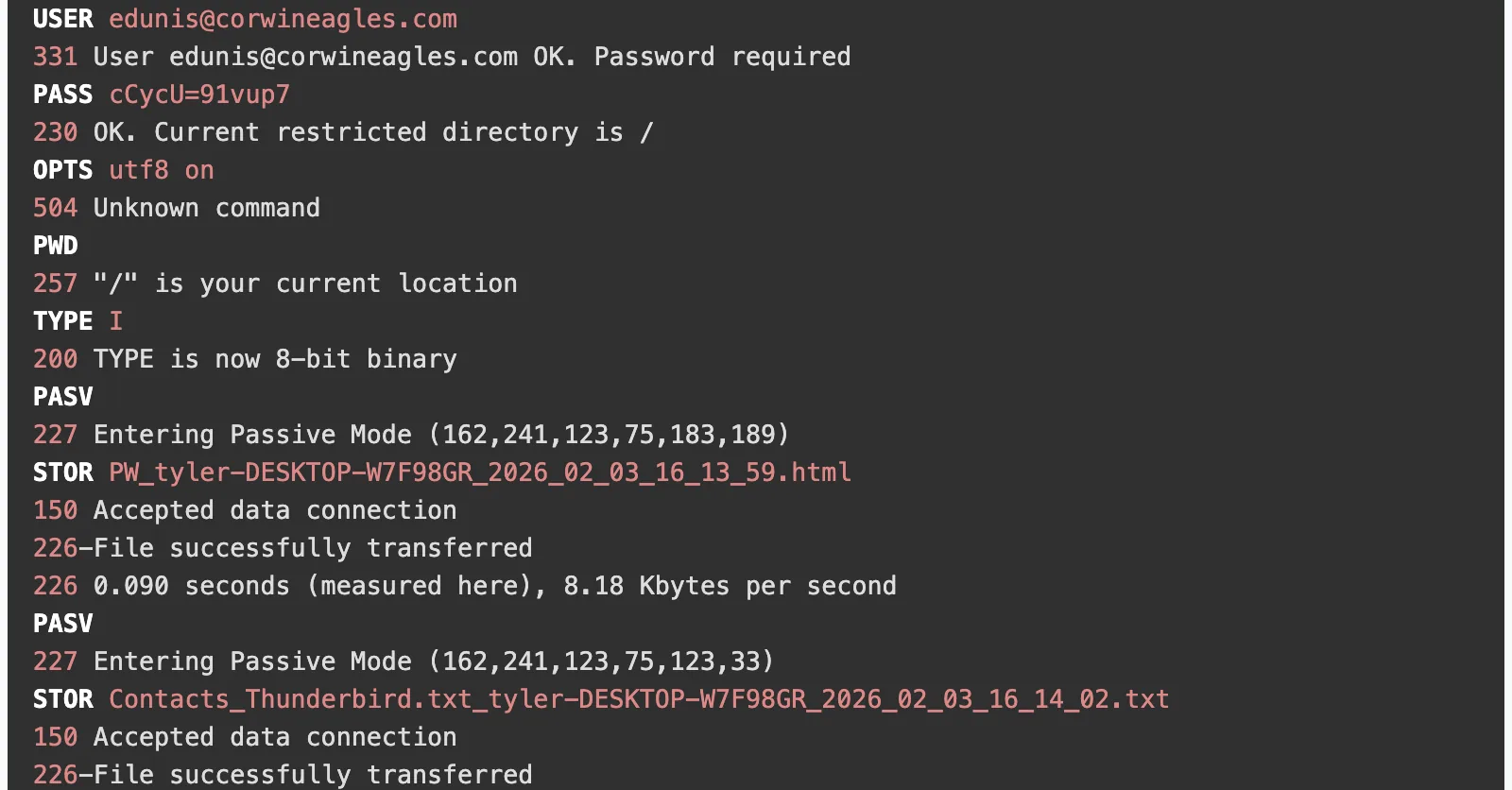
Identity often comes from the attacker's own traffic. AgentTesla names its uploads after the user and computer, so the GuLoader capture tells you the victim is tyler on DESKTOP-W7F98GR without a single endpoint query.
How it arrived
The arrival usually sits in the first minute after the lure and is the largest download in it. Read the DNS view in time order: in the macOS samples the lookups run from the ad and the fake download page to the payload host, and a multi-megabyte transfer from that host follows. Both lures told the user to paste a command into Terminal, so that download is made by the pasted command, outside the browser and its warnings. GuLoader hides the same step behind Google Drive, so the SSL/TLS view shows two sessions to Google with their server names and the Connections view shows 253 KB from the download host, 97 percent of everything the workstation received. Note the name, the address and the size; the file itself is out of reach over HTTPS. MITRE ATT&CK calls this step T1105, Ingress Tool Transfer.
Who it talks to
Cleartext command channels give themselves away by who speaks. On a Mac, Safari and Apple's own services do not send curl/8.7.1 as their user agent, and the macOS stealer and AMOS send nothing else to their servers, which are bare IP addresses with no host name. Filter the HTTP view by that user agent or address and the whole conversation lines up: registration, stage reports, uploads, polling. That is T1071.001, a command channel over web protocols.

Encrypted channels give themselves away by rhythm. The SSL/TLS view lists every session with its server name, so a name that recurs, an odd port or a domain imitating a brand stands out: mail.googlesmail.xyz on port 2096, or 8790tn5c190y51v7n2.com. To measure the interval, print the times of each new session to that name:
tshark -r capture.pcap -T fields -e frame.time_relative \
  -Y 'tls.handshake.type == 1 && tls.handshake.extensions_server_name == "mail.googlesmail.xyz"' \
  | awk 'NR > 1 {printf "%.1f\n", $1 - prev} {prev = $1}'
After its first pair of sessions, the Cobalt Strike sample prints gaps of 20.4 seconds with little drift. SHub's sessions are irregular at first and settle at 60.7 seconds. Steady intervals with small jitter are a beacon; people browsing do not produce them.
What left the network
- FTP. The FTP view shows the login and every STOR command. GuLoader's two files both leave about 12 seconds into the capture, and Wireshark's FTP-DATA export recovers their contents if you need them (T1048.003).
- HTTP POST to the command server. Multipart archives are carved under their session with a download button; the large ones curl announces with Expect: 100-continue appear as a .bin under the server's interim 100 Continue reply, so read the Content-Length above it (T1041).
- TLS. Only volume and direction remain. In the SHub sample the one pair where the Mac sends far more than it receives, 2.05 MB to 104.21.35.23, is the theft.
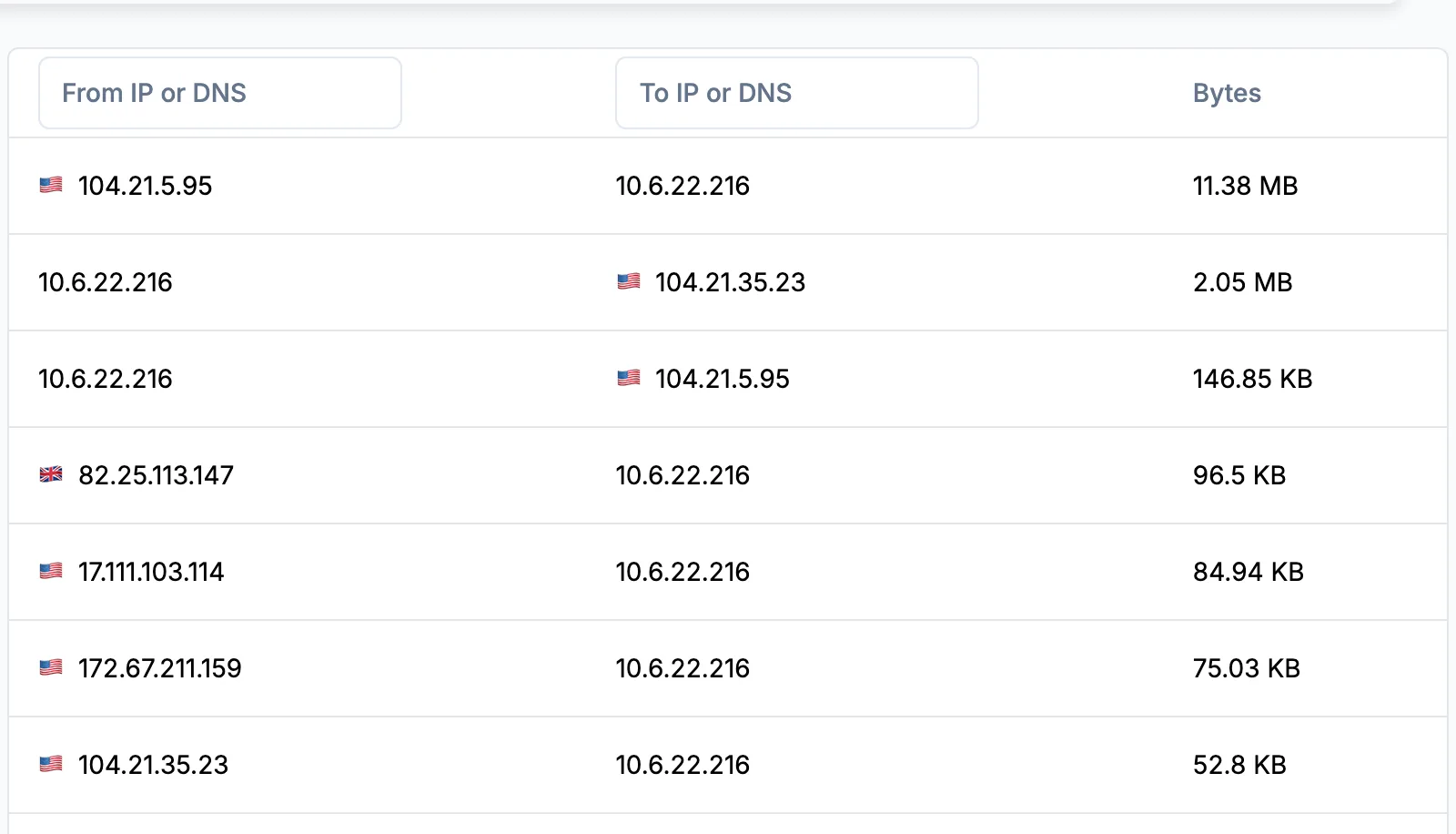
Size is the first scoping fact for the business: a few kilobytes of saved browser passwords and ten megabytes of documents lead to very different notifications.
What to hand over
The capture's output is a list someone else can act on without opening it. For the network team: domains, IP addresses with ports, URL paths such as /contact, the user agent, the beacon interval, and the time window to search in proxy, DNS and firewall logs for other hosts that made the same calls. For the endpoint team: the host, the first suspicious time, and every file name the traffic exposed. For identity: the accounts whose passwords sat in the stolen stores, starting with mail and single sign-on. Then say what the capture could not show, such as the process, persistence or anything inside TLS, so nobody mistakes an empty finding for a clean host. Captures from a live incident belong in a private report or the on-premise build; practice captures from malware-traffic-analysis.net can go through public analysis.
Malware traffic triage questions
- Is it safe to upload a capture of malware traffic?
- A capture is data: A-Packets parses it and never runs anything in it. Files carved from it can be malicious, so download them only inside an isolated analysis VM.
- Where can I find captures of real infections to practice on?
- malware-traffic-analysis.net publishes infection traffic with notes, including four of the five captures on this page. Its archives are password-protected, and the site explains the password.
- Can a beacon be found when its traffic is encrypted?
- Often. TLS hides the content but not the server name, the port or the timing, and new sessions to one name at a steady interval, such as every 20.4 seconds, are a beacon whatever they carry.
- Why do some stealers still send stolen data over FTP?
- FTP accounts on cheap or compromised hosting are easy to set up, and every programming library speaks the protocol. The login travels in cleartext, which is why defenders can read it and report the account.