Layer 2
Detect ARP spoofing in a PCAP
Updated · Worked on public sample captures, each linked to its report
Users on one VLAN report broken sessions, an IDS logs a duplicate address for the gateway, or an audit asks you to prove that nobody sits between a segment and its router. A capture from that segment answers the question if you know which evidence to trust. To detect ARP spoofing in a PCAP, look past the duplicate-address warning: arpspoof repeats its forged reply every two seconds and trips it, but a poisoning that forges two frames and goes quiet trips nothing, and only the victim's changed next hop gives it away.
Capture where the poisoning happens
ARP lives inside one broadcast domain, so a capture from a router uplink or another VLAN shows nothing useful. Take it on the segment in question: a mirror of the access switch port that serves a suspected victim, the victim host itself, or a mirror of the VLAN when you do not know which host is targeted. Start the capture before the problem you are chasing, because the strongest evidence is a change, and a change needs a before. The arpspoof sample has eight minutes of ordinary browsing before the first forged reply. The arppoison sample has under five seconds, and that is still enough: the victim sends 28 frames to the real gateway first.
Write down the gateway's real MAC address before you open any view. Take it from the router's own interface, the switch's MAC table or the DHCP server, not from a host that might already be poisoned.
When the attack comes and goes, leave a ring buffer running on the mirror port, for example
dumpcap -i eth1 -b filesize:100000 -b files:24 -w segment.pcapng, and upload the file that covers the
complaint. Resist a capture filter of arp alone. It keeps the files small, but it would have cut the
one-shot sample in the table below down to its four ARP frames and dropped the data frames that prove the
redirect.
Two poisonings, one false alarm
| Capture | Forged ARP | Rhythm | Duplicate-address hits | Clearest evidence |
|---|---|---|---|---|
| arpspoof against one victim | 26 replies, then 5 restores | every 2.00 s for 50 s | 26 | two MACs reply as 192.168.1.1 |
| one-shot poisoning | 1 request and 1 reply | once, at 4.6 s | 0 | the victim's next hop changes from a Cisco to an HP card |
| Windows lab host | none | routine requests | 0 | the router asks as two addresses, each with one MAC |
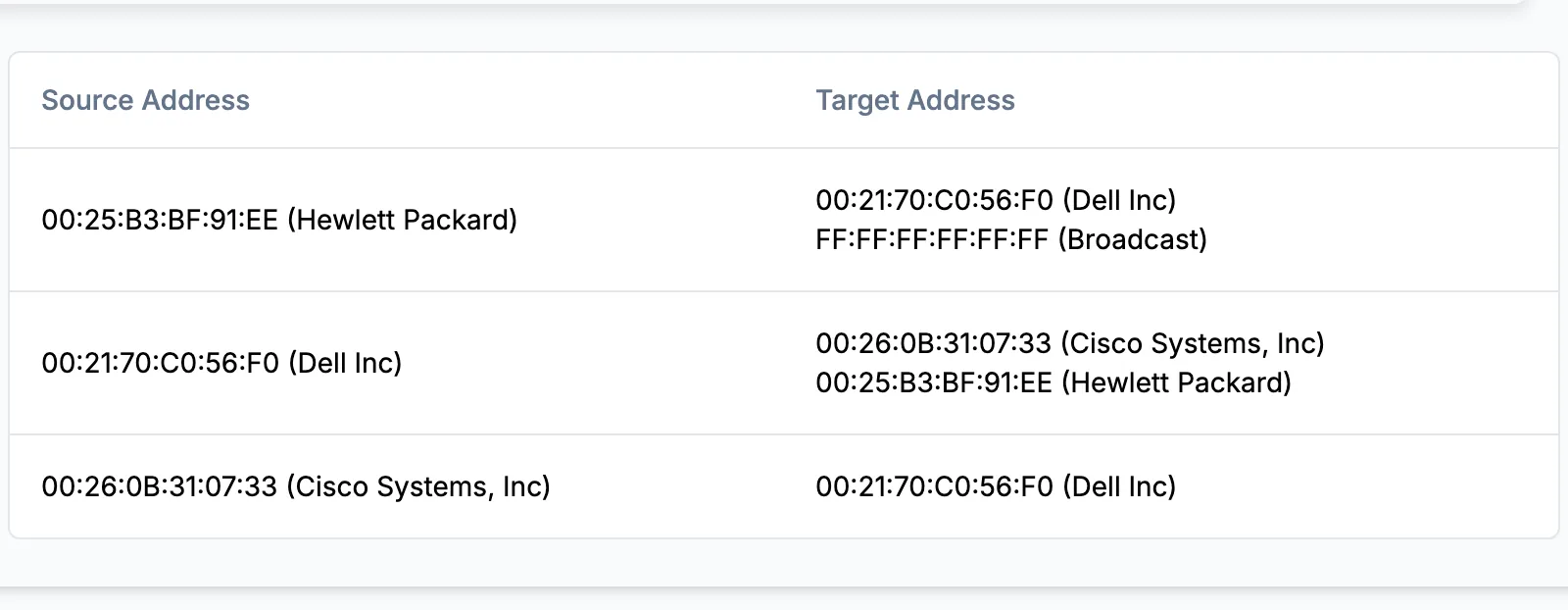
The first row is what most detection rules expect: a tool repeating its lie on a timer. Wireshark's expert info flags all 26 forged replies, and a rate threshold on unsolicited replies would fire within seconds. The second row defeats both. The attacker sends a request that carries the gateway's address as its sender, which poisons the victim's cache as surely as a reply, adds one reply, and goes quiet. The real Cisco gateway never sends ARP during the capture, so Wireshark has no second binding to compare and reports nothing. The proof sits in the data frames: until 0.42 seconds the victim's traffic to the internet goes to 00:26:0b:31:07:33, and from 6.55 seconds it goes to 00:25:b3:bf:91:ee.
Reading the ARP and Ethernet views
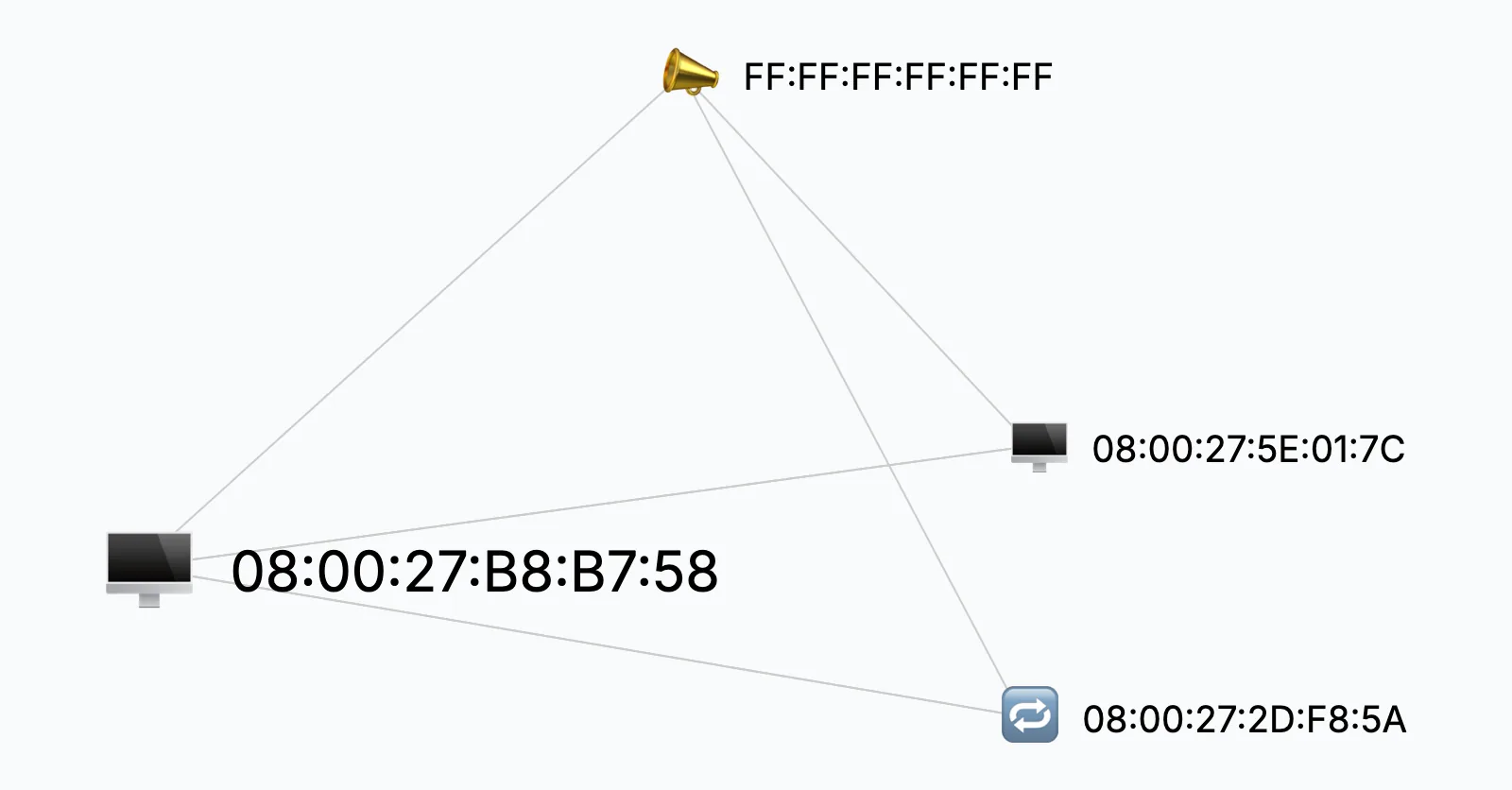
The ARP view draws every MAC address in the capture as a node, with switches that show or hide requests, replies and gratuitous ARP and a count beside each. Two icons mark nodes worth a look: a flag for a MAC that uses more than one IP address as a sender, and the router icon for a MAC whose frames carry more than one sender MAC inside. In arppoison.pcapng the HP card gets the flag. In arpspoof.pcap the spoofer gets the router icon, because its restore replies carry the real gateway's MAC. Point at a node and its tooltip lists the addresses it used, split into requests, replies and gratuitous announcements. Work through the nodes in this order:
- Find every MAC whose tooltip names the gateway's IP address. More than one, as in arpspoof, is a conflict on its face.
- If only one MAC names it, compare that MAC with the one you wrote down. In the arppoison sample the gateway address 172.16.0.1 appears only under 00:25:B3:BF:91:EE.
- Open the Ethernet devices view, which names each card's vendor. There the Hewlett Packard card that claims the gateway sits next to the Cisco card that carried the victim's traffic before 4.6 seconds.
The vendor test fails in virtual labs. All three machines in arpspoof.pcap carry the VirtualBox prefix 08:00:27, which the devices view reports as PCS Systemtechnik, so only the address you recorded tells the spoofer from the router there.
One MAC with two addresses is not always an attack
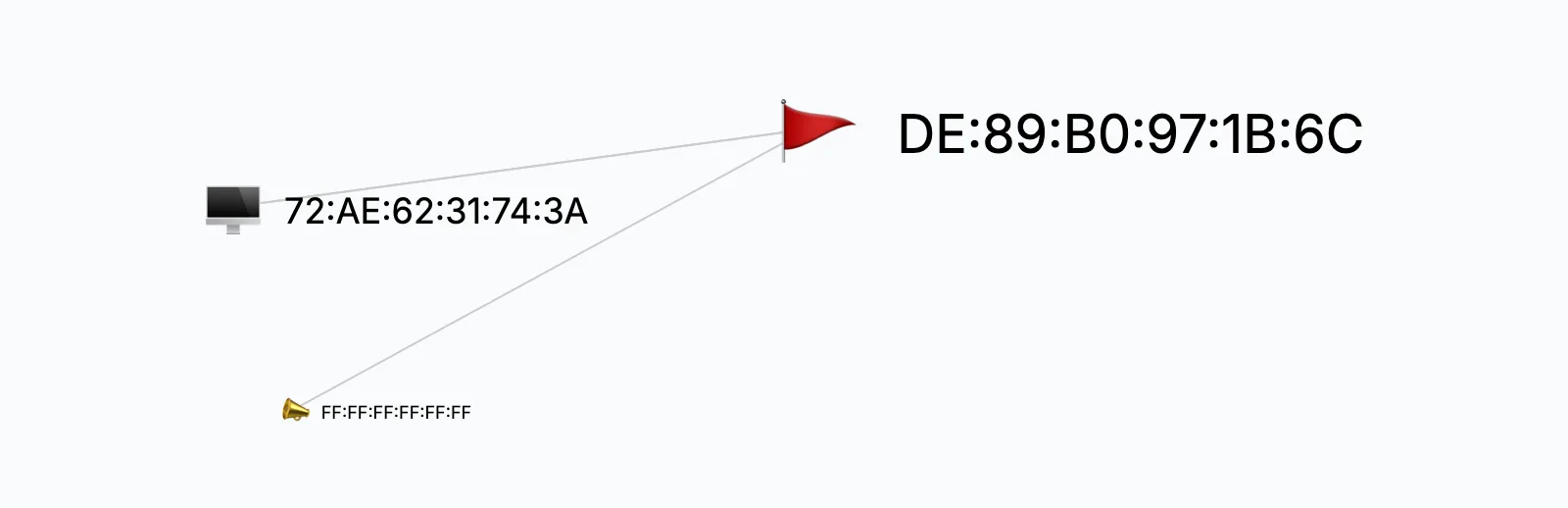
In the Cobalt Strike sample the router de:89:b0:97:1b:6c sends ARP requests as 10.127.0.1 and as 154.61.71.13, and the ARP view gives it the same flag as the HP card in arppoison. Here the flag is a false alarm: each address has exactly one MAC, and all 898 of the host's frames to the internet go to that router. Routers with secondary addresses, firewalls doing NAT and hosts with several IPs on one card all look like this.
Other events change ARP legitimately:
- a VRRP or HSRP failover, where the new active router announces the shared virtual MAC (00:00:5e:00:01:xx for VRRP);
- address conflict detection from RFC 5227, whose probes carry 0.0.0.0 as the sender address;
- proxy ARP, where a router answers for addresses behind it with its own MAC.
Each of these comes from the router's own card or a documented virtual MAC. None of them sends a workstation's traffic through another workstation.
Confirming the finding in Wireshark
Three filters cover both styles of attack. The first is the expert check, the second lists every reply that claims the gateway with its sender, and the third prints the next hop the victim's own traffic used:
arp.duplicate-address-detected
arp.opcode == 2 && arp.src.proto_ipv4 == 192.168.1.1
tshark -r arppoison.pcapng -Y "ip.src == 172.16.0.107 && !(ip.dst == 172.16.0.0/24)" \
  -T fields -e frame.time_relative -e eth.dst
On arpspoof.pcap the second filter returns 36 replies: 26 forged ones sent from 08:00:27:2d:f8:5a, five restores that the same machine sends with the real gateway's MAC inside, and five genuine replies from 08:00:27:5e:01:7c. The restores matter for the timeline. A clean tool hands the victim its cache back when it stops, so the window of exposure ends at the last restore, 538.7 seconds into the capture, and the cache holds no trace afterwards.
After the spoofer is confirmed
MITRE ATT&CK lists this as T1557.002, ARP Cache Poisoning. Find the switch port behind the spoofing MAC in the MAC address table and take it offline, then scope the window from the first forged frame to the last restore. Anything the victim sent in cleartext in that window, logins included, should be treated as read; the cleartext password audit shows how to list it. TLS sessions in the same window exposed server names and certificates only. Dynamic ARP Inspection with DHCP snooping on the access VLAN drops forged replies at the port, and the ARP poisoning report covers those defenses in detail.
What analysts ask about ARP spoofing
- Why does Wireshark's duplicate address warning miss some ARP poisoning?
- It needs two MAC addresses advertising the same IP inside the capture. When the real gateway sends no ARP while the capture runs, there is nothing to compare, and only the changed next hop in data frames shows the attack.
- Can ARP spoofing be seen in a capture from another subnet?
- No. ARP never leaves its broadcast domain, so capture on the affected VLAN: a mirror of its access switch, or the suspected victim itself.
- Does ARP spoofing work against IPv6 hosts?
- IPv6 has no ARP. Neighbor Discovery does the same job over ICMPv6 and can be forged the same way, so look for neighbor advertisements that claim the router's address from a second MAC.
- Why does the spoofer keep repeating its replies?
- Hosts refresh their ARP caches, and one genuine reply from the gateway would undo the poisoning. Repeating the forged reply, every two seconds in the arpspoof sample, keeps the victim pointed at the wrong MAC.