File carving
Extract files from a PCAP: what a capture can give back
Updated · Worked on public sample captures, each linked to its report
Sooner or later an investigation needs the file itself: the payload a workstation downloaded, the archive a stealer sent out, the page a user was shown. To extract files from a PCAP you first have to find the transfer, then know whether the capture holds its bytes at all. A-Packets carves what crossed the wire over plain HTTP, Wireshark's export covers FTP, SMB and mail, and a file sent over HTTPS leaves only its size and server name behind.
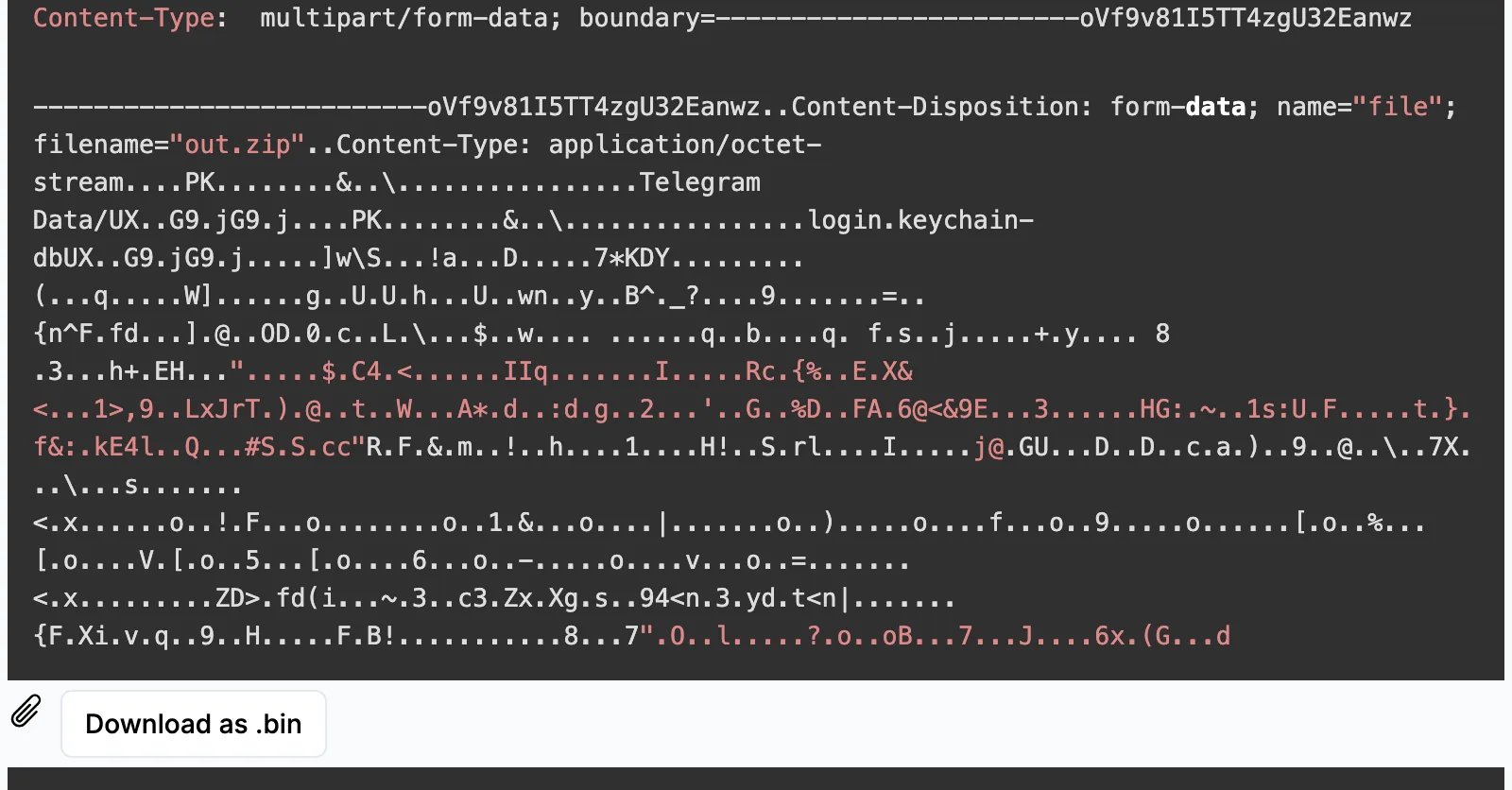
PK of a ZIP archive with Telegram Data and login.keychain-db inside, and Download as .bin saves
what A-Packets carved.
What a capture can give back
A-Packets carves bodies from HTTP in both directions, after undoing chunked transfer encoding and gzip or deflate compression. Every other route a file can take needs a second tool or is closed. The examples come from public sample captures:
| Transfer | A-Packets | Wireshark, tshark | Example |
|---|---|---|---|
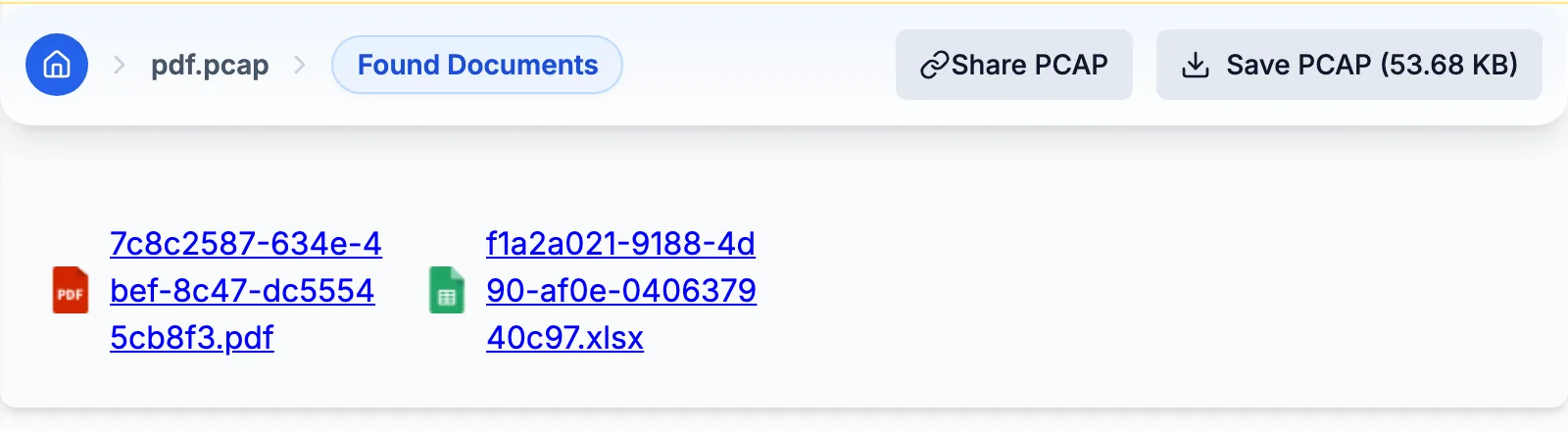
| HTTP download | carved | Export Objects, HTTP | a 32,134-byte PDF and a 9,932-byte workbook |
| HTTP upload, multipart form | carved | Export Objects, HTTP | macOS stealer: two archives, 12.6 and 13.0 KB |
| HTTP upload sent after 100 Continue | carved, filed under the 100 Continue reply | Export Objects, HTTP | AMOS: a 3.3 MB archive |
| Pages a client received | carved | Export Objects, HTTP | SQL injection: two result pages |
| FTP data connection | file names only | Export Objects, FTP-DATA | GuLoader: two stolen files, 754 and 724 bytes |
| Mail and its attachments | not carved | Export Objects, IMF | SMTP and IMAP: a 20,966-byte message with an attachment |
| SMB file copies | not carved | Export Objects, SMB | none in these samples |
| HTTPS, any TLS | server name and size | the same, without session keys | SHub: 2.05 MB sent, contents sealed |
The last row is the one that decides most modern cases. The GuLoader payload came from Google Drive over HTTPS, so the capture holds its size, 253 KB, and nothing else. Without the TLS session keys, which a passive capture does not record, no tool can turn those bytes back into a file.
Find the transfer before you carve anything
Start from volume. The Connections view sorts traffic by the bytes each host pair moved, and a pair where the inside host sends far more than it receives is an upload worth explaining: in the SHub sample that is 2.05 MB to 104.21.35.23. Then switch to the view that matches the protocol:
- HTTP view. Leave GET on for downloads and POST for uploads, search for a host or path, and expand a session. Its headers, the start of each body and a download button for each carved file sit together.
- HTTP Headers view. One line per request, the quickest place to spot a strange path, a curl user agent from a laptop, or a Content-Type that does not fit the URL.
- FTP view. The control session as a transcript, including the names in STOR and RETR commands.
- SSL/TLS view. The server name of an encrypted transfer, which is all you will get.
Expect background files and set them aside early. The freshly booted Windows host in the Cobalt Strike sample yields 12 carved objects, and none of them is the beacon: three copies of disallowedcertstl.cab, the 4,770-byte certificate trust list Windows fetches from ctldl.windowsupdate.com, XML posts to Microsoft metadata services and certificate status (OCSP) checks. The Linux desktop in the arpspoof sample yields ten objects, every one an OCSP request or answer. Knowing what housekeeping looks like on each operating system makes the one file that does not fit easier to spot.
Large uploads filed under the server's reply
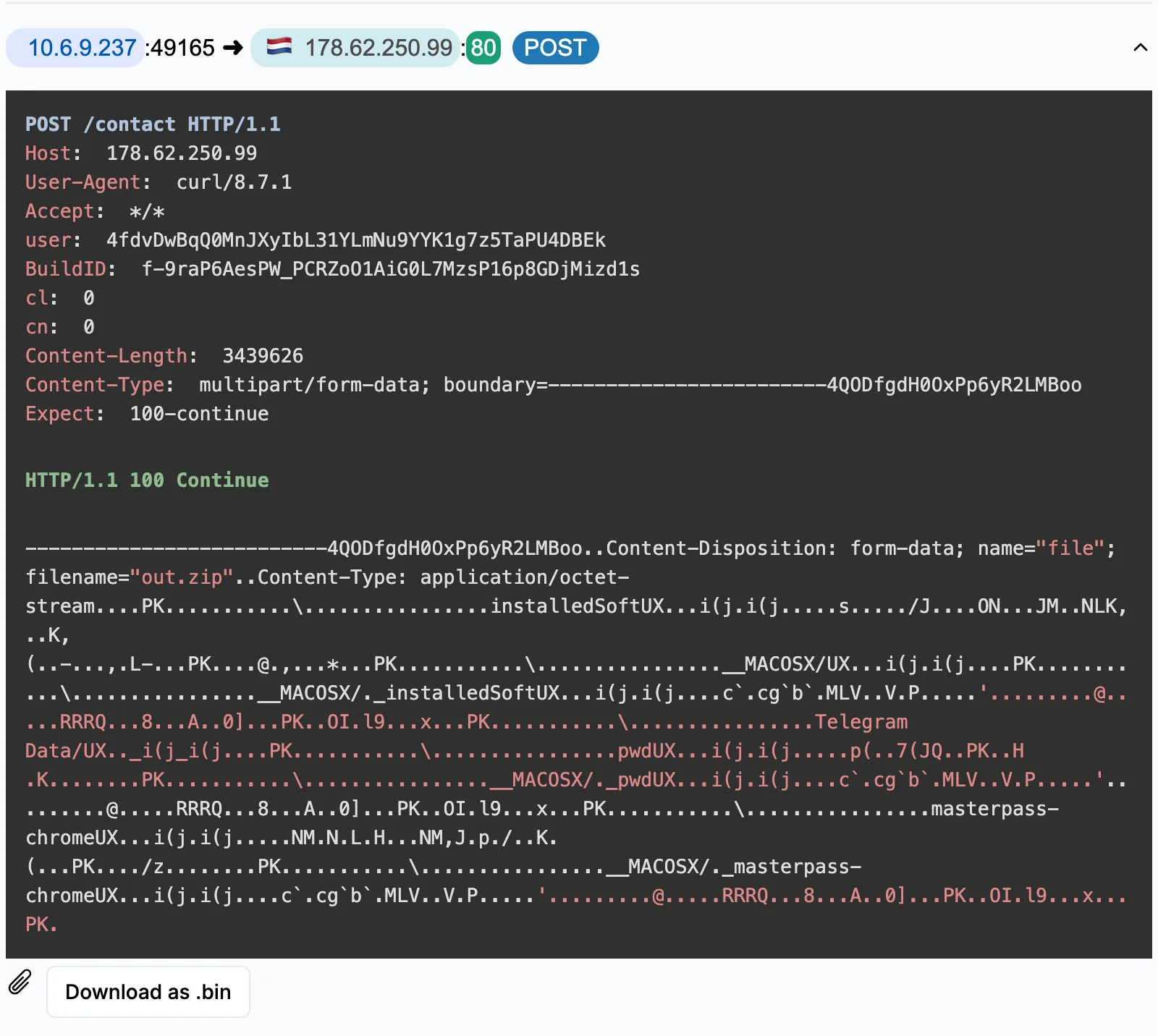
curl announces a large upload with Expect: 100-continue and waits for the server's interim reply
before it sends the body. A-Packets keeps that body, but it files it under the interim
HTTP/1.1 100 Continue response: the session shows the request headers, the 100 Continue, a preview of
the multipart body and a Download as .bin button, with no Content-Type to name the file. Both macOS stealer samples
send their largest archive this way, 10.5 MB in the macOS sample and 3.3 MB in AMOS, so the biggest theft in each
capture looks like something the server sent until you read the request above it.
To cross-check the sizes, or for the protocols A-Packets does not carve, export the objects with tshark:
mkdir out && tshark -r capture.pcap -q --export-objects http,out
ls -lS out | head
On the AMOS capture this writes 74 objects, the largest being the 3,439,626-byte upload; on the macOS capture,
37 objects with an 11,008,735-byte upload on top. The same option takes
ftp-data, smb, imf for mail and tftp in place of
http, which covers every row of the table except TLS.
Check what the file really is
A carved file gets its extension from the Content-Type label, and labels lie. A server can send an executable as
image/png, and the saved file will say .png. Before anyone opens it, compare the first bytes, which the session
preview shows, with the label: PDF files start with %PDF, ZIP archives and Office documents with
PK, Windows executables with MZ. Then compare the size with the Content-Length header.
A file shorter than its header means packets are missing from the capture, and A-Packets does not save a body that
falls short of its declared length. Before you blame the network, run capinfos -l capture.pcap: a
sensor configured to keep only the first 96 or 128 bytes of each packet produces captures in which no body is
ever complete.
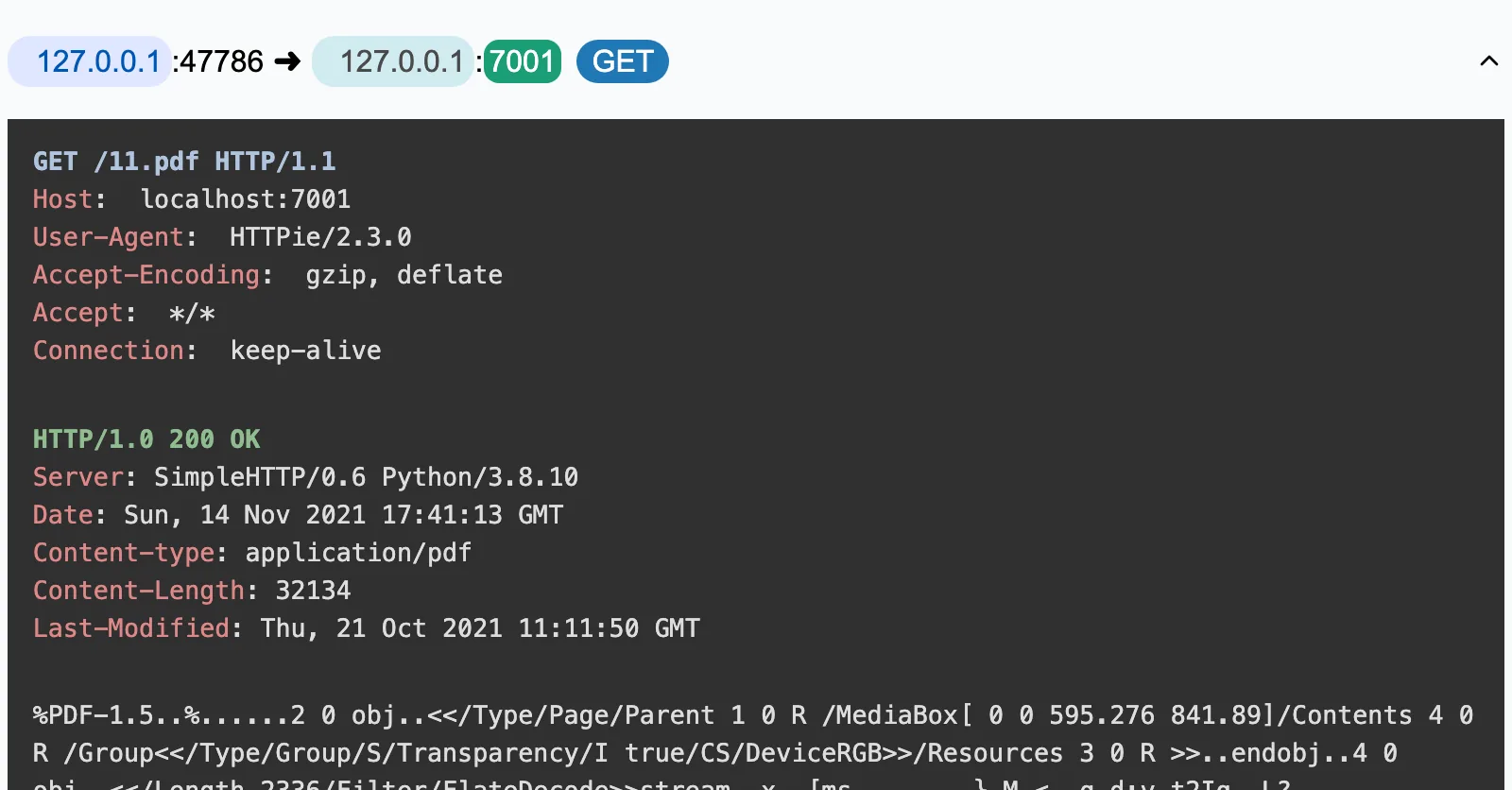
application/pdf with a
Content-Length of 32134, and the preview starts with %PDF, so label, size and first
bytes agree.
Hash every file you keep with SHA-256 and look the hash up in your sandbox or threat intelligence platform. A known hash settles a case faster than any reading of the traffic.
Keep the provenance with the file
A file without its session is an orphan nobody can testify about. Store each one with the report link or the capture's hash, the client and server addresses, the host name and path, the direction and the time of the transfer. That record is what lets the endpoint team match the file to a process, and it is what MITRE ATT&CK mapping rests on: a payload pulled into the network is T1105, Ingress Tool Transfer, while archives posted to the command server, as in both macOS samples, are T1041, Exfiltration Over C2 Channel.
On a public report, carved files are public too: anyone with the link can download them. Internal documents and incident captures belong in a private report or the on-premise build. A-Packets does not run or scan what it carves, so download files only inside an isolated analysis VM. To try the extraction on traffic you can share, upload a sanitized capture; the malware triage walkthrough shows where carved files fit in a full investigation.
Carving files from captures: what people ask
- Can A-Packets extract files from HTTPS traffic?
- No. Without the TLS session keys no tool can carve files fetched over HTTPS. The SSL/TLS view still names the server, and the Connections view shows how many bytes moved.
- Why does a large upload show up as a .bin under the server's reply?
- curl sends big uploads after an Expect: 100-continue exchange, and A-Packets files the body under that interim 100 Continue reply. The file is the upload; the request headers above it give its real size and type.
- Are gzip and chunked HTTP responses supported?
- Yes. Chunked transfer encoding and gzip or deflate content encoding are decoded before the file is saved, so the download is the file the server sent.
- Does A-Packets carve files from FTP, SMB or email?
- Not today. It shows FTP file names and SMB activity but carves contents from HTTP only. Wireshark's Export Objects covers FTP-DATA, SMB and IMF for mail messages.