Reconnaissance
Detect a port scan in a PCAP
Updated · Worked on public sample captures, each linked to its report
Free uploads create public reports. Use only sanitized captures; choose private analysis for sensitive traffic.
A firewall log shows one address touching hundreds of ports, an IDS raises a scan event, or an audit asks whether anyone mapped a segment from inside. A capture answers the part a log cannot: which ports answered, and how. Three public captures show the forms a port scan takes in a PCAP: a SYN scan against a public test host, an ACK scan that maps a firewall rather than services, and scripted HTTP probes that announce themselves in their user agent. In A-Packets the evidence sits in Open Ports, Connections and the HTTP view, and three tshark counts confirm it.
Capture on the side that answers
A scan is a question sent to many ports at once, and the answers are the evidence. Capture where both directions
pass: on the target, on a mirror of its switch port, or at the firewall in front of it. A capture at the scanner's
end shows what was asked but not what a firewall dropped on the way back, and a capture beyond a NAT shows the
translated address instead of the scanning host. Do not filter on one port to keep the file small. The breadth of a
scan is its signature, and a filter of port 22 turns a sweep of a thousand ports into a few harmless
looking packets.
A SYN scan, port by port
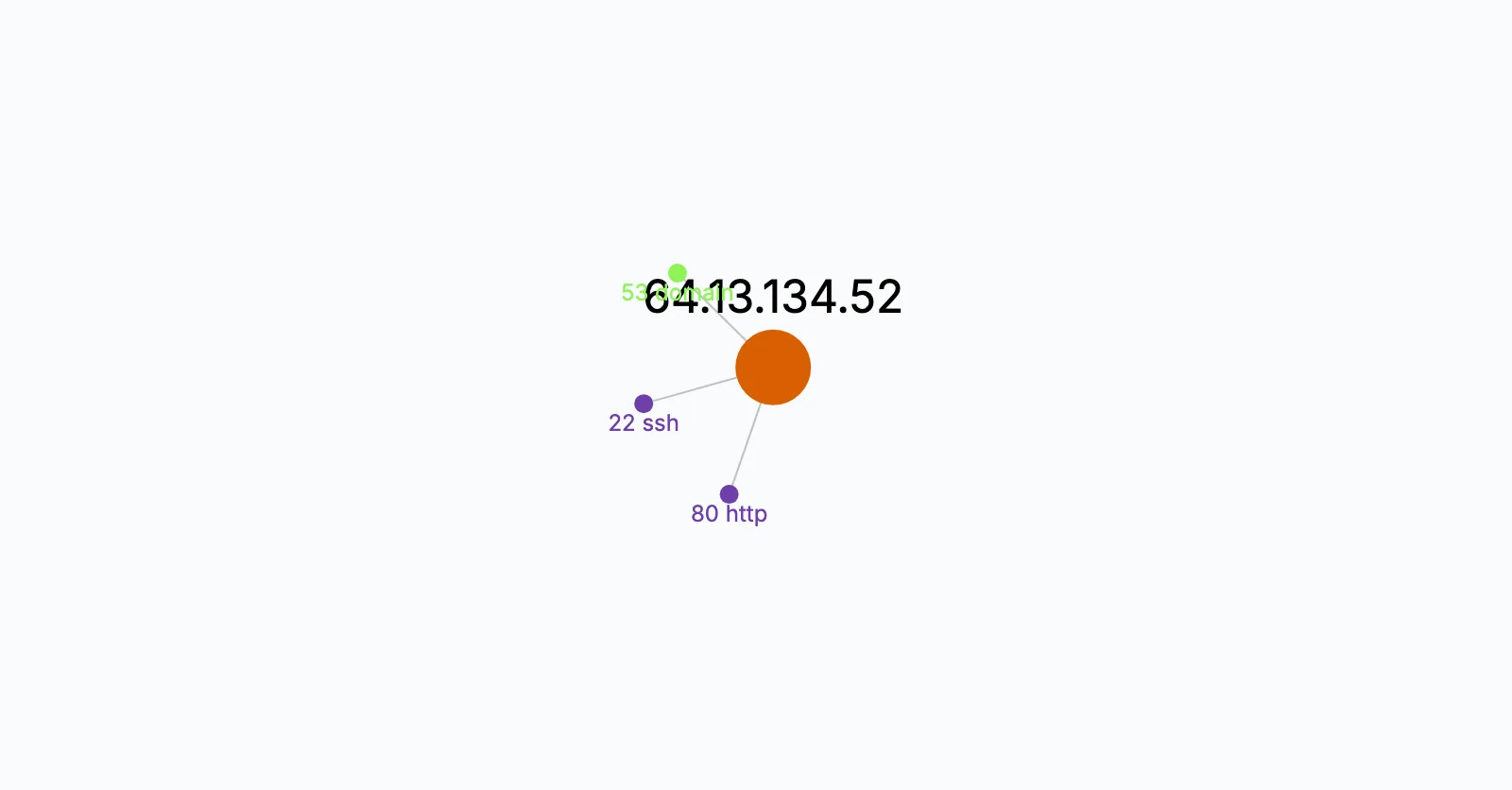
In synscan.pcapng the scanner at 172.16.0.8 probes 1,000 ports of 64.13.134.52 with 1,994 SYN packets within 23 seconds, most ports twice, because Nmap retries the ones that stay silent. Three ports answer with SYN-ACK: 22, 53 and 80. Four answer with a reset, 25, 70, 113 and 31337, which means closed but reachable. Everything else stays silent, the usual sign of a filtering firewall. Not one packet carries payload, since a SYN scan never completes a handshake. A-Packets turns this into two short answers. Open Ports lists 22 ssh, 53 domain and 80 http for the target, the ports that answered a SYN with SYN-ACK, named from the standard port list. Connections shows the two directions of one host pair: 115 kB of probes one way and about 1 kB of answers back, a shape no ordinary client produces.

An ACK scan maps the firewall instead
The ACK sample looks nothing like it in Open Ports, which stays empty. Its 2,088 packets cover five seconds: a bare ACK to each of 1,000 ports and a reset back from each one. With no SYN there is no SYN-ACK, so no port is shown as open, and that is correct, because a reset to an unsolicited ACK says only that the packet got through. Nmap uses this to learn which ports a stateless filter lets pass, not which services listen. In A-Packets the Network view joins the two hosts with one edge that counts 2,088 TCP packets, and the ACK scan report walks through it frame by frame.
Scripted probes sign their requests
Nmap's scripting engine goes past the handshake and sends real requests, and its HTTP scripts identify themselves.
In the NSE sample, eight requests reach port 8080 within a quarter of a second. Four are a plain
GET /, answered 200. Four carry the user agent
Mozilla/5.0 (compatible; Nmap Scripting Engine; https://nmap.org/book/nse.html) and ask for
/sdk, /nmaplowercheck1772537968, /evox/about and /HNAP1: three
look for a particular kind of device, one checks how the server answers a page that cannot exist, and all four get
a 404. The HTTP view lists those requests with their user agent, and in the Network view the scanning host's
tooltip shows that user agent with a terminal icon, as it does for curl, DirBuster and Wget. A tester can change
the string, so its absence proves nothing, but its presence ends the argument.
Confirm it with three tshark counts
tshark -r synscan.pcapng -Y "tcp.flags.syn == 1 && tcp.flags.ack == 0" -T fields -e tcp.dstport | sort -u | wc -l
tshark -r synscan.pcapng -Y "tcp.flags.syn == 1 && tcp.flags.ack == 1" -T fields -e tcp.srcport | sort -u
tshark -r synscan.pcapng -Y "tcp.len > 0" | wc -l
On the SYN sample the first command prints 1000, the number of distinct ports probed. The second prints 22, 53 and
80, the ports that accepted. The third prints 0: no data moved. Together they separate a scan from a busy client,
which reaches few ports and exchanges data on each. For an ACK scan, count resets with
tcp.flags.reset == 1 instead of SYN-ACKs. In Wireshark, Statistics > Conversations sorted by packets
shows the same single pair at the top.
Rule out the lookalikes, then follow up
Not every fan-out is hostile. Vulnerability scanners run by your own team, monitoring that checks a fixed list of ports, load balancer health probes and peer-to-peer clients all touch many ports or hosts, so ask who owns the source address and whether the timing matches a schedule. If the scan was not authorized, the open ports are the next question: look for a later connection from the same source that completes a handshake and carries data, since that is use of the service rather than mapping. Then check whether each open port was meant to be reachable from where the scan came from, and close what was not.
Port scan questions
- How can I tell a port scan from a busy client?
- Count the destination ports per source. A scan sends one or two packets to each of hundreds of ports and carries no data; a busy client sends real requests to a few ports and reads the replies.
- Why is the Open Ports view empty after an ACK scan?
- Open Ports lists the ports that answered a SYN with a SYN-ACK. An ACK scan sends no SYN, so every answer is a reset, which says the port is reachable through the firewall, not that a service listens on it.
- Does a SYN-ACK in a capture prove a service was exposed?
- It proves something accepted connections on that port when the scan ran. The name comes from the standard port list, so confirm what really runs there with the owner of the host or a full connection.