Credential exposure
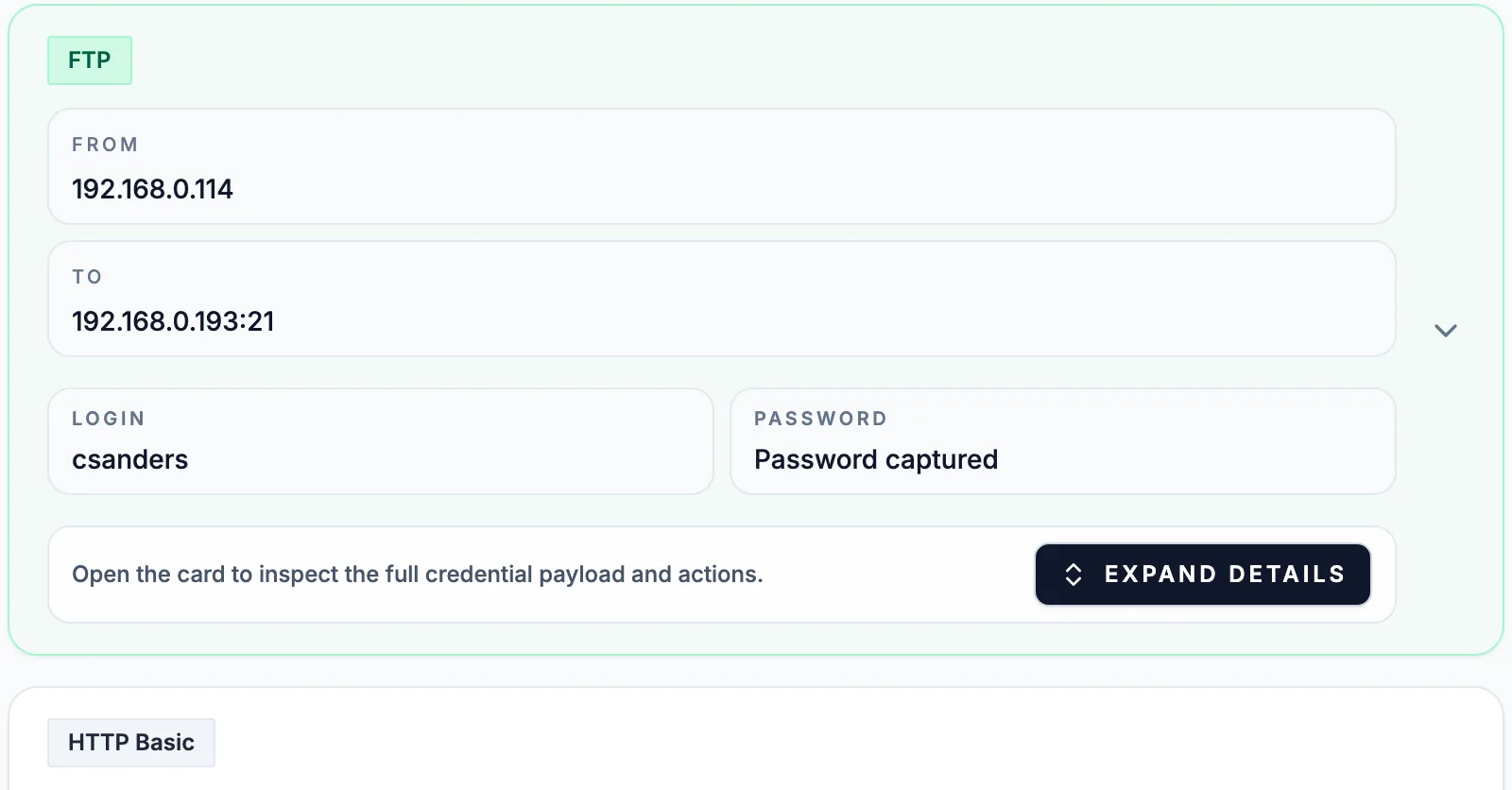
Run a cleartext password audit from packet captures
Updated · Worked on public sample captures, each linked to its report
Configuration reviews say which services should use TLS; a capture shows which logins still cross the wire anyway. A cleartext password audit turns that into a check you can repeat every quarter: capture the segments where old equipment lives, list every login readable on the wire, fix each service, then capture again to prove the fix. The counts below come from three public sample reports and one merged test capture, so every claim can be checked against real traffic.
Plan the audit before the first capture
Cleartext logins cluster where old equipment lives. Cover three kinds of segment: the uplinks of server VLANs, where applications log in to databases and directories; the management VLAN, where switches, printers and UPS cards still accept Telnet, FTP and SNMP; and one representative user segment, where mail clients and intranet sites sign in. A mirror port on each uplink is enough. Run each capture for at least one business day and one night, because the logins most likely to be missed are machine logins: nightly backups to FTP, monitoring that polls with an SNMP community every five minutes, batch jobs that bind to LDAP once a day.
Remote staff are easy to leave out. Their logins reach internal services through the VPN, so they cross your network unencrypted only after the concentrator: mirror its inside interface, not the internet side, where all you would see is the tunnel.
Get the audit approved in writing before it starts. The files will hold working passwords, so agree who may open them, where they are stored and when they are deleted.
Three levels of exposure
- Readable. The password crosses the wire as typed or in Base64, which decodes in one step: FTP, Telnet, HTTP Basic, SMTP AUTH LOGIN and PLAIN, IMAP LOGIN, SNMP v1 and v2c communities, LDAP simple binds and PostgreSQL cleartext authentication. MSSQL only scrambles its login password, and A-Packets shows it decoded.
- Challenge-response. NTLM, Kerberos, HTTP Digest and CRAM-MD5 never send the password itself, but an exchange recorded on the wire lets anyone test guesses offline. Count the account as exposed until its password is confirmed long and unique.
- Posted in a form. A login typed into a web page travels in the body of a POST. A-Packets decodes it into form fields in the HTTP view, and it does not appear in the Credentials view.
The SMTP and IMAP report shows the first two levels side by side: two of its mail sign-ins are CRAM-MD5 and the rest are readable, while none of the mail servers in that capture answers on 465, 587 or 993.
Run two tools, because each misses something
Wireshark has a credentials list of its own, Tools › Credentials, which tshark runs as -z credentials.
On the three sample reports it misses the Telnet login and all but two of the mail logins, and neither tool puts
the form login in its list:
| Sample | A-Packets Credentials view | tshark 4.6 credentials tap |
|---|---|---|
| FTP and Telnet | 2: FTP, Telnet | 1: FTP |
| SMTP and IMAP | every SMTP and IMAP login, the two CRAM-MD5 exchanges included | 2: one SMTP, one IMAP |
| DVWA form login | none; the HTTP view shows the POST fields | none |
For web applications, filter the HTTP view to POST and read the requests to login paths, or run
http.request.method == "POST" in Wireshark. For everything else, start from the Credentials view and
use tshark as the second opinion that goes into the ticket.
A remediation table for the ticket
| Protocol | On the wire | Replace with | The next capture shows |
|---|---|---|---|
| FTP | USER and PASS commands | SFTP, or FTPS with TLS required | no USER outside TLS on port 21 |
| Telnet | every keystroke | SSH | no sessions to port 23 |
| HTTP Basic, forms | Authorization header, POST body | HTTPS with HSTS | no login requests on port 80 |
| SMTP AUTH | Base64 user and password | port 465, or 587 with STARTTLS required | no AUTH before STARTTLS |
| IMAP LOGIN | user and password | IMAPS on 993, or LOGINDISABLED until STARTTLS | no LOGIN in a cleartext session |
| SNMP v1, v2c | community string | SNMPv3 with authPriv | no communities in the report |
| LDAP | bind DN and password | LDAPS on 636, or StartTLS before the bind | no simple bind on 389 in clear |
| MSSQL | scrambled password | Force Encryption on the server | the login inside TLS |
| PostgreSQL | password or MD5 response | hostssl rules with scram-sha-256 | no authentication outside SSL |
For mail, cite RFC 8314 in the ticket. Its title, Cleartext Considered Obsolete, makes the case on its own, and it recommends implicit TLS for both submission and mailbox access.
Record each finding so it can be closed
A finding that says "FTP password seen" gets lost between teams. Give each one the fields that let someone else verify and close it without opening the capture:
- the account name, with the password masked;
- protocol, client address, server address and port;
- first and last time the login appears, and how often;
- the report link or the capture's file hash, so the evidence can be found again;
- the owner of the service, the planned fix from the table above, and the date of the retest capture.
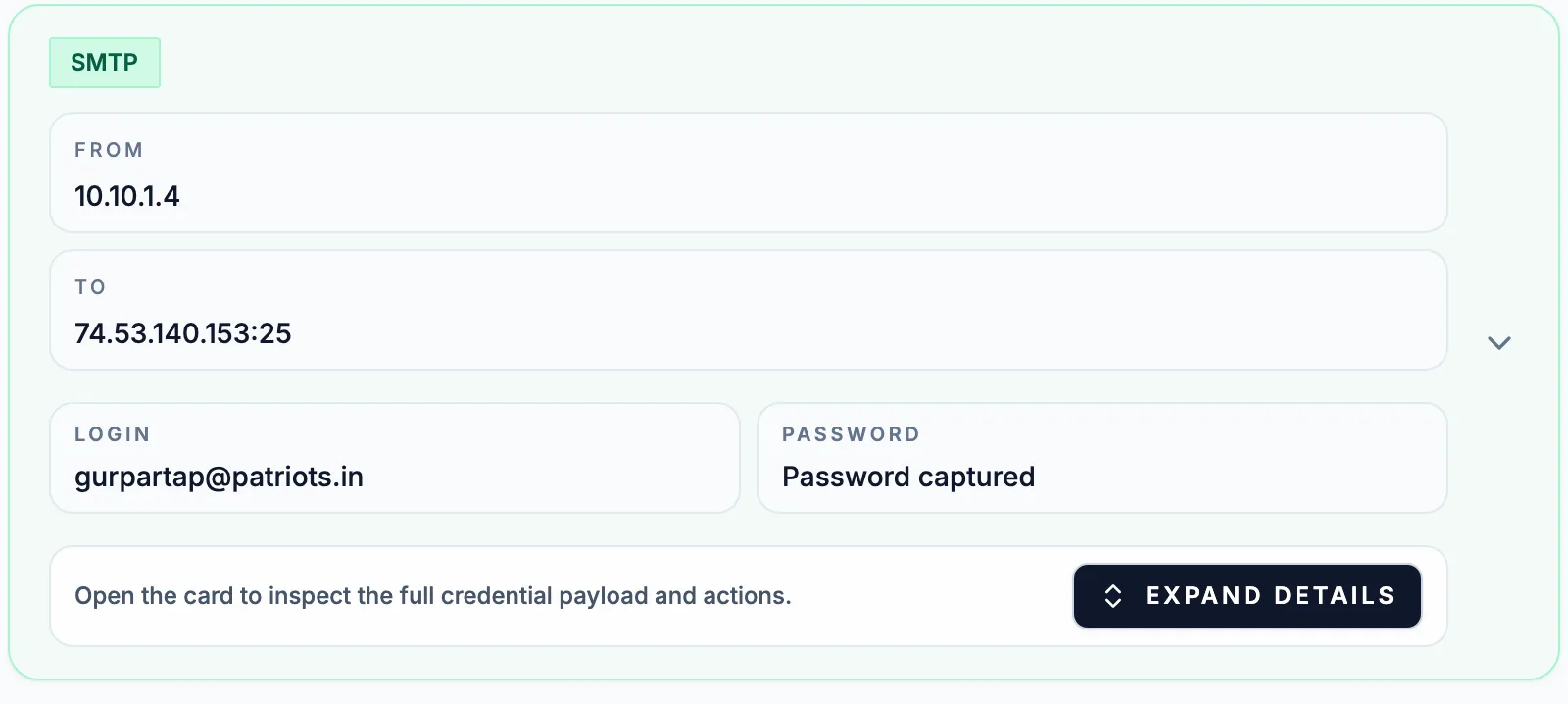
Keep the passwords themselves out of tickets and chat. The owner needs to know which account to rotate, and the value is already compromised.
Decide what to fix first
An audit of a real network returns more findings than one change window can absorb, so rank them. Administrator accounts on network devices come first, because one Telnet password often opens every switch. Service accounts come next: the graph above the credential cards shows which accounts were used against which servers, and an account that appears on several hosts carries all of them with it. Shared device secrets follow. SNMP communities are rarely unique per device, and the arpspoof report shows two of them broadcast to 255.255.255.255, where every host on the segment receives them. Personal mailbox logins close the list; they matter mostly where the same password is reused for VPN or single sign-on.
Retest, and keep the evidence private
Rotate each exposed password, change the service, then capture the same segment for the same length of time and compare. A fixed service disappears from the Credentials view; a service that merely moved to another port does not. On networks that change often, the Advanced plan can email you when an uploaded capture contains credentials, and the REST API key on Professional and Advanced lets a sensor upload on a schedule, which turns the audit into a standing check. Reading credentials off the wire is what MITRE ATT&CK calls T1040, Network Sniffing, so each closed finding is one account that sniffing no longer yields. Audit captures belong in a private report or the on-premise build, never in the public feed. The credential extraction guide covers each protocol's wire format in depth.
Questions that come up in cleartext password audits
- Does Base64 in HTTP Basic or SMTP AUTH protect the password?
- No. Base64 is an encoding anyone can reverse in one step, which is why A-Packets shows the decoded login. Only TLS around the session keeps the password off the wire.
- Does A-Packets find passwords inside HTTPS or other TLS sessions?
- No. TLS payloads are not decrypted, so logins inside HTTPS, IMAPS or LDAPS do not appear. Moving a service to TLS is exactly what removes it from the audit results.
- Why does a web form login not appear in the Credentials view?
- A password typed into a web form travels in the body of an HTTP POST, which A-Packets decodes as form fields in the HTTP view. Review the POST requests to login paths there when you audit web applications.
- Do challenge-response logins such as NTLM count as exposed?
- Treat them as exposed until the password is checked. The password does not cross the wire, but a recorded exchange lets anyone test guesses offline, so weak or reused passwords on those accounts need rotating too.