DNS
Detect DNS tunneling in a PCAP
Updated · Worked on public sample captures, each linked to its report
An alert says one workstation sends far more DNS than its neighbors, or a hunt turns up a domain nobody recognizes. The capture can settle whether that is DNS tunneling, a subdomain sweep or a busy browser, and three measurements usually decide it: how much of the DNS goes to one domain, how many lookups fail, and how long the names get. Four public sample captures show the patterns side by side, and the same counts run on your own PCAP in A-Packets, with tshark and in your resolver logs.
Four captures, four DNS patterns
The numbers below were counted with tshark on the original files. Each row links the report that explains its capture in full.
| Capture | Queries | Unique names | Top domain | NXDOMAIN | Longest name | Types |
|---|---|---|---|---|---|---|
| iodine tunnel | 222 in 24.5 s | 222 | pirate.sea, 100% | 0 | 252 | NULL |
| subdomain sweep | 2,602 in 59 s | 1,301 | forgewize.llc, 100% | 2,596 | 43 | A, AAAA, 2 AXFR |
| Linux desktop browsing | 278 in 9 min | 54 | redditmedia.com, 18% | 6 | 42 | A, AAAA |
| Windows host after boot | 35 in 2.3 min | 27 | in-addr.arpa, 43% | 9 | 31 | A, PTR |
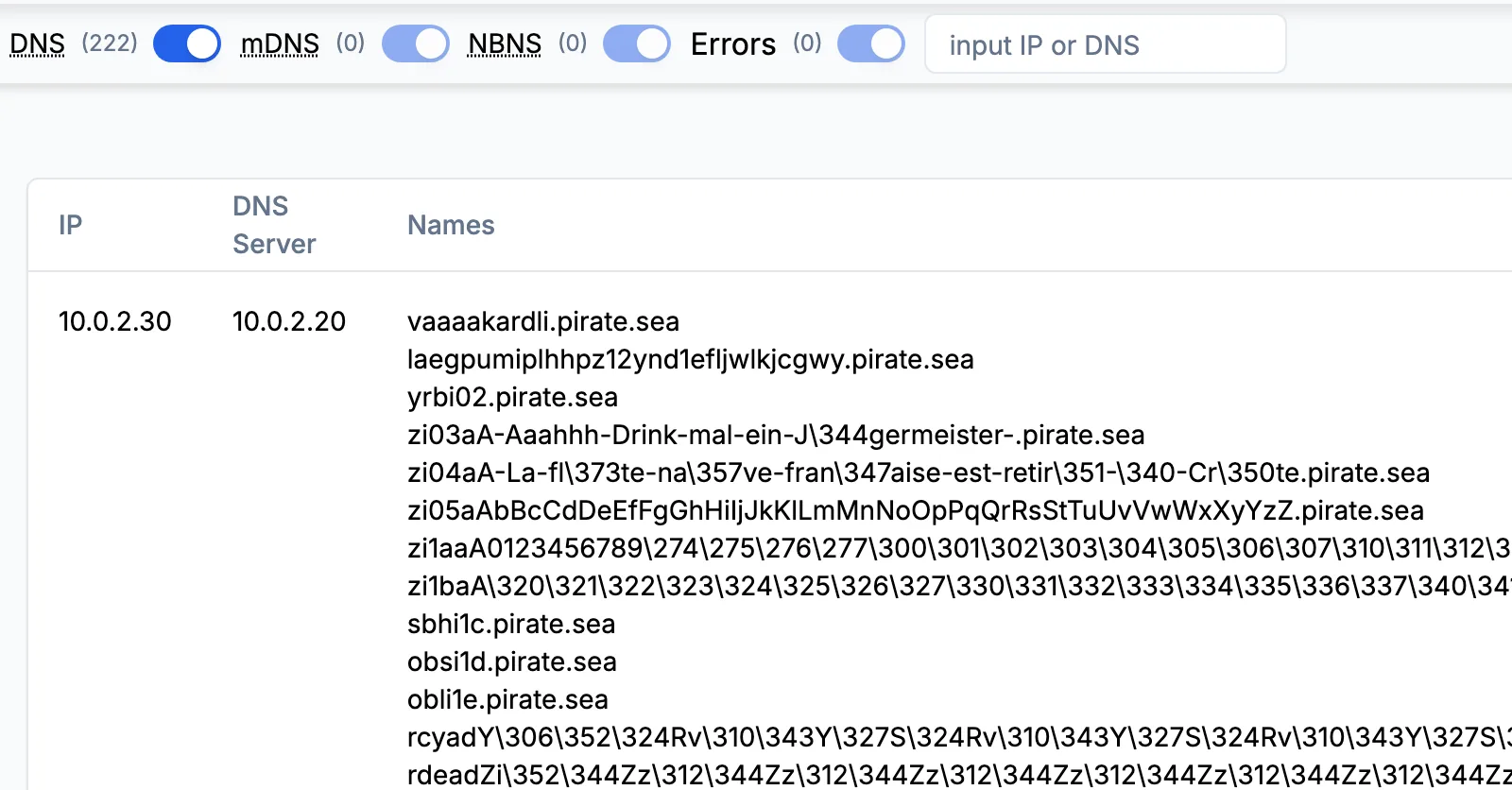
Read the columns together. A tunnel and a sweep both pour every query into one domain, so concentration alone cannot separate them. The answers can: the sweep guesses names that do not exist and collects NXDOMAIN for almost all of them, while iodine gets 212 answers to its 222 queries and not one NXDOMAIN, because the attacker runs the authoritative server for pirate.sea. Length and type finish the job. iodine packs data into names up to 252 characters, one short of the limit for a whole name, and asks for NULL records to carry data back. In the other three captures no name passes 45 characters, and the questions are for addresses. Browsing spreads across 38 domains and asks for the same names again and again: 278 queries for 54 names.
Checking your capture in A-Packets
- Open the DNS view and read the counters first. The switches above the table count DNS, mDNS and NBNS names and errors separately, and a pie chart splits the lookups by response code. A capture whose errors run into the thousands points to a sweep before you read a single name.
- Turn mDNS and NBNS off. Local service discovery adds dozens of names under _tcp.local and similar suffixes that have nothing to do with the internet.
- Read the table one client and server pair at a time. A pair whose names share one long suffix and look random, such as 10.0.2.30 and its server 10.0.2.20 in the iodine sample, is the candidate.
- Search for that suffix. The search box filters by domain or IP address, so every other client that used the same domain appears in one list.
- Open the Connections view for the pair. In the iodine sample the server sent 34 KB back for 16 KB of questions, the downstream half of the channel.
On a sweep, the first step already settles most of the question:
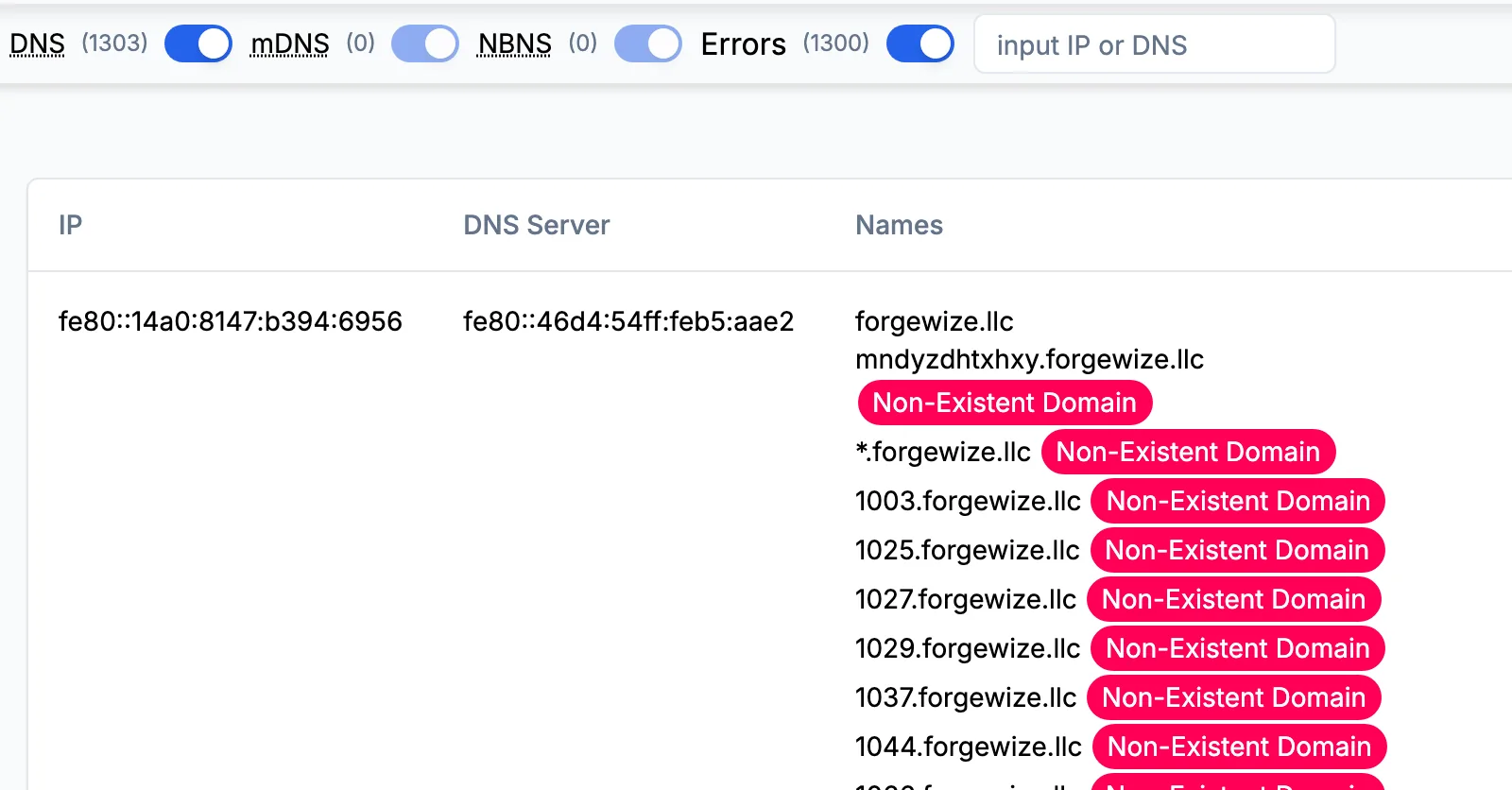
A-Packets lists names and failures but does not show the record type of each query or score labels for entropy. Those two checks belong to tshark, below, so the decision rests on numbers you can show in a ticket.
Where the capture was taken decides what it can show
On the client's own segment you see the host and the server it asks. When the client talks to the tunnel server directly, as 10.0.2.30 does with 10.0.2.20 in the iodine sample, the tunnel is visible end to end: one source, one destination, one domain. In most offices the client asks an internal recursive resolver instead, and a capture taken at the internet edge shows only the resolver's address on the way out. The pattern survives, but the client does not, so take the domain from the edge capture and look it up in the resolver's query log to find which host asked.
Some hosts skip your resolvers altogether. The Windows machine in the Cobalt Strike sample sends all 35 of its queries straight to 8.8.8.8, so no internal log holds them and the capture is the only record. Others hide DNS inside TLS: both macOS stealer samples open sessions to dns.google on port 853, DNS over TLS, and whatever they resolve that way never reaches the DNS view. A capture that shows TLS on 853, or HTTPS to a known DoH resolver, has DNS this check cannot read.
Traffic that looks like a tunnel at first glance
- Reverse lookups. In the Cobalt Strike sample, 15 of 35 queries are PTR lookups for 12 addresses under in-addr.arpa, and 9 of those names do not resolve. Monitoring agents, mail servers and network tools look up peer addresses this way. Leave in-addr.arpa and ip6.arpa out of any count of names per domain.
- Service discovery. The macOS stealer sample asks for 19 names under _tcp.local over mDNS. They stay on the local link and stop at the mDNS switch.
- Security agents and CDNs. Some endpoint and anti-abuse products encode a hash or a verdict in a lookup, and CDNs use long generated hostnames. Those domains belong to a vendor you can name, other clients use them too, and they carry web traffic as well as DNS.
- Enumeration. A sweep is reconnaissance (MITRE ATT&CK T1590.002), and the answer to it is a zone transfer policy and resolver rate limits. The enumeration report shows its full signature, including the two refused AXFR requests.
Confirming the pattern with tshark
Three counts reproduce the table for any capture. Names per domain, using the last two labels, which is a rough cut that needs adjusting for suffixes such as co.uk:
tshark -r capture.pcap -Y "dns.flags.response == 0" -T fields -e dns.qry.name \
  | awk -F. 'NF>1 {print $(NF-1)"."$NF}' | sort | uniq -c | sort -rn | head
Query types, where 10 is NULL, 16 is TXT and 252 is AXFR, then response codes, where 3 is NXDOMAIN:
tshark -r capture.pcap -Y "dns.flags.response == 0" -T fields -e dns.qry.type | sort | uniq -c
tshark -r capture.pcap -Y "dns.flags.response == 1" -T fields -e dns.flags.rcode | sort | uniq -c
On the iodine sample the three commands print 222 pirate.sea, 222 10 and 212 answers
with code 0. On the sweep, the response codes come back as 2,596 NXDOMAIN, 2 REFUSED and only 4 answers. A result that matches
the first row of the table, from a host with no business reason to run a tunnel, is strong enough to act on.
Once the tunnel is confirmed
MITRE ATT&CK files a tunnel that carries other traffic under T1572, Protocol Tunneling, and a command channel spoken in DNS queries under T1071.004. Either way the domain is the indicator that travels best: it outlives the client's address, and resolver logs can be searched for it across weeks. Hand the endpoint team the host, the first and last query time and the domain, block the domain on your resolvers, and allow outbound port 53 and 853 only from them. The iodine report covers how the tool negotiates its record type and encoding, which helps when a tunnel in your traffic uses TXT or CNAME instead of NULL. iodine itself is on GitHub, if you want a lab sample of your own to test a detection rule.
DNS tunneling questions
- Does A-Packets flag DNS tunneling automatically?
- No. It lists every name per client and server and counts failed lookups, which makes a tunnel easy to see, but it does not score names or label hosts. The decision stays with the analyst.
- Which record types besides NULL should I look for?
- TXT, CNAME, MX and SRV can carry data back too, and some tools hide data in the name while asking for ordinary A records. Type is a hint; one domain with many unique, long names is the stronger signal.
- Can a PCAP show lookups made over DNS over HTTPS or DNS over TLS?
- Only as encrypted sessions. DNS over TLS runs on port 853 and DNS over HTTPS looks like ordinary HTTPS, so the DNS view cannot list those lookups. The SSL/TLS view shows the session and the resolver's server name.
- How long must a capture run to catch a slow tunnel?
- Long enough to collect a few dozen of its queries. A tunnel throttled to one query a minute needs about an hour; resolver logs kept for weeks are the better place to hunt for slow ones.