Credentials
SMTP and IMAP logins: five readable passwords, two CRAM-MD5 proofs
Updated
- File
- email-login-credentials.pcap
- Format
- pcap, ether
- Size
- 104.28 KB
- Packets
- 471
- Duration
- 3 min 21 s
- Captured (UTC)
- 2009-10-05 06:06:07
- SHA-256
- 348090930cad28d747728b82d2ff36245cad089375151d0290bb165dd7b38f30
- Built
- merged from 6 single-protocol captures
Seven mail sign-ins sit in this SMTP and IMAP login PCAP, and five of them hand over a password anyone can read, sent as plain text or wrapped in Base64. The other two are CRAM-MD5 exchanges, where the password itself never crosses the wire. Side by side, the capture shows which sign-ins land in plain view and which only look protected because they are encoded. A-Packets lists the recovered accounts and masks the secret fields on this page; the CRAM-MD5 entries hold challenge-response evidence, not a decoded password.
The distinction matters for an audit, because a mechanism name in a mail-server config is not the same as protection on the wire. The file stitches six mail captures into one 201-second timeline, so the clock between sessions is the assembly, not one user's day, but every exchange in it is a real login as a sniffer would see it. The lesson is that Base64 is an encoding, not encryption, and that none of these mechanisms encrypts the session; TLS does.
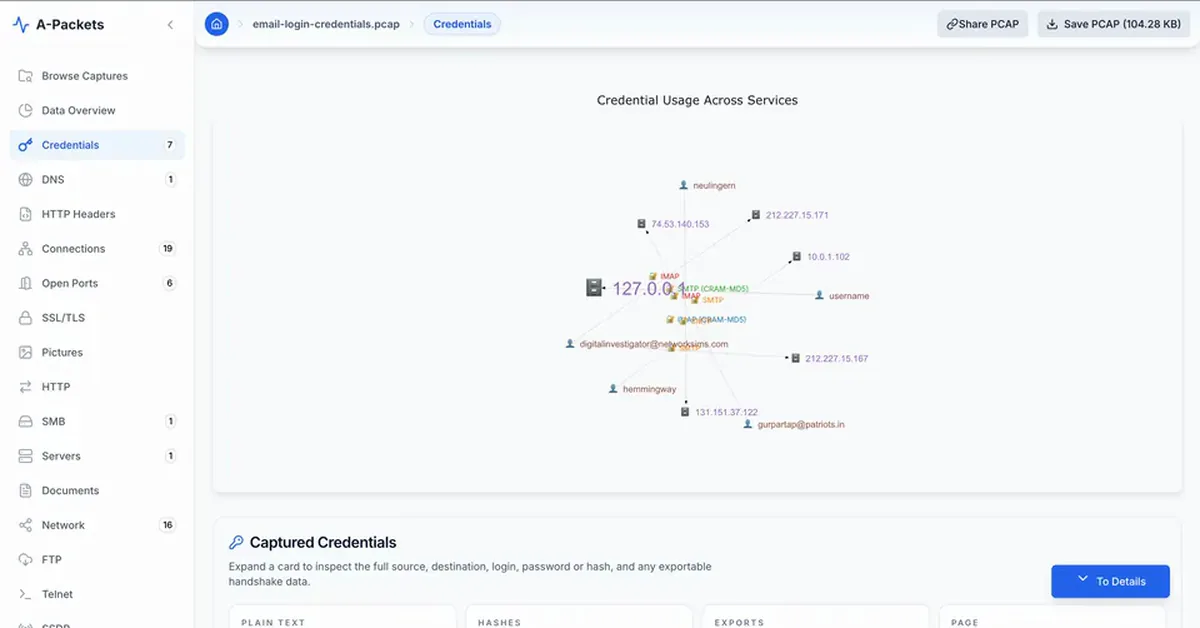
Every mail login the capture gave up
A-Packets lists each mail credential with its protocol and the mechanism it used. The entries marked plainly as SMTP
or IMAP are the ones sent as AUTH LOGIN, AUTH PLAIN or a bare IMAP LOGIN command; the ones marked
CRAM-MD5 used the challenge-response mechanism. Having the two kinds side by side is the point of the sample.
| Protocol | Client | Server | Login | Password |
|---|---|---|---|---|
| IMAP (CRAM-MD5) | 10.0.2.101 | 10.0.1.102:143 | hemmingway | $cram_md… (131 chars) |
| IMAP | 131.151.32.21 | 131.151.37.122:143 | neulingern | •••••• (6 chars) |
| IMAP | 192.168.0.4 | 212.227.15.171:143 | [email protected] | n•••••••3 (9 chars) |
| SMTP (CRAM-MD5) | 127.0.0.1 | 127.0.0.1:25 | username | $cram_md… (123 chars) |
| SMTP | 10.10.1.4 | 74.53.140.153:25 | [email protected] | p••••••••3 (10 chars) |
| SMTP | 127.0.0.1 | 127.0.0.1:25 | username | p••••••d (8 chars) |
| SMTP | 192.168.0.4 | 212.227.15.167:25 | [email protected] | n•••••••3 (9 chars) |
For an auditor the table is the finding: every account that authenticated without TLS around it, regardless of which
mechanism the server advertised. Four of the SMTP exchanges end in 235, the accepted-authentication
reply of SMTP AUTH, and a refused attempt would
expose the submitted password just the same. The next two sections explain why the mechanism label does not change
the verdict for most of these, and where the one real difference lies.
AUTH LOGIN and AUTH PLAIN: Base64 is not encryption
The most common SMTP and IMAP mechanisms, AUTH LOGIN and AUTH PLAIN, send the username and password Base64-encoded.
Base64 exists to carry arbitrary bytes through a text protocol safely; it has no key and hides nothing. A string like
cGFzc3dvcmQ= decodes to password with a one-line command and no secret. AUTH PLAIN packs
the authorization identity, the username and the password into a single null-separated string and encodes the lot;
AUTH LOGIN sends the username and password as two separate Base64 lines after the server prompts. Either way the
credential is fully recoverable from the capture, and A-Packets decodes it automatically, which is why these entries
appear with a readable account and a masked-but-present password.
The trap is that a packet of Base64 looks, to a casual glance, like it might be protected. It is not. An AUTH LOGIN session over a plaintext connection is exactly as exposed as a cleartext FTP password; the encoding only delays the reader by the second it takes to decode. Treat every AUTH LOGIN or AUTH PLAIN exchange that is not inside TLS as a cleartext credential.
CRAM-MD5: better, but not a substitute for TLS
CRAM-MD5 is genuinely different. The password is never sent at all. The server issues a random challenge, the client returns an HMAC-MD5 digest of that challenge keyed with the password, and the server verifies the digest against its own copy of the secret. What the capture holds is a challenge and a response bound to that one exchange, not a reusable password and not a hash taken from the server, so an observer cannot simply decode it the way they decode Base64.
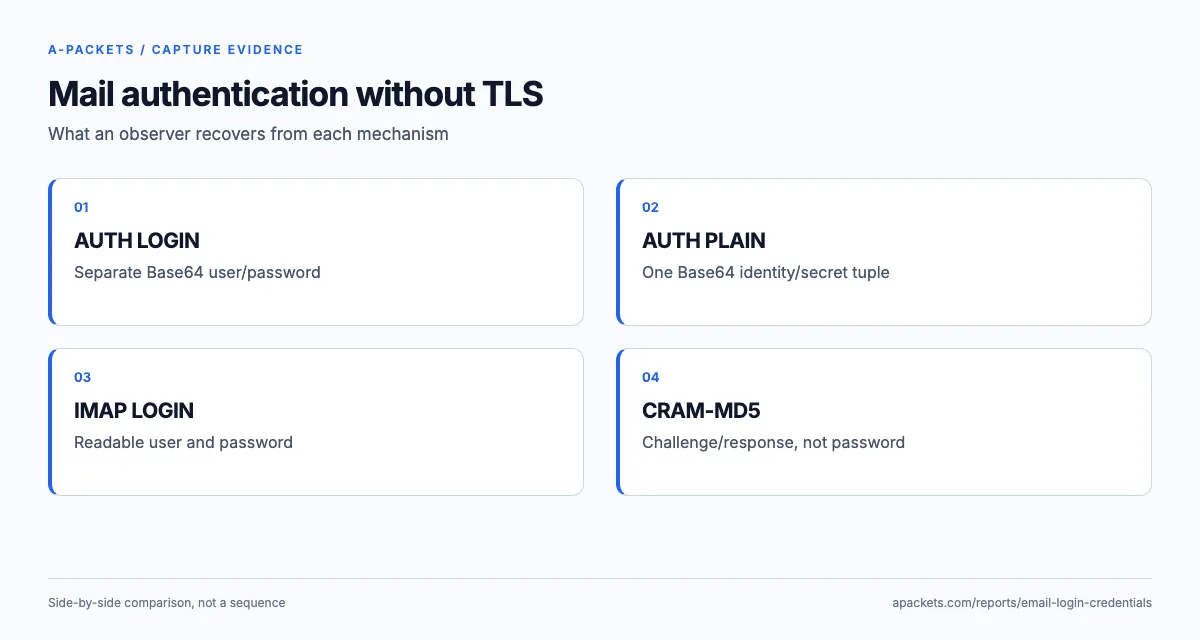
That is a real improvement, but it is not a reason to skip TLS, for three reasons the capture makes concrete. First, the username still travels in the clear, so the account is exposed even when the password is not. Second, the challenge-response pair can be attacked offline: because MD5 is fast, a weak password behind a captured CRAM-MD5 exchange falls to a wordlist, so the scheme protects a strong password far better than a weak one. Third, CRAM-MD5 authenticates the client to the server but does nothing for the rest of the session, so the message contents, recipients and everything after the login are still in the clear. A-Packets records the challenge-response as it was captured and does not attack it; the point of listing it next to the AUTH LOGIN entries is to show that "we use CRAM-MD5" is not the same as "our mail is encrypted".
What the sessions carry after the login
The login is only the first thing a plaintext mail session gives away, and this capture holds the rest in full. The
first SMTP client authenticates and then sends a multipart message with a text attachment, NEWS.txt;
the envelope, the headers, the body and the attachment are all readable after the DATA command. One
IMAP client lists its inbox by fetching the date, sender and subject of thirteen messages, opens one of them in full
and deletes another. The subject lines alone mention a planned BIND upgrade, the backup agent the team runs and a
Novell login problem: reconnaissance about the server estate that an attacker would otherwise have to work for.
The Thunderbird 17 session shows how one message leaks twice. The client submits a 452-byte message over SMTP, then
saves the same 452 bytes to its Sent folder with an IMAP APPEND, and seventy seconds later
the connection it holds open with IDLE wakes up and downloads the reply: the whole conversation, in both
directions, with no TLS anywhere. It also authenticates three times with the identical AUTH PLAIN string, once to
SMTP and twice to IMAP, because a single account serves both protocols. Rotating that one password covers the sending
and the reading side together, and the session is a reminder that a mail audit has to cover every protocol a client
speaks, not only the one named in the ticket.
Where legacy mail auth still lurks
It is tempting to think cleartext mail authentication is a solved problem, but it persists in specific corners worth checking in an audit. Multifunction printers, scanners and other devices that send mail often support only SMTP with AUTH LOGIN and no TLS, and they are configured once and forgotten. Legacy IMAP and POP3 clients, and the service accounts behind monitoring and ticketing systems, frequently fall back to basic authentication over a plaintext connection. And internal mail relays are sometimes left unencrypted on the assumption that internal traffic is safe, an assumption any capture on the segment, or an ARP-poisoning position like the one in the arpspoof report, disproves. These are exactly the accounts a credential audit surfaces and the owners never think to check.
OAuth mail authentication, through the SASL OAuth mechanisms, swaps the stored password for a token the account owner can revoke, but a token captured in the clear still opens the mailbox until it expires, so it needs TLS just the same. Where you cannot move to token-based auth, requiring TLS around the existing mechanisms is the floor, and this capture is the argument for it: four mechanisms, and without TLS every one of them hands an observer at least the account name.
The fix is STARTTLS or implicit TLS, everywhere
For every mailbox in this capture the remediation is the same: require TLS around the whole session, with STARTTLS on the submission and IMAP ports or implicit TLS on 465 and 993, and rotate the passwords that were sent over a plaintext connection, starting with any AUTH LOGIN or AUTH PLAIN account, since those passwords are recoverable outright. Once the session is inside TLS, the account name, the credential and the mechanism all disappear from a passive capture, and none of these entries would appear in a report at all. A CRAM-MD5 login is worth upgrading too, not because the password leaks but because the username does and because the rest of the mail does.
Ports, STARTTLS downgrades and how to check a server
The ports in this capture are part of the finding. Every login runs on 143 or 25, and all four SMTP logins
authenticate on port 25, the server-to-server relay port; client submission has had its own port, 587, since RFC 6409,
and RFC 8314 recommends implicit TLS for it on
465, with 993 for IMAP and 995 for POP3. Implicit TLS also removes the downgrade risk of STARTTLS. A STARTTLS session
begins in clear text and upgrades only if both sides agree, so an attacker on the path can remove the
STARTTLS capability from the server's greeting, and a client configured to use TLS "when available"
carries on without it, credentials included. A session that starts inside TLS gives that attacker nothing to strip.
Two settings close the gap from the server side: offer authentication only after TLS is in place, and refuse
plaintext logins outright. In Postfix that is smtpd_tls_auth_only = yes; Dovecot has an equivalent
option that rejects plaintext authentication on unencrypted connections, and an IMAP server configured that way
advertises LOGINDISABLED before the upgrade. Checking a server takes one connection: send
EHLO on 587, and the capability list before STARTTLS should not contain AUTH;
repeat it after the upgrade with openssl s_client -starttls smtp -connect mail.example.com:587, and only
then should AUTH appear. On the client side the matching control is to require TLS rather than prefer it,
so a stripped capability ends the connection instead of exposing the password.
Run the audit over your own mail paths with a capture of real traffic. The Credentials view lists each recovered exchange by mechanism, exactly as it does here, and each is one to move behind encryption. The cleartext password audit walkthrough covers the full process across protocols, and the FTP and Telnet report shows the older cleartext protocols where there is not even Base64 in the way.
A login made inside TLS never reaches this report, which is the whole argument for requiring it. Reading credentials off the wire is T1040, Network Sniffing, in MITRE ATT&CK, and requiring TLS is what denies a sniffer anything to read. To audit a capture from your network, upload a PCAP, or see extracting credentials from PCAP files for every protocol A-Packets recovers logins from.