Mastering DNS Traffic Analysis: Exploring DNS, mDNS, and NBNS with A-Packets
When analyzing network traffic, DNS (Domain Name System) traffic is often at the heart of identifying network anomalies, potential security threats, or resolving issues. Whether you are a system administrator maintaining a robust network infrastructure, a security engineer tracking potential breaches, or an IT professional curious about DNS behavior, understanding DNS traffic is critical. With A-Packets' DNS Exploring Section, analyzing DNS, mDNS, and NBNS traffic has never been more insightful and accessible.
In this article, we will explore how A-Packets can enhance your packet capture (PCAP) analysis by allowing you to dissect DNS communications in depth. We will look at the benefits of DNS exploring for network diagnostics and security monitoring, examine key features such as tracking failed DNS requests, and highlight how graphical representations of DNS traffic can provide critical insights.
Why DNS Analysis is Vital
DNS traffic forms the backbone of internet connectivity by translating human-readable domain names into IP addresses that machines can understand. However, DNS can also be exploited in various attacks, including DNS spoofing, tunneling, and amplification attacks. Analyzing DNS traffic can help administrators uncover:
- Misconfigurations that lead to DNS failures.
- Potential DNS-based attacks.
- Communication issues between clients and DNS servers.
- Unusual DNS traffic patterns that may indicate malware activity or data exfiltration.
A-Packets makes this process easier with its DNS Exploring Section, enabling system administrators and security engineers to get a comprehensive view of DNS communications.
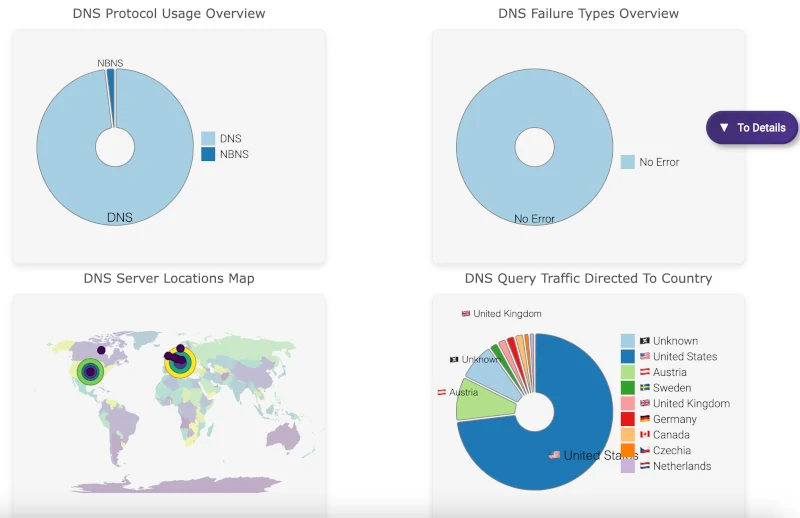
Key Features of the DNS Exploring
View DNS, mDNS, and NBNS Request/Response Traffic
DNS, mDNS (multicast DNS), and NBNS (NetBIOS Name Service) protocols are vital for network communications. The DNS Exploring Section in A-Packets allows you to:
- View both standard DNS queries and responses.
- Inspect multicast DNS (mDNS) traffic, often used in local network discovery processes, such as identifying network devices.
- Analyze NBNS, which is used in legacy systems or Windows environments for resolving NetBIOS names into IP addresses.
This level of visibility is invaluable when you're troubleshooting domain name resolution issues or tracking down rogue devices communicating on the network.
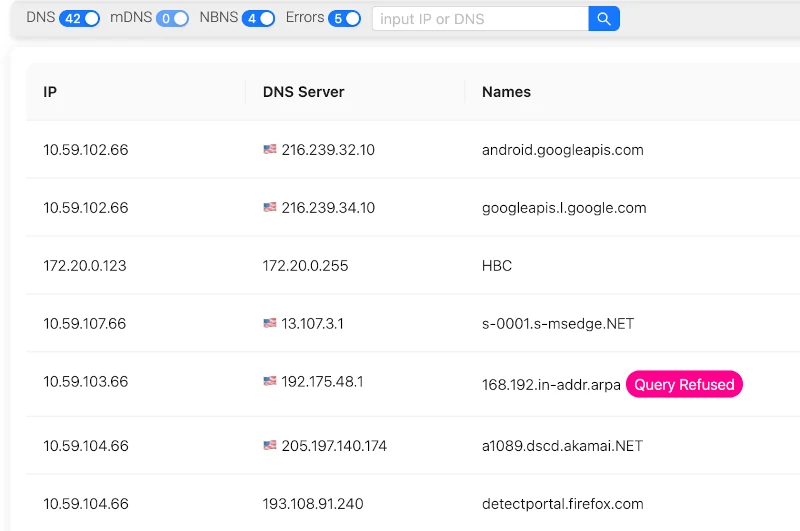
View DNS Failures
Network issues related to DNS failures can cause service interruptions or delays. The DNS Exploring Section highlights all DNS failures, providing detailed error codes and descriptions to simplify troubleshooting. The feature helps you quickly identify:
- DNS servers that are not responding to queries.
- Incorrectly configured DNS zones or records.
- Client-side issues leading to failed DNS lookups.
Whether it's a SERVFAIL, NXDOMAIN, or any other error code, having this information at your fingertips saves valuable time in pinpointing and resolving issues.
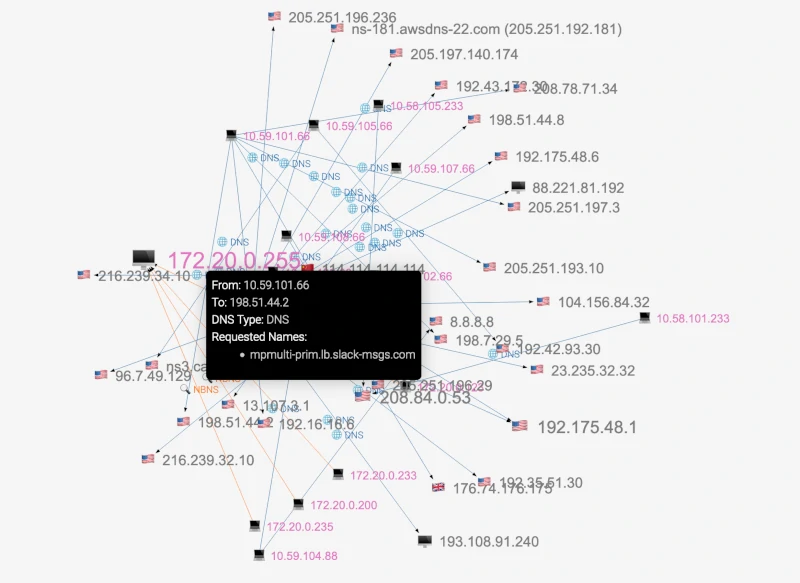
Client-DNS Server Communications Graph
A-Packets goes beyond basic packet analysis with a visual graph showing interactions between clients and DNS servers. This feature is especially helpful in visualizing the network topology, allowing system administrators and security engineers to:
- Identify which DNS servers are serving specific clients.
- Detect load-balancing issues, such as clients being directed to underperforming or incorrect DNS servers.
- Spot anomalies like a single client sending an unusually high volume of DNS queries.
The visual representation of DNS traffic makes it easier to spot outliers and potential issues that may be missed when relying solely on raw packet data.
Detailed Node Information
For each node (client or DNS server) communicating within the DNS network, A-Packets provides detailed information. The DNS Exploring Section allows users to:
- View the DNS name and IP address of each node.
- Analyze geo-location and country data, which is particularly useful for spotting cross-border communications that may be indicative of data exfiltration or policy violations.
- Quickly identify nodes involved in unusual DNS traffic, potentially pointing to misconfigured clients or malicious activity.
This feature is especially valuable for organizations with global networks, enabling rapid geo-location of DNS traffic to ensure compliance with network policies and to detect potential security breaches.
Benefits for System Administrators, Security Engineers, and Users
For system administrators, A-Packets' DNS Exploring Section is a powerful tool for monitoring and maintaining DNS infrastructure. From diagnosing DNS failures to ensuring the correct routing of traffic, it simplifies daily network operations. The ability to visualize and troubleshoot DNS issues quickly means less downtime and smoother network performance for end-users.
For security engineers, DNS traffic is a critical element of network monitoring. Malicious actors often use DNS for command-and-control communications, data exfiltration, or to resolve domain names of malicious servers. A-Packets provides the insight you need to detect unusual DNS traffic patterns and analyze potential security threats in real-time.
- Identify compromised devices using DNS tunneling.
- Track down DNS spoofing or poisoning attempts.
- Uncover unusual DNS requests to domains associated with phishing or malware campaigns.
Even for users with general knowledge of networking or IT professionals who aren't focused on DNS security, the DNS Exploring Section in A-Packets is an excellent way to deepen your understanding of network behavior. By analyzing DNS requests and responses, users can learn more about how devices communicate, the role of DNS in daily operations, and how to detect common issues.
Conclusion
The DNS Exploring Section in A-Packets opens up a wealth of possibilities for anyone involved in network management or security. By providing detailed insights into DNS, mDNS, and NBNS traffic, offering tools to diagnose DNS failures, and presenting client-server communications visually, it takes the complexity out of PCAP analysis. Whether you're analyzing DNS traffic for routine troubleshooting or to track down a security issue, A-Packets is your go-to tool for DNS traffic exploration.
Start exploring your network traffic today with A-Packets, and unlock the hidden details of DNS communications within your environment.