Network and transport
An iodine DNS tunnel: 222 unique NULL queries under one domain
Updated
- File
- dns-tunnel-iodine.pcap
- Format
- pcap, ether
- Size
- 75.71 KB
- Packets
- 438
- Duration
- 24 s
- Captured (UTC)
- 2010-08-21 02:10:40
- SHA-256
- 91fd221e07107507c8327a9d9487cd7f7531a1fd87cf543b1a76160ff0609b7b
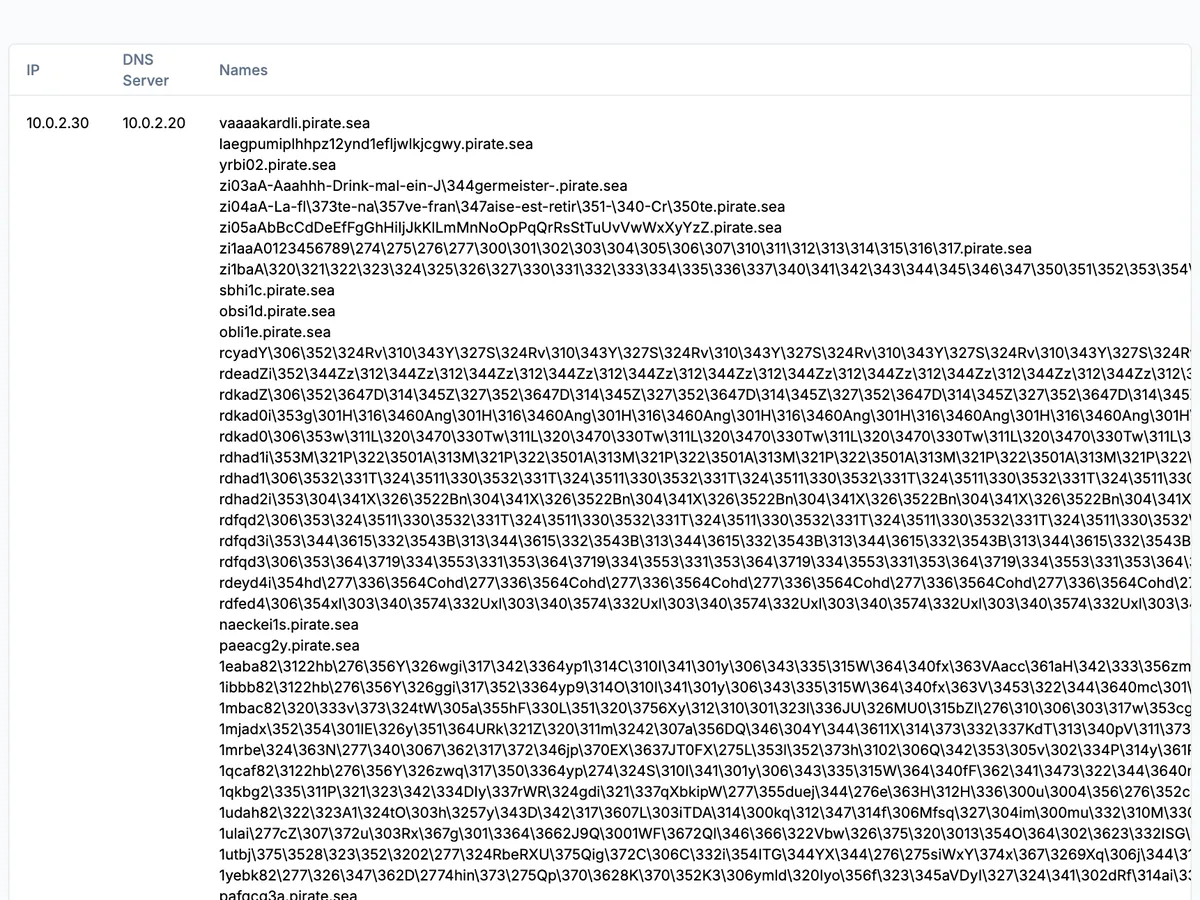
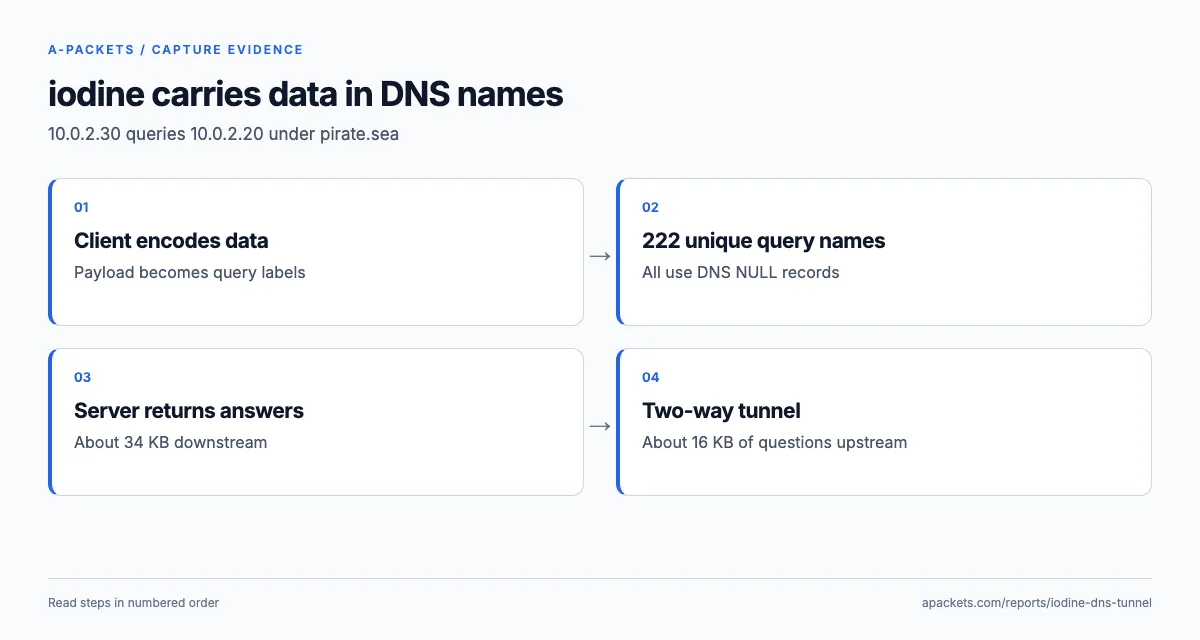
In 24.5 seconds 10.0.2.30 sends 222 DNS queries to 10.0.2.20, every one of type NULL,
every name different and every one ending in pirate.sea: this iodine DNS tunnel PCAP is a covert channel
built entirely out of DNS lookups. DNS is supposed to look up names, not carry files, but because almost every network
lets DNS out, attackers abuse it to smuggle data inside queries and read replies back out of the answers. A-Packets
lists every name each client queried, per server, so the tunnel's signature, high volume, every name unique, all
under one parent domain, stands out in one table.
DNS tunneling is how malware exfiltrates data or runs command-and-control from networks that block everything else, and iodine is one of the best-known tools for building the tunnel. Recognising its traffic matters because, to a firewall, it is just DNS; the query structure, the record types and the rhythm of the exchange are what give it away.
How a tunnel hides data in query names
A DNS tunnel encodes outbound data into the labels of query names and reads replies back out of the records the
server returns. To send data, the client asks for a name like 12ebv82…gm.pirate.sea, where the long
random-looking label is the payload encoded into a hostname; the attacker's own authoritative server for that domain
decodes it, and answers with more encoded data in the response. Both directions ride entirely inside ordinary DNS,
so a firewall rule that allows port 53 passes it; only a DNS-aware policy that looks at the domain or the record type
can stop it.
That mechanism leaves a combination of unusual features, and the DNS view shows all of them at once: one host, one server, over two hundred queries, every name different and every name ending in the same parent domain. Ordinary workstation DNS repeats common names and spreads its queries across many domains, so next to normal DNS, which reads like a browsing history, the tunnel reads like noise, and that contrast is the detection.
The four signals that separate a tunnel from normal DNS
Reading this capture, four properties together make the case, and no single one would be conclusive alone. Volume: hundreds of queries to one domain in seconds, far above what any host's normal resolution produces. Uniqueness: every name different and asked once, where normal browsing repeats a small set of names. Length and entropy: some labels approach the DNS length limit and look random, because they are encoded data, not words. A single parent domain: all the traffic funnels through one zone, the one the attacker controls. A monitoring rule that scores DNS on these together, queries per domain, distinct-name ratio, average label length and label entropy, ranks the suspicious traffic first; the analyst then checks it against the network's normal DNS.
The record type is a fifth hint. Tunnels favour query types that carry the most data per answer, and a sudden
prevalence of an unusual record type under one domain, rather than the A and AAAA lookups that dominate normal
traffic, is itself suspicious. This tunnel uses NULL for every one of its queries. In Wireshark,
dns.qry.name contains "pirate.sea" isolates the session and the query type column shows it at a
glance.
This iodine capture uses NULL records, not TXT
All 222 requests are DNS type 10, NULL, from 10.0.2.30 to 10.0.2.20, and 212 answers come
back, all NOERROR, within the 24.5-second window. NULL records carry arbitrary binary data, which is why iodine
prefers them when the path allows, and a detector that only watches for floods of TXT queries, the type most write-ups
associate with tunnels, would miss this one completely. The client talks straight to the tunnel server, both on
private lab addresses, so the file shows the protocol itself rather than a passage through an enterprise resolver.
The names run from 17 to 252 characters, and only 39 of the 222 carry a label longer than 50: short control queries keep the session alive between the long, data-bearing names. A rule that waits for near-maximum labels would discard most of this known tunnel. The mix itself, short control questions interleaved with long data names under one domain, is a more telling pattern than maximum length alone.
The opening probes: iodine testing what the path allows
The session starts with names that are plainly not host lookups: vaaaakardli.pirate.sea, then a run of
z-prefixed probes mixing upper- and lowercase letters, punctuation and high-byte characters. The
iodine documentation explains them: the client
autodetects which encoding survives the path, whether case is preserved, whether raw 8-bit bytes get through, and
how large a reply can be, before it settles on the most efficient codec. That startup sequence is more specific to
iodine than any entropy score, and it marks the first seconds of a tunnel even before any data moves.
When you investigate such probes, keep the raw label bytes. A text export can replace non-UTF-8 octets with a placeholder, and lowercasing, harmless for ordinary domain comparison, destroys the case-sensitive encodings iodine is testing. Group by a normalised parent domain, but reconstruct from the original bytes. The tunnel's password, for its part, authenticates the client to the server; it does not encrypt the traffic, so whatever the user sent without its own SSH or TLS layer travels encoded, not encrypted.
Scoring the pattern, and the evasions that defeat naive rules
Turning the four signals into an automated detector means scoring DNS traffic on measurable features: queries per domain per minute, the ratio of distinct names to total queries, average label length, and the Shannon entropy of the labels, which is high for encoded data and low for real words. Tune it on two kinds of data: tunnel samples like this one, which a working rule must flag, and your own normal traffic, where CDNs, anti-abuse lookups and endpoint agents also generate long, unique names. The capture is the ground truth for the first half: a rule that does not flag it is too loose.
Attackers who know they are watched slow the tunnel down and add padding to make the labels look less uniform, which blunts a rule keyed only on rate or length. The more robust signal is the single parent domain, since all of a tunnel's traffic must funnel through the zone the attacker controls, and a steady trickle of odd queries to one never-before-seen domain is suspicious even at low volume. Blocking direct external DNS narrows the path, but a tunnel can also run through your own recursive resolver, so the resolver is where the policy and the monitoring belong.
Containing a confirmed tunnel
Treat a confirmed tunnel as a compromised host with an open channel out of the network, because that is what it is. Identify the process on the client that is generating the queries and isolate the host unless the tunnel is a sanctioned tool, then block the tunnel's parent domain on your resolvers with a response-policy zone so no host can reach it. The structural fix is to stop clients reaching external DNS servers directly at all: allow outbound DNS only from your own resolvers, so a client cannot run a tunnel to an arbitrary server on port 53, and then watch those resolvers for the query pattern above. Finally, search the resolver logs for other clients that queried the same domain, since one tunnel often means a foothold that touched more than one host.
A-Packets lists every name and makes the pattern visible; decoding the tunnel's contents takes an iodine-aware decoder working from the raw packets. One evasion worth noting: DNS over HTTPS would wrap these same queries inside TLS to a public resolver, hiding them from a passive capture entirely, which is a reason to control which resolvers clients may use rather than relying only on inspecting port 53. In MITRE ATT&CK terms this is T1071.004, Application Layer Protocol over DNS, used for command-and-control or T1048 exfiltration over an alternative protocol.
For the full detection walkthrough step by step, see detect DNS tunneling in a PCAP, and compare the DNS enumeration sample, a different abuse of the same protocol where DNS is used to map names rather than to carry data. To read the DNS of a capture from your own network, upload a PCAP for public analysis, or keep it private with a paid plan.