Free CloudShark Alternative for PCAP Analysis: When You Just Need to Quick Visualize the Capture
Short answer: CloudShark does not currently offer a permanent free plan. CloudShark Personal has been discontinued, and QA Cafe now positions CloudShark as an Enterprise packet-analysis product. The public product page points users toward demo and sales conversations, not a self-serve freemium workflow.
That does not make CloudShark a bad product. It means the product category is different. CloudShark is built for Enterprise packet workflows: shared investigations, controlled access, larger captures, Zeek, Suricata, APIs, support, and team processes. Those are valid requirements.
This post is about the smaller but common case: we have a sanitized PCAP from an old archive of training attacks. What matters is that the capture contains a concrete DNS tunnel pattern. We want to look at it quickly, in a browser, and decide what the packets support.
That is where a free CloudShark alternative can be useful. Not as an Enterprise replacement. As a fast visual triage path for PCAP files that are safe to analyze publicly.
TL;DR
- CloudShark Personal is discontinued. The current public CloudShark positioning is Enterprise packet analysis.
- A-Packets has a free public tier. Upload sanitized PCAP or PCAPng files up to 25 MB without registration.
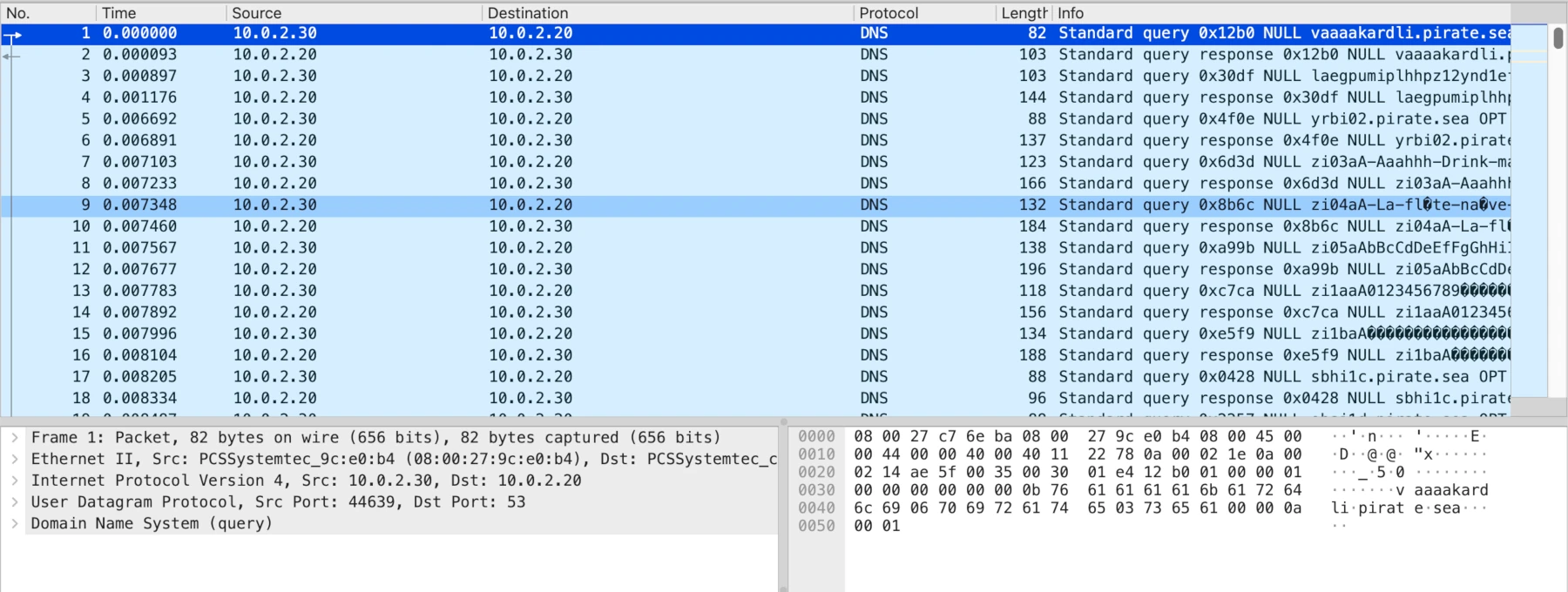
- The test capture looks like DNS tunneling. It contains many DNS NULL queries between 10.0.2.30 and 10.0.2.20, with machine-generated labels under pirate.sea.
- Wireshark shows the raw truth. The suspicious pattern is visible, but the analyst has to assemble the story manually.
- We cannot verify CloudShark on this file without product access. Since CloudShark is Wireshark-like in the browser, we would expect similar packet-level visibility, but that is an inference, not a claim from this test.
- A-Packets does not need to auto-declare "DNS tunnel" to be useful. Fast visualization makes the anomaly easier to inspect and discuss.
The PCAP: DNS Tunnel Indicators
The capture is small, but it has enough structure to be useful for comparison. The traffic is mostly DNS between two internal hosts:
- Client: 10.0.2.30
- DNS server or responder: 10.0.2.20
- Protocol: DNS over UDP/53
- Query type: NULL
- Domain pattern: many generated-looking labels under pirate.sea
- Timing: repeated query/response pairs over the capture window
The suspicious part is not a single packet. It is the pattern. We see many DNS NULL queries. The labels look machine-generated. Some strings look encoded or base64-like, which is common when a tunnel wants to move bytes through DNS-safe characters and avoid whitespace or binary data issues. That can be used for command delivery, C2 tasking, data staging, or exfiltration.
We should still be precise. "Looks like DNS tunneling" is a hypothesis. The PCAP supports that hypothesis because of query type, volume, naming pattern, and client/server repetition. To confirm intent, we would also want the original lab description, decoded payload if possible, host telemetry, or a known tool signature.
What Wireshark Shows
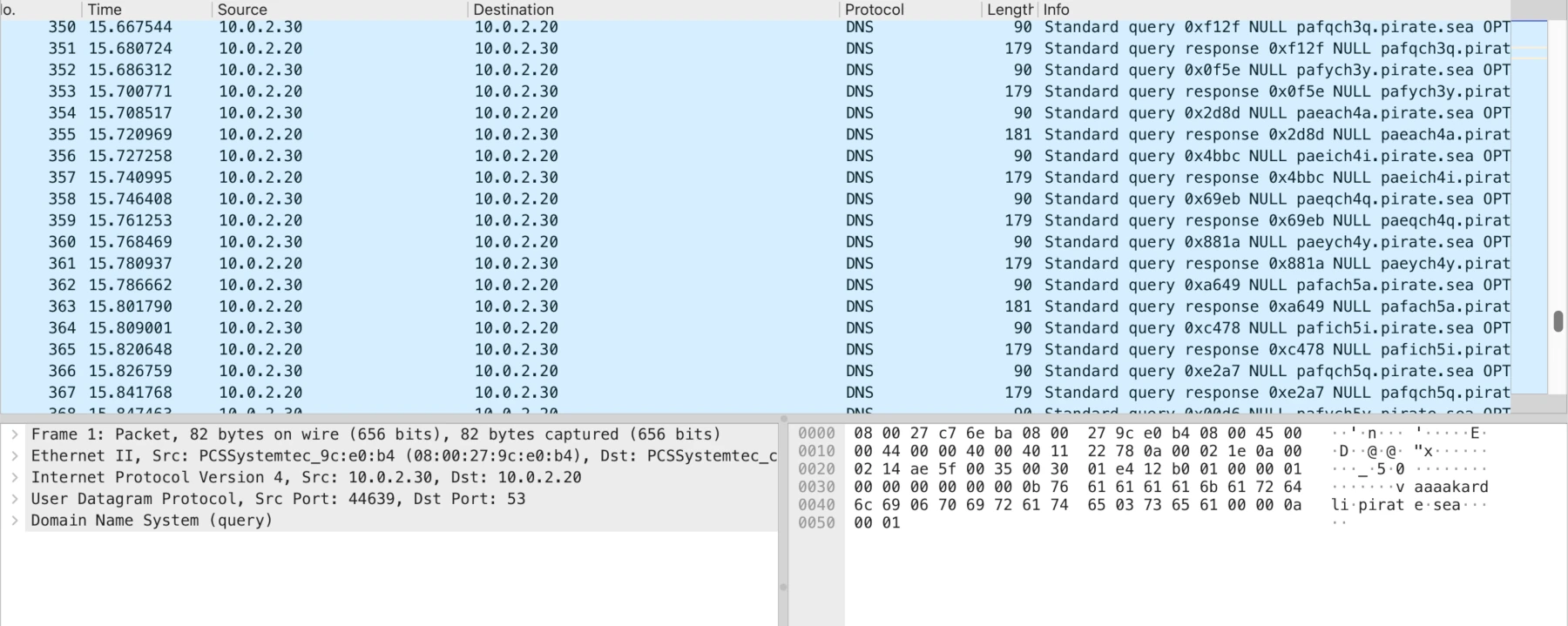
Wireshark is still the reference tool for packet truth. In the screenshots, the pattern is visible: many DNS packets, the same two hosts, NULL queries, and strange labels. If you click into a packet, the protocol tree and hex pane show the exact bytes on the wire.
The limitation is not accuracy. The limitation is presentation. Wireshark was not built to turn every PCAP into an executive summary or a quick visual triage page. The analyst has to inspect rows, sort, filter, follow the DNS names, and mentally group the sequence. That is fine for deep work. It is slower for a quick first pass.
In this file, a useful Wireshark workflow would be:
- filter on dns or ip.addr == 10.0.2.30;
- review query type NULL;
- extract queried names under pirate.sea;
- check query timing and response pattern;
- look for non-DNS follow-on traffic from the same client.
What We Can and Cannot Say About CloudShark Here
We do not have CloudShark access for this specific capture, so we should not pretend we tested it. Based on CloudShark's product positioning, it is reasonable to expect browser-based packet review with Wireshark-style concepts. It may show this DNS pattern well. It may also provide team workflow around it. That is the Enterprise use case.
The problem for this article is simpler: if an analyst only needs to inspect a sanitized training PCAP, there is no permanent CloudShark free tier to use. The path is demo or sales-led Enterprise evaluation. That is too heavy for a small DNS tunnel lab file.
How A-Packets Helps With This PCAP
A-Packets is not claiming an automatic "DNS tunnel detected" verdict here. That would be the wrong promise. The useful part is that the DNS anomaly becomes visible quickly:
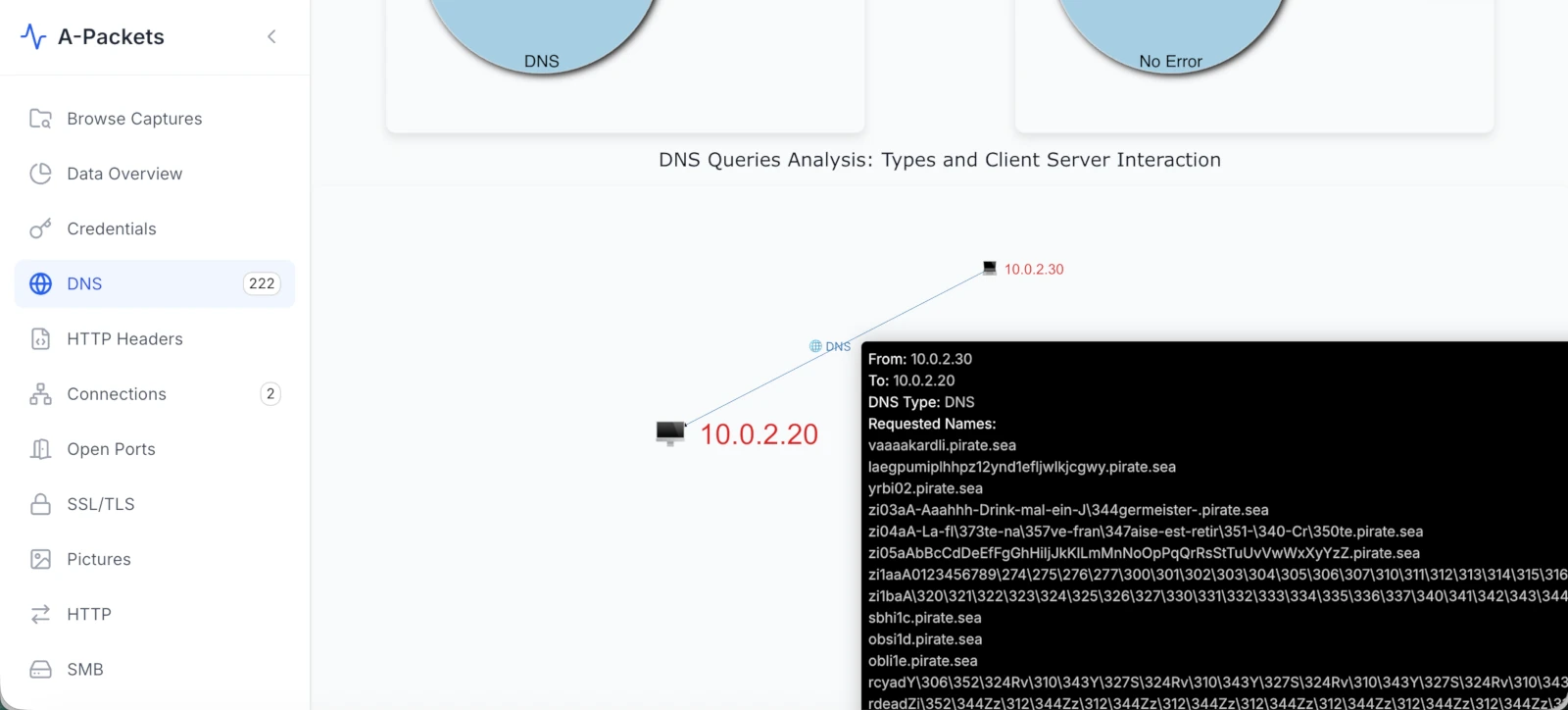
- the DNS module groups DNS activity instead of leaving it as hundreds of similar packet rows;
- generated-looking names under pirate.sea stand out as a family of related queries;
- the query volume and request/response repetition are easier to assess visually;
- the analyst can pivot from DNS to hosts, protocol mix, and network relationships without rebuilding context manually.
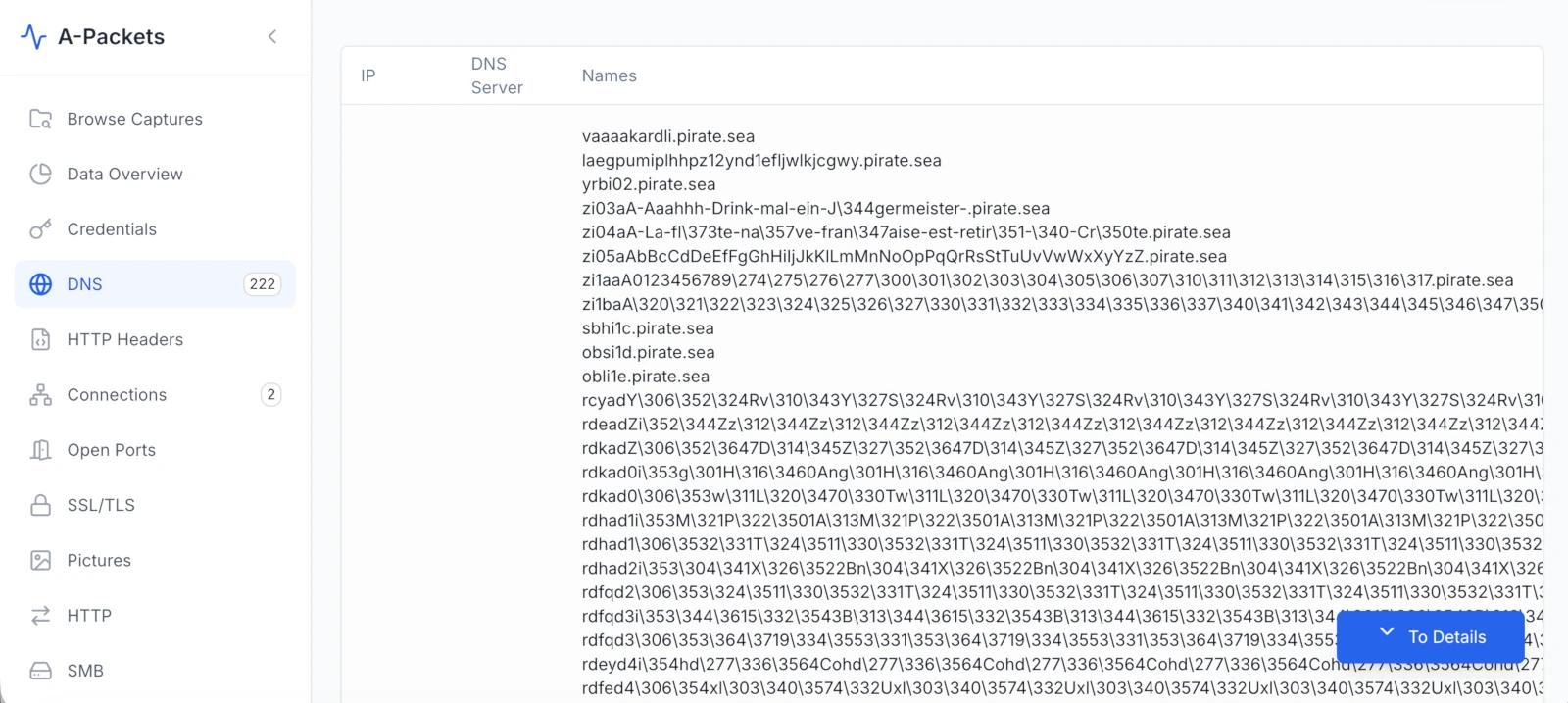
This matters in DFIR because the first question is rarely "can we prove the entire intrusion from this one PCAP?" The first question is usually: "Is there enough signal to spend more time?" In this case, yes. DNS NULL queries, repeated generated labels, and internal client/responder behavior are enough to justify deeper review.
CloudShark vs A-Packets on This Specific Workflow
| Workflow Question | CloudShark | A-Packets |
|---|---|---|
| Is there a permanent free tier? | No public freemium plan. CloudShark Personal is discontinued. | Yes. Free public analysis for sanitized captures up to 25 MB, no registration required. |
| Can we verify this exact PCAP here? | No. We do not have access to test this capture in CloudShark. | Yes. The capture can be uploaded and visually reviewed in the browser. |
| Best fit for this file | Likely useful if your team already has CloudShark Enterprise. | Useful for quick DNS tunnel triage without procurement or registration. |
| DNS tunnel visibility | Expected to expose packet details, but not validated in this article. | DNS views make repeated NULL queries and generated names easier to inspect. |
| First-use friction for a lab PCAP | Demo or sales path for current Enterprise product. | Upload one file and analyze. No account required for public mode. |
| Sensitive PCAP handling | Enterprise controls are the point of the product. | Use private plans or on-prem for sensitive captures. Use free mode only for sanitized traces. |
Why This Is a Good Comparison Page
Google does not need another generic "best tools" article. Analysts do not need it either. A useful comparison should show a real artifact, explain what is visible, state what was not tested, and avoid pretending a tool made a conclusion that the packets do not support.
This is why the CloudShark comparison is strong for A-Packets. The difference is not "we are better at everything." The difference is narrower and more credible: when the file is safe to upload publicly and the job is quick visual triage, A-Packets gives a free path that CloudShark no longer provides.
Evidence Checklist for This DNS Tunnel PCAP
If we were writing a DFIR note from this capture, we would document:
- Hosts: 10.0.2.30 querying 10.0.2.20.
- Protocol: DNS over UDP/53.
- Record type: NULL queries and responses.
- Names: generated-looking labels under pirate.sea.
- Pattern: repeated request/response sequence over time.
- Hypothesis: DNS tunnel or lab simulation of DNS tunneling.
- Confidence limits: source of PCAP is unknown; payload is not decoded in this article; no host telemetry is available.
Public Free Analysis Has a Boundary
A PCAP can contain more sensitive data than a log file: passwords, cookies, internal hostnames, private IP ranges, emails, files, tokens, database queries, and payload fragments. Use public free analysis only for sanitized captures, training labs, CTF samples, and data you are allowed to expose publicly.
Do not use public mode for active incident evidence, customer networks, internal authentication traffic, healthcare data, financial systems, or anything under legal hold. Use private analysis or on-prem deployment for that.
Bottom Line
If you are searching for a free CloudShark alternative, the honest answer depends on the job. For governed Enterprise packet analysis, CloudShark is in the correct category. For a sanitized DNS tunnel training PCAP where the goal is quick visualization, A-Packets is the lighter path.
The important part is not the brand comparison. The important part is the evidence: repeated DNS NULL queries, generated-looking labels, internal client/responder behavior, and a pattern that deserves deeper analysis.
The PCAP is the evidence. A good tool should help us see the pattern faster without pretending that visualization is proof by itself.
Have a sanitized PCAP you can safely analyze publicly?
Upload PCAP FreeNo registration required for public analysis up to 25 MB. Use private plans or credit packs for sensitive captures.