Credentials
HTTP form login: a cleartext password and an unrotated session
Updated
- File
- http_dvwa_clearlogin.pcapng
- Format
- pcapng, ether
- Size
- 31.06 KB
- Packets
- 54
- Duration
- 9 s
- Captured (UTC)
- 2017-04-05 20:10:10
- SHA-256
- 82b6e8b0d95ee16bb14d12932f824b6fa13a3de5f2960d729a4e1bc5a17a2cb9
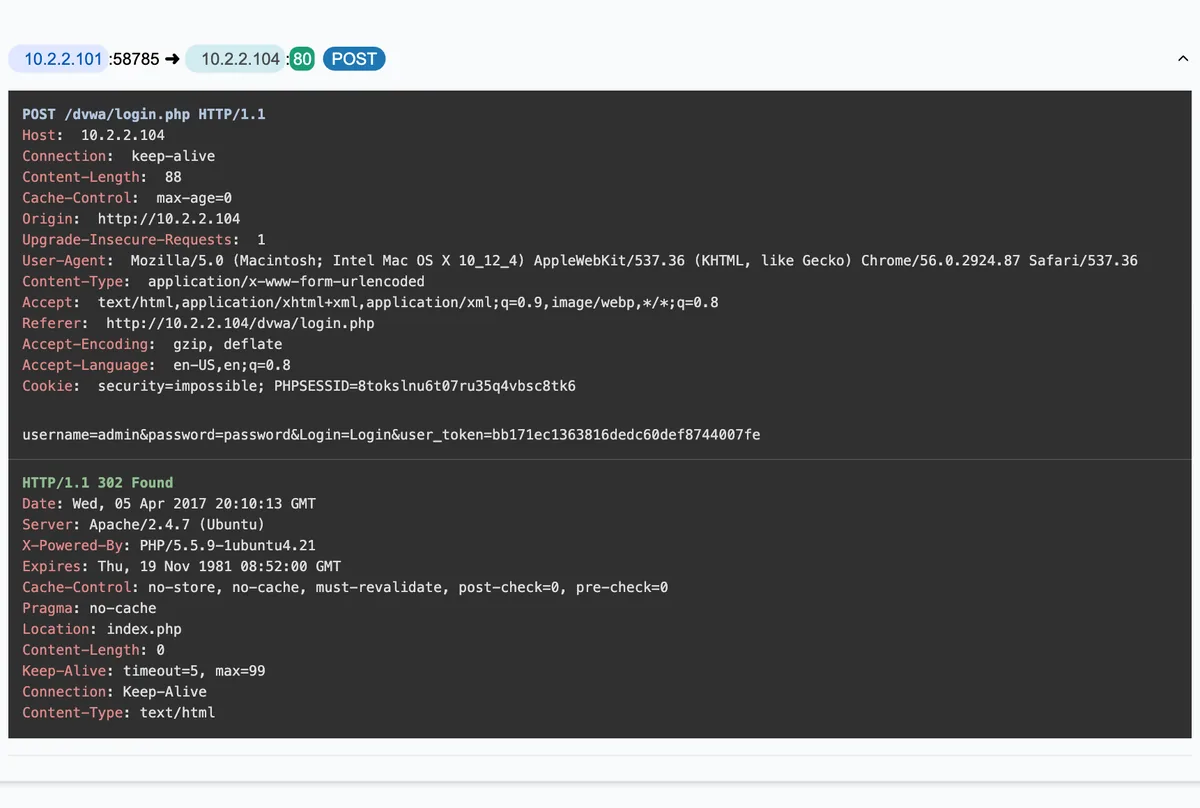
Four seconds after the DVWA sign-in page loads from 10.2.2.104 over plain HTTP, the browser posts
username=admin and its password in the body of a POST, and the server answers with a
302 and the authenticated home page. This HTTP form login PCAP is a complete sign-in, readable end to
end. A login form posted without TLS puts the credentials in the request body for anyone on the path to read, and
A-Packets rebuilds the exchange and decodes the form, so the exposure is plain. It is the web equivalent of the
cleartext FTP and Telnet logins, and it remains possible whenever a site serves its login over HTTPS but still
leaves an old HTTP version reachable.
The capture is short and entirely ordinary, which is the point: nothing unusual has to happen for a password to leak. A normal browser, a normal form, a normal login, served over the wrong protocol.
The sign-in, request by request
The flow reads like any login. The browser fetches the login page with its stylesheet and logo over plain HTTP, the
user types their credentials, and 3.8 seconds later the browser sends a POST back to the login endpoint
carrying the form fields.
| Host | Request | Status | Type |
|---|---|---|---|
| 10.2.2.104 | GET /dvwa/login.phpUA: Mozilla/5.0 (Macintosh; Intel Mac OS X 10_12_4) AppleWebKit/537.36 (KHTML, like Gecko) Chrome/56.0.2924.87 Safari/537.36 | 200 OK | text/html 698 Bytes |
| 10.2.2.104 | GET /dvwa/dvwa/css/login.cssUA: Mozilla/5.0 (Macintosh; Intel Mac OS X 10_12_4) AppleWebKit/537.36 (KHTML, like Gecko) Chrome/56.0.2924.87 Safari/537.36 | 200 OK | text/css 406 Bytes |
| 10.2.2.104 | GET /dvwa/dvwa/js/dvwaPage.jsUA: Mozilla/5.0 (Macintosh; Intel Mac OS X 10_12_4) AppleWebKit/537.36 (KHTML, like Gecko) Chrome/56.0.2924.87 Safari/537.36 | 200 OK | application/javascript 413 Bytes |
| 10.2.2.104 | GET /dvwa/dvwa/images/login_logo.pngUA: Mozilla/5.0 (Macintosh; Intel Mac OS X 10_12_4) AppleWebKit/537.36 (KHTML, like Gecko) Chrome/56.0.2924.87 Safari/537.36 | 200 OK | image/png 8.88 KB |
| 10.2.2.104 | POST /dvwa/login.phpusername=admin, password=p••••••d, Login=Login, user_token=b••••••••••eUA: Mozilla/5.0 (Macintosh; Intel Mac OS X 10_12_4) AppleWebKit/537.36 (KHTML, like Gecko) Chrome/56.0.2924.87 Safari/537.36 | 302 Found | text/html 0 Bytes |
| 10.2.2.104 | GET /dvwa/index.phpUA: Mozilla/5.0 (Macintosh; Intel Mac OS X 10_12_4) AppleWebKit/537.36 (KHTML, like Gecko) Chrome/56.0.2924.87 Safari/537.36 | 200 OK | text/html 2.63 KB |
| 10.2.2.104 | GET /dvwa/dvwa/css/main.cssUA: Mozilla/5.0 (Macintosh; Intel Mac OS X 10_12_4) AppleWebKit/537.36 (KHTML, like Gecko) Chrome/56.0.2924.87 Safari/537.36 | 200 OK | text/css 1.08 KB |
| 10.2.2.104 | GET /dvwa/dvwa/images/logo.pngUA: Mozilla/5.0 (Macintosh; Intel Mac OS X 10_12_4) AppleWebKit/537.36 (KHTML, like Gecko) Chrome/56.0.2924.87 Safari/537.36 | 200 OK | image/png 4.93 KB |
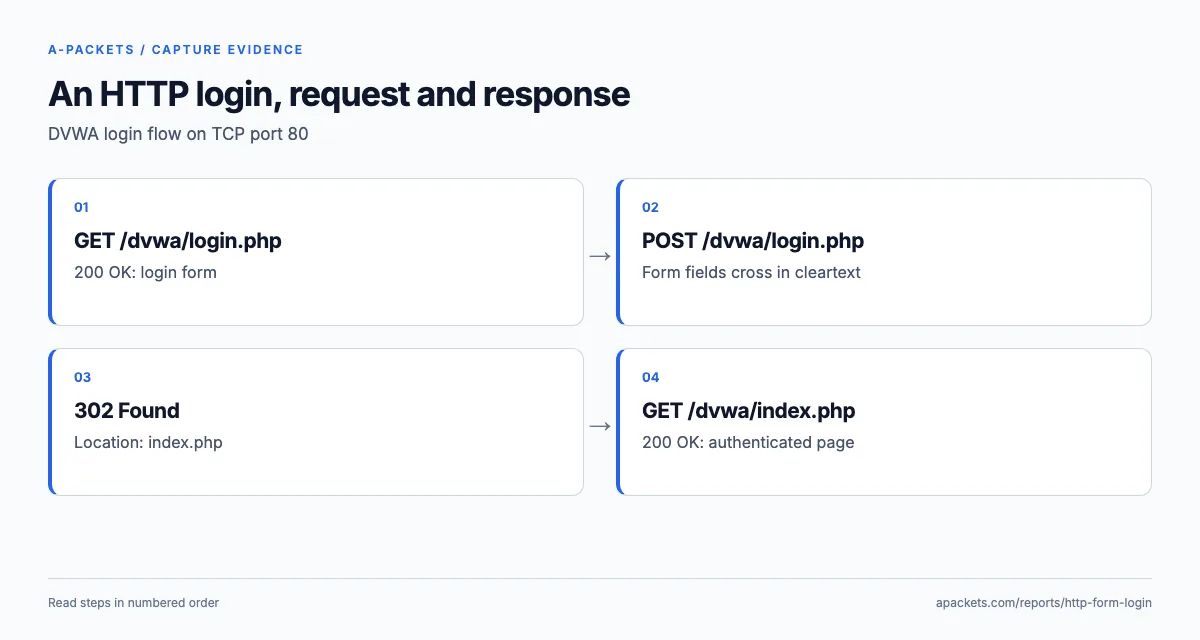
A-Packets pairs each request with its response and decodes the posted form. The body carries four fields:
username and password with the credentials, Login, and a
user_token. The username is shown in the clear and the password is masked on this page; both are fully
present in the capture. The 302 redirect to index.php, followed by the authenticated home
page, shows that the login succeeded. Everything is visible precisely because the site served its login over HTTP
rather than HTTPS.
The HTTP form login carries an upgrade preference, not encryption
The request headers identify Chrome 56 on macOS 10.12.4, and each of the three page requests includes
Upgrade-Insecure-Requests: 1. That header tells the server the browser would prefer an encrypted
version of the page; it does not negotiate TLS or encrypt the current request. The credential POST is
already readable by the time the server could react to it.
A redirect on the credential POST arrives too late to protect that submission. The application has to
send the browser to HTTPS before it presents the login form, post the form to an https:// action, and
refuse logins that arrive over HTTP. When checking the fix, follow the whole navigation chain rather than just
confirming that the hostname has a working certificate: a redirect back to an HTTP landing page leaks the session
even when the login itself was encrypted.
Why a CSRF token does not help here
The user_token field is worth a moment, because it is a security control that solves a different
problem and gives no protection against this one. It is an anti-CSRF token: a per-session value the server embeds in
the form and checks on submission, so that a malicious third-party site cannot forge a login or an action on the
user's behalf. It defends against cross-site request forgery, and DVWA includes it to exercise that defence.
But a CSRF token does nothing for confidentiality. It is submitted in the same cleartext POST body as
the password, so an observer on the path reads the token along with the credentials, and in any case the token
protects the server from forged requests, not the user from eavesdropping. The presence of a CSRF token on a
cleartext login is a useful illustration that a form can carry one modern protection and still leak everything
because the transport is wrong. The only control that protects the credential in transit is TLS. The cookies say the
same thing from another angle: DVWA is set to its impossible security level, the setting at which its
exercises run the hardened version of their code, and the login leaks regardless, because no control inside the
application can repair the transport underneath it.
The fix: HTTPS, and HSTS so there is no HTTP to catch
The remedy is to serve the login, and the whole authenticated application, over HTTPS, so the form body is encrypted
in transit. That alone removes this exposure. But serving HTTPS is not quite enough on its own: if an HTTP version
of the page remains reachable, a user who types the bare hostname, or follows an old link, still makes the first
request in the clear, and an attacker in the path can keep them there. Redirecting every HTTP request to HTTPS
closes most of the gap, and HTTP Strict Transport Security (HSTS), a response header that tells the browser to use
HTTPS for the site from then on, closes the rest by removing the cleartext first request on return visits. Mark the
session cookie Secure so it is never sent over HTTP either.
HSTS has two gaps worth knowing before you rely on it. The first is the very first visit, before the browser has
seen the header; preloading covers it, but only once the domain has been accepted into the browsers' preload list.
The second applies to this capture directly: the application is reached by its bare address,
10.2.2.104, and RFC 6797 excludes
IP-literal hosts from HSTS. Give the application a hostname and a certificate its clients trust, from an internal CA
or a public one, and HSTS can then do its job.
Any account that signed in over the plaintext page should be treated as exposed and its password rotated, because the credential sat in a capture-able form at least once. A capture like this is also the fastest way to make the case to whoever owns the site: the password is right there in the HTTP view, which is more persuasive than a policy citation.
Why the session cookie matters as much as the password
The password is the obvious loss, but the 302 redirect and the authenticated page load that follow it
carry a second one: the session cookie carried into the authenticated requests. An attacker on the path reads that
cookie in the clear too, and with it they do not even need the password, they can replay the cookie and act as the
logged-in user for as long as the session lasts. That is session hijacking, and it is why serving only the login
page over HTTPS while leaving the rest of the application on HTTP, a surprisingly common half-measure, does not solve
the problem: the credential is protected but the session that the credential creates is handed out in the clear on
the very next request. Confidentiality has to cover the whole authenticated session, not just the moment the
password is typed.
This is also why the fix list includes marking the session cookie Secure and enabling HSTS, not just
"use HTTPS for the login". A Secure cookie is never transmitted over HTTP, so even a stray plaintext
request cannot leak it, and HSTS stops the browser making that plaintext request in the first place. Each control
has its own job: TLS protects the bytes, Secure limits where the cookie travels,
HttpOnly keeps it away from page scripts, and SameSite and CSRF tokens deal with cross-site requests.
None of them replaces another.
The session ID did not change at login
Read the cookies in order and a second flaw appears. The server issues PHPSESSID with the login page,
before anyone has authenticated, and the 302 that answers the credential POST sets no new
cookie: the browser carries the same identifier into the authenticated home page and every request after it. An
observer therefore held the soon-to-be logged-in session from the first response, 5 milliseconds into the capture,
without needing the password at all. That is the condition behind CWE-384, session fixation: an attacker who can
plant a known session ID in a victim's browser inherits the login that follows.
Regenerate the identifier at login and invalidate the old one. PHP provides session_regenerate_id, and
the OWASP
session guidance explains the rotation rule; after the fix, the identifier issued with the login page must stop
working the moment the user signs in. The cookie is marked HttpOnly, which keeps it away from page
scripts, but it cannot usefully be Secure on a site that only speaks HTTP. The responses also advertise
the stack, Apache/2.4.7 (Ubuntu) and PHP/5.5.9-1ubuntu4.21, the packages of Ubuntu 14.04:
a version map an attacker gets for free, which ServerTokens Prod and expose_php = Off take
away.
Finding cleartext logins in your own traffic
Treat this as one instance of the broader cleartext-credential problem. Over real traffic, A-Packets flags not only HTTP form posts but logins across FTP, Telnet, SMTP, IMAP and other protocols that authenticate without TLS, each an account to rotate and a service to move behind encryption. The cleartext password audit walkthrough runs the process end to end, and the SMTP and IMAP report covers the mail protocols where Base64 encoding can make a login look protected when it is not.
In Wireshark, filtering on http.request.method == "POST" and inspecting the form bodies finds posted
credentials, and a capture on the segment is all an attacker would need to do the same. When you retest a fix, sign
in with a disposable test account, so the verification capture does not become a second store of real passwords. A
login posted over HTTPS does not appear in this view at all, which is the point of the fix. Reading a credential off
the wire this way is T1040, Network Sniffing, in MITRE ATT&CK. To read one of your own captures,
upload a PCAP, or see
extracting credentials from PCAP files.