Reconnaissance
An Nmap ACK scan: a thousand ports, a thousand resets
Updated
- File
- nmap-ack-scan.pcap
- Format
- pcap, ether
- Size
- 142.76 KB
- Packets
- 2088
- Duration
- 5 s
- Captured (UTC)
- 2026-03-03 11:27:11
- SHA-256
- 460b3677b1d9c85ba5c87afe37692f7a6801aa974dac320e33dda4eb9ea9b02f
- Source
- A-Packets lab capture
- Built
- trimmed to the scan conversation
In five seconds 192.168.129.52 sends 1,088 bare ACK segments to 1,000 ports of its gateway,
192.168.129.1, and every one of those ports sends a reset back. This Nmap ACK scan PCAP finds no open
ports, by design: an ACK scan maps the firewall in front of the ports, not the services behind them. A-Packets groups
the burst into one conversation between the scanner and the gateway, and the capture, taken in the A-Packets lab, is
trimmed to the TCP traffic between those two hosts, which makes the probes and the answers easy to count.
The ACK scan is the scan people misread most often, because it finds no open ports and looks almost like noise. Understanding what it is actually testing, and why a reset is the interesting answer rather than a boring one, is the point of this report. It is a reconnaissance technique aimed at a defence, the firewall, rather than at a service.

What an ACK scan actually tests
A normal connection begins with a SYN. An ACK segment, by contrast, belongs in the middle of an established connection, acknowledging data already received. An ACK scan sends ACK segments for connections that never existed, which is a nonsensical packet on purpose, and watches how the path reacts. The point is not the port behind the firewall; it is the firewall's own behaviour. A stateless rule that permits such packets lets the unexpected ACK through to the host, which replies with a RST because it has no matching connection, and the scanner marks the port "unfiltered". A stateful firewall drops an ACK that matches no connection, and when the scanner sees no reply after its retries, it marks the port "filtered".
So an ACK scan sorts ports into filtered and unfiltered, not open and closed. Here all 1,000 tested ports reset: every one of them is unfiltered for unsolicited ACKs on this path, a finding about the network's defences rather than about any single service. Unfiltered is not open, and Nmap's documentation is explicit about it: a closed port and a listening port both reset an unexpected ACK, and an ACK that gets an answer says nothing about whether a SYN would be admitted.
A thousand ports, a thousand resets
The capture is almost entirely two kinds of packet: outbound ACK segments and inbound RSTs, 1,088 ACK probes and 1,000 resets, between the same two hosts in five seconds. A-Packets reports no credentials, no HTTP, no DNS, because an ACK scan establishes nothing and carries no payload; the whole story is in the connection between the scanner and the gateway and in the protocol mix, which is nothing but TCP control segments.
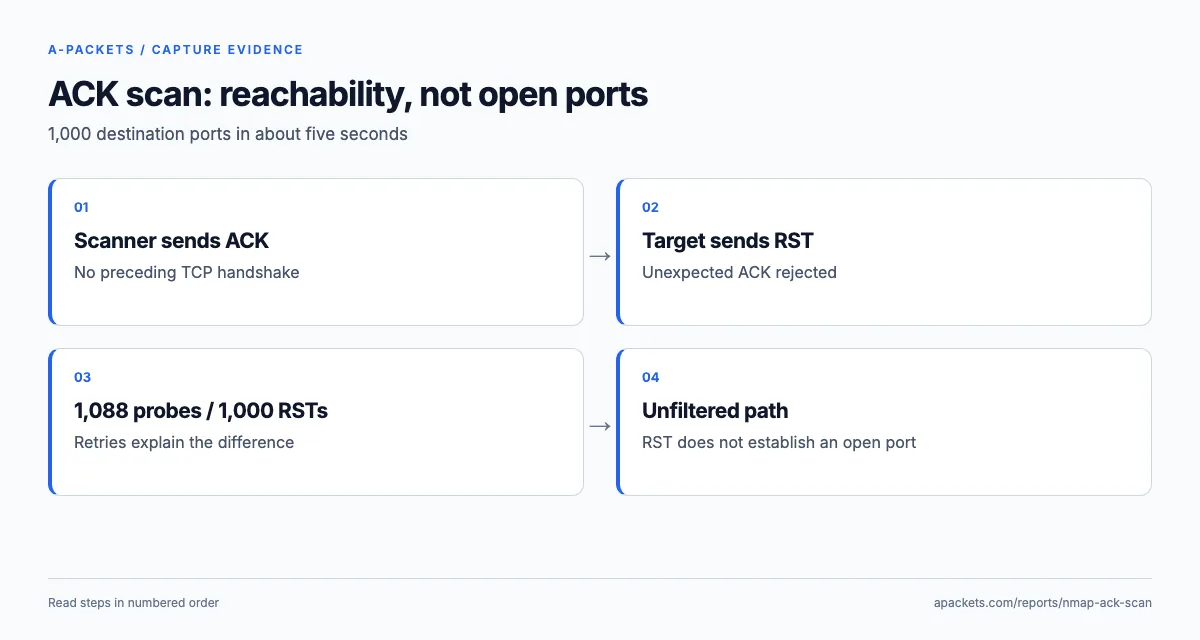
One source, a thousand destination ports, no handshake and not a byte of payload: that combination is an ACK sweep,
not a handful of stale connections. In Wireshark, tcp.flags == 0x010 selects the probes and
tcp.flags == 0x004 the bare resets. The two totals differ by 88 because Nmap retried some ports,
sometimes from a new source port; counted by port rather than by packet, the probes and the resets cover exactly the
same 1,000 ports, so the result is one answer per port, not 88 failures.
Every reset can be tied to the probe it answers. For all 1,000 of them, the reversed address and port pair matches a prior ACK, and the reset's raw sequence number equals that probe's acknowledgement number, which is how a TCP stack answers an unexpected ACK. The first reset comes back 15.5 milliseconds after the first probe; the last probe leaves at 5.013594 seconds and its reset arrives at 5.022111. Compare raw sequence numbers when reproducing this, because Wireshark's per-stream relative numbering hides the relationship across a thousand short conversations.
Why the Open Ports and other views are empty
An analyst expecting a port scan might read the empty views as a problem. An ACK scan completes no handshakes, so A-Packets' Open Ports view, which lists only ports that answered a SYN with SYN-ACK, stays empty here, and so do Credentials, DNS and HTTP. That absence is not a gap in the analysis; it is the nature of the scan. The ACK scan deliberately avoids the handshake that would reveal an open service, because it is not asking that question. The evidence lives in the connection view and the protocol mix, which is where to look for this technique.
Related techniques that read the same way
The ACK scan is one of a small family of scans that probe a firewall rather than a service, and they all leave a similar control-packet-only fingerprint in a capture. The window scan is an ACK scan that goes a step further: it reads the TCP window size in the returned RST, which on some older systems differs between open and closed ports, so it can occasionally distinguish them where a plain ACK scan cannot. A firewalk, by contrast, sets the TTL so packets expire just past the firewall, using the resulting ICMP time-exceeded messages to map which ports the firewall forwards. All of these produce captures dominated by bare TCP control segments or ICMP errors, with no established sessions, so recognising "control packets only, no payload, one source, many ports" as a category catches the whole family, not just the ACK scan shown here.
The practical point for a reader is that an empty Open Ports view plus a wall of RSTs is not a failed scan or a quiet network; it is a specific reconnaissance technique that succeeded at its own goal. Knowing which scan produced the capture, from the exact flag pattern, tells you what the attacker learned: open ports from a SYN scan, filtering behaviour from an ACK or window scan, firewall forwarding from a firewalk.
Reading the result and hardening the firewall
An all-unfiltered result means unsolicited ACKs get an answer, and every answer is information for the scanner. A stateful firewall that silently dropped them would both defeat the scan and remove the attacker's ability to map the network this way. The ACK scan is thus a free audit of the firewall, and the defender should read its result the same way the attacker does.
One detail of this capture shapes that reading. The target is the gateway itself, so the resets come from the gateway's own TCP stack: they show how it treats unsolicited ACKs addressed to it, not what it forwards to the hosts behind it. To test the forwarding policy, run the same scan from outside against a host behind the gateway, and set the packet result next to the firewall's own counters or logs, which also reveal a reject rule that answers on the target's behalf.
Detecting the scan relies on the pattern you see here: a single source sending a large number of ACK-only segments to many ports in a short time, with resets coming back. Stateful firewalls drop the unsolicited ACKs, which both blinds the scan and makes it stand out in logs, and a sensor configured for ACK-sweep detection can flag the burst. In MITRE ATT&CK terms this is T1046, Network Service Discovery, used here for firewall rule mapping rather than service enumeration; it commonly precedes a more targeted approach once the attacker knows where filtering is weak.
This scan sits alongside the SYN port scan, which does find open ports, and the Nmap NSE HTTP scan, which probes one service in detail. For the forensic approach to scans, see using PCAP analysis for network forensics, or upload a capture to inspect one yourself.