Web attacks
Directory traversal over HTTP: one request returns /etc/passwd
Updated
- File
- http_dvwa_directorytraversal.pcapng
- Format
- pcapng, ether
- Size
- 3.58 KB
- Packets
- 10
- Duration
- 5 s
- Captured (UTC)
- 2017-04-05 20:12:05
- SHA-256
- da72986c76095f6926b3387e36d7ce78b26e6a68f92bcb873266ff952c5c88f1
One GET request with six ../ steps in its page parameter, and a 1,521-byte answer that
begins root:x:0:0:root:/root:/bin/bash: this directory traversal PCAP is ten packets long, and the
server hands over /etc/passwd in the first exchange. That makes it a clean example of what a path
traversal looks like in a capture and, more importantly, of how to tell from the response that the read succeeded
rather than merely being attempted. A-Packets rebuilds the request and carves the file from the response, so the
proof is on the page.
Directory traversal, also called path traversal, is one of the oldest web vulnerabilities and still common wherever an application builds a file path from user input. The sample comes from the file-inclusion exercise in DVWA, the Damn Vulnerable Web Application, but the shape is identical to real traversal flaws in production software, which is what makes a single clean request worth studying.
The one request and what it returned
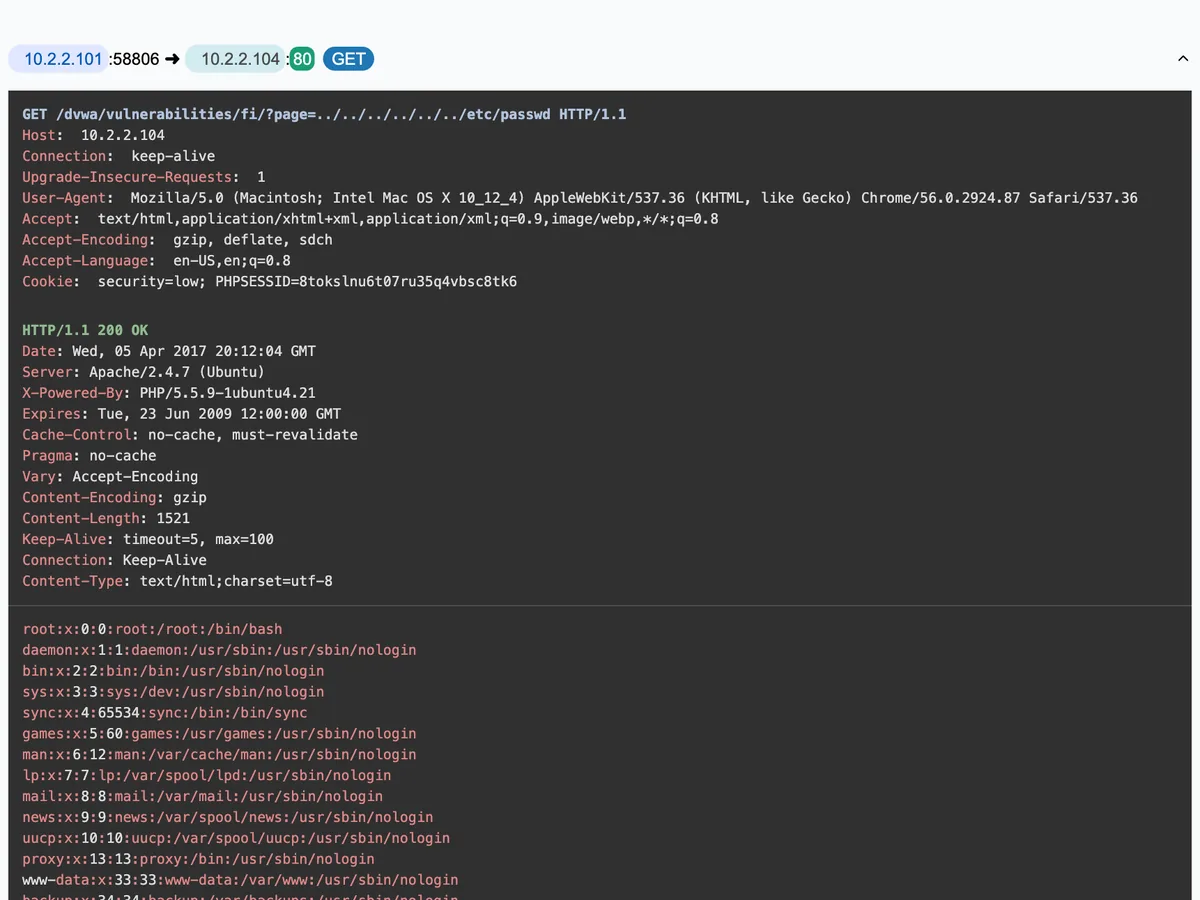
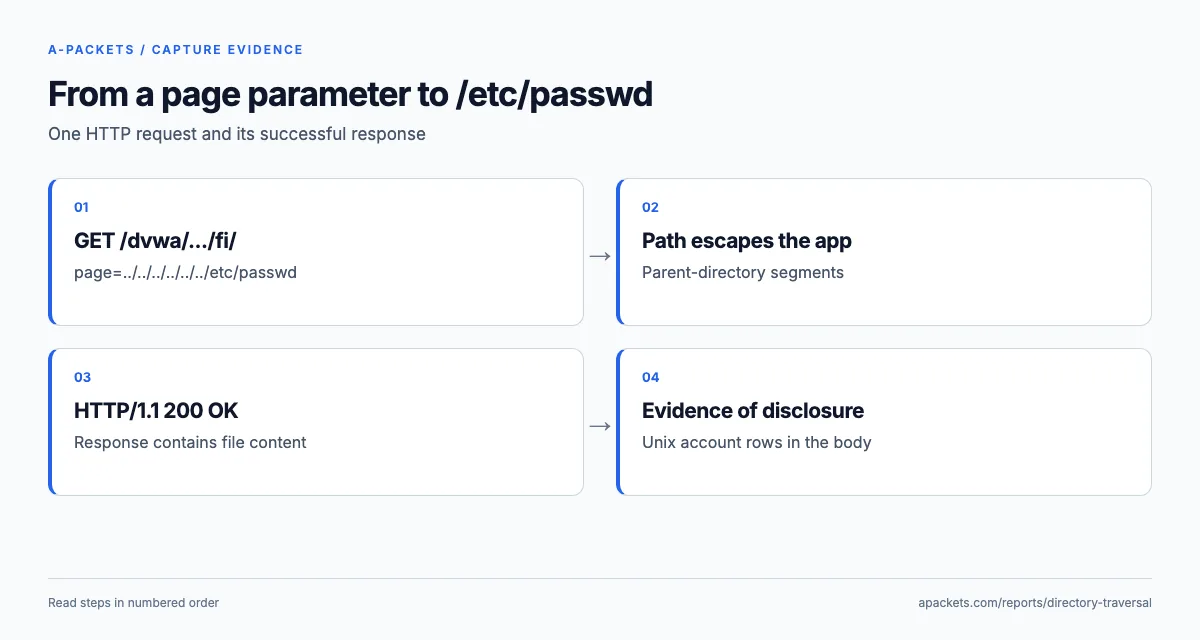
The HTTP sessions view holds one request and its response. The request targets a page parameter the
application uses to choose a file, and sets it to a path that climbs several directories with repeated
../ before naming a sensitive system file.
| Host | Request | Status | Type |
|---|---|---|---|
| 10.2.2.104 | GET /dvwa/vulnerabilities/fi/?page=../../../../../../etc/passwdUA: Mozilla/5.0 (Macintosh; Intel Mac OS X 10_12_4) AppleWebKit/537.36 (KHTML, like Gecko) Chrome/56.0.2924.87 Safari/537.36 | 200 OK | text/html 1.49 KB |
Each ../ moves one directory up the filesystem. The page parameter is meant to name a file
inside the application's directory; the six ../ sequences climb from there back to the filesystem root,
after which etc/passwd names the Unix account file. The server answers 200 OK and returns
the file, which A-Packets carves from the response body. That carved file is the difference between a probe and a
breach: its first lines are root:x:0:0:root:/root:/bin/bash and the other account entries, so the
capture proves the traversal succeeded and the server disclosed a file far outside the web root.
In the pcapng, frame 4 carries the request and frame 7 the reassembled response, 1,521 bytes served as
text/html;charset=utf-8. The label is the application's, not the file's: a vulnerable page can wrap
disclosed text in HTML, so a hunt that only inspects text/plain responses would miss exactly this case.
Why the response, not the request, proves the traversal
On a traversal attempt, the request looks the same whether it works or fails; what changes is the response. A
404, a 403 or a 200 that returns an error page means the read failed, though
an error page is still worth reading for leaked paths. A 200 that returns the contents of a system file,
as here, means the read went through. This is why triaging a traversal alert means reading the response, not just the
request: the ../etc/passwd string in a log proves someone tried; the file coming back proves they
succeeded.
/etc/passwd is the classic target not because it holds passwords, modern systems keep those hashed in
/etc/shadow, which the web user usually cannot read, but because it is world-readable, present on every
Unix-like system and unmistakable in format, so it makes a reliable proof-of-concept. The x in each
entry's second field points to that separate hash store, so what leaked here is the account list, not a password
dump. A real attacker uses the same primitive to read far more valuable files: application configuration with
database credentials, private keys, session files, or source code. The /etc/passwd response here stands
in for any of those.
Traversal, local file inclusion, and where it leads
This exercise sits on the line between directory traversal and local file inclusion. Pure traversal reads a file and
returns its bytes, which is what happens here. Local file inclusion goes further: if the application interprets the
included file, for example by running it through a PHP engine, an attacker who can first write attacker-controlled
content somewhere on the server, into a log the application will later include, or an uploaded file, can turn a read
primitive into code execution. The same injectable page parameter is the root of both, which is why a
confirmed traversal should be treated as potentially more than information disclosure until the application's
handling of the included file is understood.
Variations on the same attack evade naive filters: URL-encoded sequences such as %2e%2e%2f, doubled
encodings, absolute paths, or null-byte tricks on older platforms. A filter that blocks the literal
../ string but decodes the input afterwards can be bypassed by encoding it, which is why validation has
to run on the decoded path the filesystem actually opens.
Where traversal hides and why log review needs the decoded path
A practical complication for detection is that the same attack wears many spellings. The literal ../
here is the clearest form, but an attacker evading a filter may send %2e%2e%2f (URL-encoded),
..%252f (double-encoded, which a filter decodes once and passes), backslashes on Windows targets, or
Unicode and overlong UTF-8 encodings of the dot and slash. A web server or application that decodes the path after
the filter runs is vulnerable whenever its decoding differs from the filter's, which is why matching on the raw
string alone misses real attacks. Effective detection, in a capture or in logs, decodes the path the way the target
does before matching, and that catches the encoded variants a naive signature lets through.
This matters for reading the capture too. A-Packets shows the request as it was sent; if a real attacker had encoded
the sequence, the ../ would not appear literally in the URL, and you would confirm the attack by
decoding the parameter and by the response, the system file coming back, rather than by the raw string. The response
is the reliable signal across all the encodings: whatever spelling got the server to return /etc/passwd,
the file in the body is the proof the read succeeded.
Closing the path boundary without breaking legitimate pages
A robust repair removes the browser's authority to choose a filesystem location. If this route offers three help pages, accept three logical identifiers and resolve them through a server-side mapping, so an unknown identifier fails before any file is opened, whatever dots, separators or absolute paths it contains. That is what OWASP's path traversal guidance recommends, and it gives the application an explicit authorization point instead of treating a plausible-looking path as permission to read it.
Where dynamic file selection is unavoidable, resolve the requested name against a designated directory and compare path components, not a string prefix: a sibling directory whose name starts with the permitted one is still outside it, and a symlink can redirect an apparently contained path. Open files through APIs and permissions that keep the boundary at access time, and run the web server as a least-privilege user so a traversal that slips through reaches less. Retest with the legitimate page identifiers as well as rejected inputs: allowed pages must still work, and disallowed paths must return no bytes from outside the directory and no filesystem details in the error.
Detecting the attempt on the wire and in logs
On the network and in the logs, the request and its telltale ../ sequence, in raw or encoded form, are
what to search for, and a 200 is a reason to inspect content rather than a verdict. In Wireshark,
http.request.uri contains ".." || http.request.uri contains "etc/passwd" isolates the attempt, and
following the stream shows whether the file came back. Review the application logs for neighbouring requests from the
same client around the captured read: a successful traversal is rarely the only path an attacker tries. In MITRE
ATT&CK terms this is T1190, Exploit Public-Facing Application; the disclosed file maps to collection or credential
access depending on what it contains.
For the wider set of web attacks visible in traffic, see top threats found in PCAP analysis, or upload a capture to inspect one yourself. The SQL injection sample is the other classic input-handling flaw read straight from the HTTP exchange.