A-Packets vs PcapAI: PCAP Analysis Tools Compared for DFIR Work
PCAP analysis is not about pretty dashboards. In DFIR, a capture file is evidence. It should tell you which host talked to which endpoint, when the session started, which protocol was used, how much data moved, and whether the payload or metadata supports the hypothesis.
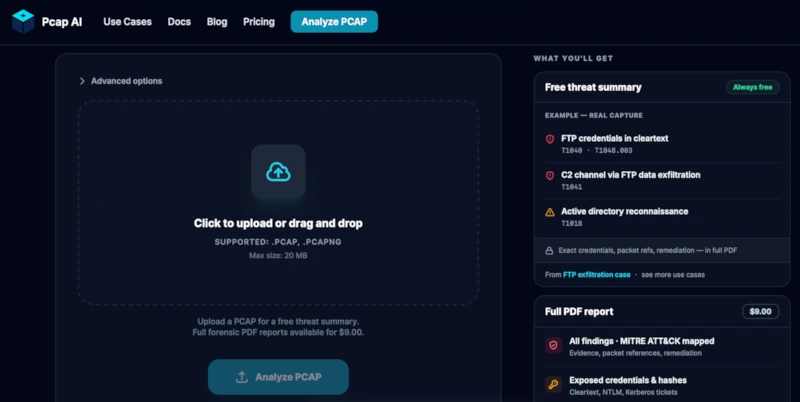
A-Packets and PcapAI both analyze PCAP and PCAPng files in the browser. They solve different parts of the same incident response problem. A-Packets is an interactive packet investigation workspace. PcapAI is an automated report generator with AI-assisted findings, severity ranking, and MITRE ATT&CK context.
The difference matters during a real case. If a workstation at 10.10.4.23 starts sending 900-byte HTTPS sessions to a VPS every 60 seconds, a report can say "possible C2 beaconing." An investigator still needs to see the DNS query, SNI, TCP timing, byte counts, certificate metadata, and follow-on SMB or Kerberos activity. That is where the tool choice becomes operational, not cosmetic.
TL;DR
- Use A-Packets when you need to inspect evidence: DNS records, HTTP requests, TLS sessions, SMB authentication, credentials, topology, protocol pivots, Wi-Fi artifacts, and packet-level context.
- Use PcapAI when you need fast triage and a shareable PDF report: severity-ranked findings, MITRE ATT&CK mapping, remediation notes, and API-driven report generation.
- Use both when the workflow is triage first, investigation second. Let the report identify suspicious areas, then validate the finding against the actual traffic.
How Each Tool Treats the PCAP
A-Packets at a Glance
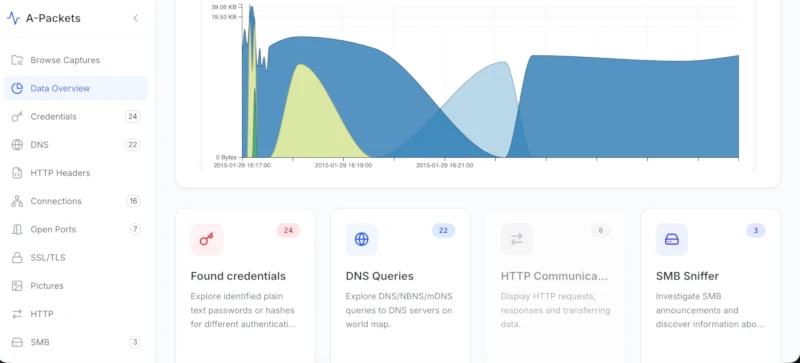
A-Packets decomposes the capture into protocol modules and visual views. The platform exposes DNS, HTTP, TLS/SSL, ARP, SMB, SIP, SSDP, FTP, Telnet, 802.11 Wi-Fi, credentials, topology, and other analysis views. The point is not just to label traffic. The point is to let an analyst pivot.
In a real PCAP, that means starting with an unusual DNS name, moving to the resolved IP, checking the TLS ClientHello and certificate, reviewing packet timing, then opening SMB or Kerberos activity from the same host. You are testing a hypothesis against observable traffic, not accepting a verdict.
PcapAI at a Glance
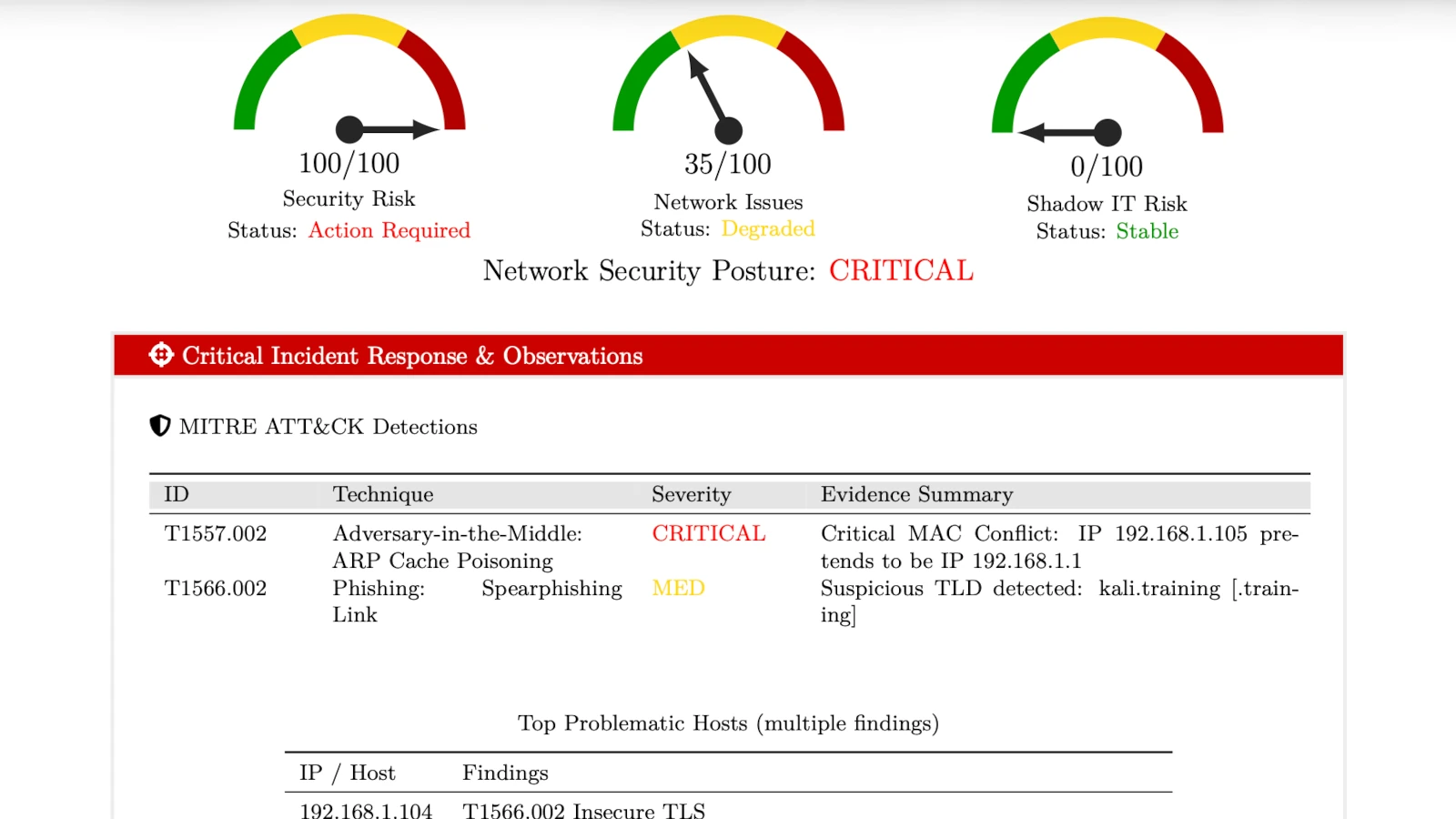
PcapAI focuses on automated security reporting. You upload a capture, the service processes it, and the output is a structured PDF with findings, severity, remediation guidance, and MITRE ATT&CK mapping. Its public pages position it around credentials, C2 beacons, DNS tunneling, lateral movement, REST or CLI automation, and report delivery.
That is useful when the first question is: "Is this capture worth deeper work?" In a DFIR queue, that question matters. If PcapAI flags DNS tunneling, the analyst still needs to validate the claim in the capture: long high-entropy subdomains, repeated TXT or NULL lookups, unusual NXDOMAIN ratios, stable timing, and outbound volume that does not match normal resolver behavior.
Comparison Table
Prices and public limits change. The values below reflect the public product pages reviewed on May 20, 2026. Verify vendor pages before procurement.
| Category | A-Packets | PcapAI |
|---|---|---|
| Primary Output | Interactive analysis workspace with protocol modules, graphs, tables, and pivots | Generated forensic PDF with findings, severity, MITRE ATT&CK mapping, and remediation guidance |
| Best Fit | Packet-level DFIR, protocol inspection, network troubleshooting, credential review | Fast triage, report handoff, recurring PDF generation, ATT&CK-oriented summaries |
| Analyst Interaction | High: filter, pivot, drill into modules, inspect relationships | Lower: read and act on report findings, then verify if needed in another tool |
| Credential Extraction | Credentials view across multiple protocols, including plaintext credentials, hashes, and authentication artifacts | Report-level detection for exposed credentials, including NTLM hashes, Kerberos tickets, SMB, HTTP, and FTP claims on public pages |
| Wi-Fi / 802.11 | SSID extraction, WPA handshake export (.hccapx) | Not highlighted on public product pages |
| MITRE ATT&CK Mapping | Not the core workflow | Core report feature |
| Deployment Options | SaaS public/private plus on-prem deployment for environments where PCAP cannot leave the boundary | SaaS, with public pricing page mentioning custom or on-premise deployment via sales |
| Data Retention | Public results for free uploads; private storage on paid plans; user deletion from dashboard; configurable on-prem | Public pages mention auto-purge; exact stated window differs by page, so verify before uploading sensitive evidence |
| Pricing | Free public tier, private workspaces, private credit packs, on-prem option | Free start, $9 single report, report packs, monthly and yearly subscriptions |
| API Access | REST API for automated uploads and recurring workflows | REST API on Advanced plan; public messaging also references CLI workflows |
| File Formats | .pcap, .pcapng | .pcap, .pcapng |
DFIR Scenario 1: Suspected C2 Beaconing
A common case: EDR says a workstation ran a suspicious PowerShell command, and you receive a 20-minute capture from the user VLAN. The PCAP shows repeated outbound TLS sessions from 10.10.4.23 to 198.51.100.17 every 58 to 62 seconds. Each session sends a small request and receives a small response. The DNS lookup happened once near process start. The TLS SNI does not match the business domain list.
A-Packets workflow: use topology to isolate the host, filter the external destination, open DNS to see the original name, inspect TLS metadata, then review the packet timeline. This is useful when you need evidence for the incident timeline: first DNS query, first TCP SYN, repeated beacon interval, total bytes sent, and whether the host talked to internal SMB or LDAP services afterward.
PcapAI workflow: upload the capture and use the report to determine whether the traffic pattern is flagged as C2, what severity it receives, and which ATT&CK techniques it maps to. That helps triage. The packet-level validation still matters because beacon-like traffic can also be software update checks, monitoring agents, or broken retry logic.
DFIR Scenario 2: Credential Exposure
Credential findings are only useful when they can be tied to a protocol, host, timestamp, and direction. In a real capture, that might be an FTP USER/PASS exchange, an HTTP Basic Authorization header, an LDAP simple bind, an NTLMSSP authentication exchange over SMB, or Kerberos traffic that deserves further host-side validation.
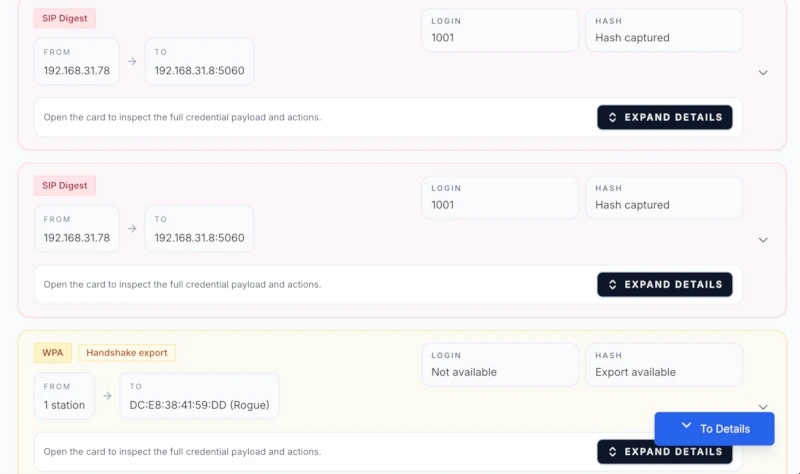
A-Packets is stronger when the analyst needs to inspect the credential path. The credentials view can show what was detected and where it appeared, while the related protocol modules provide context. For example, an NTLM hash seen in SMB is a different incident story from a cleartext password submitted to an internal HTTP admin panel.
PcapAI is useful when the goal is to put credential exposure into a report quickly. If the report says "cleartext credentials over FTP," the investigator should still verify the actual stream, source host, destination service, and whether the credential was accepted. In DFIR, "credential observed" and "credential successfully used" are different findings.
DFIR Scenario 3: Lateral Movement
Lateral movement is rarely one packet. In PCAP it looks like a sequence: name resolution, authentication, SMB session setup, tree connect to ADMIN$ or IPC$, DCE/RPC, service control activity, WinRM, RDP, or repeated attempts across multiple internal hosts. The evidence is the chain, not a single alert.
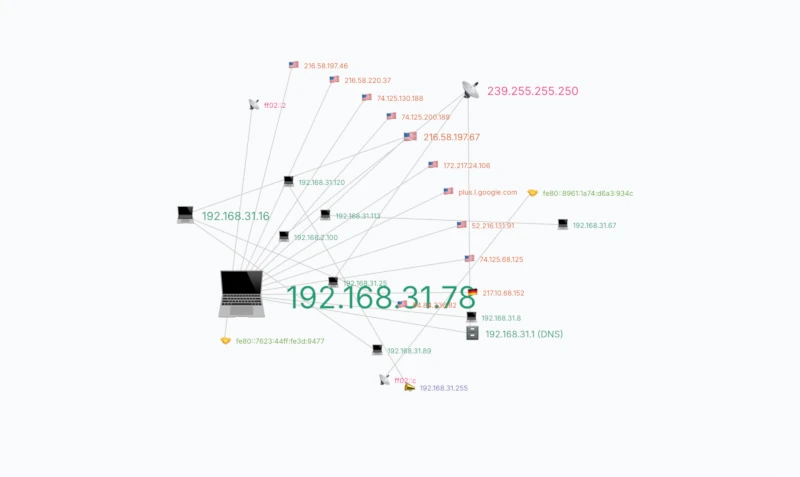
A-Packets helps when you need to reconstruct that chain. Topology shows the fan-out pattern. SMB and credential views show authentication context. Time charts show whether the connections happened in a tight burst after an initial compromise. That matters when the report has to say "host A attempted lateral movement to hosts B, C, and D between 03:14:08 and 03:16:22 UTC."
PcapAI can accelerate the first read by flagging lateral movement indicators and mapping them to ATT&CK. That is helpful for SOC handoff. It is not a substitute for checking the underlying sessions, especially when normal admin tools, backup jobs, or vulnerability scanners create similar SMB and RPC patterns.
Visual Analysis vs. Static Reporting
Visualizations are useful only if they preserve investigative context. A node graph helps when it lets you filter DNS noise, isolate SMB flows, and see which internal hosts are acting as clients versus services. A timeline helps when it shows that DNS, TLS, and SMB events happened in the same five-minute window. A treemap helps when a single protocol dominates the capture and needs explanation.
A-Packets is built around that style of work. It lets the analyst ask follow-up questions without leaving the workspace. PcapAI is built around a different output: a static document that can be forwarded, attached to a ticket, or used as an initial incident summary.
Neither format is automatically better. Static reporting is faster for communication. Interactive analysis is better for evidence handling.
Privacy, Deployment, and Data Retention
PCAPs often contain passwords, session cookies, internal IPs, hostnames, emails, file names, and payload data. Treat them as sensitive evidence by default.
- A-Packets free public analysis: use it for sanitized captures, labs, malware-training samples that are safe to expose, or public research data.
- A-Packets private workspaces: use them when the capture contains client data, internal traffic, credentials, or incident evidence. Paid plans keep results private and let users delete files from the dashboard.
- A-Packets on-prem: use it when captures cannot leave your network boundary. This is the clean path for regulated environments, internal SOCs, and teams with strict evidence handling rules.
- PcapAI: public pages describe isolated processing, TLS 1.3, and auto-purge behavior. They also mention custom or on-premise options through sales. Confirm retention, storage, and contractual controls before uploading sensitive evidence.
A practical rule: if the PCAP contains internal authentication, customer data, regulated traffic, or active incident evidence, do not upload it to any third-party SaaS until legal, security, and evidence-handling requirements are clear.
Automation and API Workflows
Automation matters when captures arrive from sensors, scheduled jobs, customer uploads, or CI pipelines. The question is not just "does it have an API?" The question is what the API returns and whether it fits the workflow.
A-Packets REST API is useful when the destination is an analysis workspace: upload a capture, track processing, and use private reports or alerting for recurring security work. That fits teams collecting periodic PCAPs from network taps or running repeat checks after firewall, DNS, or proxy changes.
PcapAI REST API is useful when the destination is a generated PDF report. Its API documentation describes upload, status check, and report download endpoints, with API access on the Advanced subscription. Public messaging also references CLI-driven workflows. That fits teams that want to batch-generate reports from captures and attach them to tickets or customer deliverables.
In a real SOC, these workflows are different. A scheduled IDS packet capture that needs analyst review belongs in a workspace. A customer-facing "what did this PCAP show?" deliverable may be better as a generated report.
Pricing and Flexibility
Pricing should match capture volume and sensitivity.
A-Packets public pricing lists:
- Free public analysis: $0, public result page, 25 MB limit.
- Private workspaces: Starter, Professional, and Advanced plans with 25 MB, 50 MB, and 100 MB file limits.
- Private credit packs: one-time packs for 3, 10, or 25 private analyses, with credits expiring after 180 days.
- On-prem: for teams that cannot send PCAP data outside their environment.
PcapAI public pricing lists:
- Single report: $9 one-time, 25 MB max size, one PCAP upload and one PDF report.
- Report packs: 5, 15, or 30 reports, with public pricing showing credits that do not expire.
- Subscriptions: Starter, Pro, and Advanced plans with monthly or yearly billing.
- API: listed on the Advanced plan.
- Custom or on-prem: public pricing page points larger limits and on-premise requests to sales.
For a consultant handling a few sanitized captures per month, per-report pricing is simple. For an internal SOC processing repeated private captures, workspace pricing and on-prem deployment usually matter more than the price of one report.
When to Choose A-Packets
- You need to validate evidence manually. Example: confirm that an HTTP POST contained a credential, not just that a credential detector fired.
- You need protocol pivots. Example: start from a DNS lookup, jump to the resolved IP, inspect TLS metadata, then check whether the same host opened SMB sessions.
- You investigate lateral movement. Example: identify SMB fan-out from one workstation to multiple servers and line it up with authentication events.
- You need Wi-Fi artifacts. Example: extract SSIDs, access points, probe requests, or WPA handshake material from an 802.11 capture.
- You cannot send PCAPs to a public SaaS. Example: legal hold, regulated data, internal credentials, or customer incident evidence.
- You process captures regularly. Example: daily tap captures, customer support PCAPs, or repeat validation after network changes.
When to Choose PcapAI
- You need first-pass triage. Example: decide whether a PCAP attached to an incident ticket contains enough signal for full investigation.
- You need a PDF deliverable. Example: send a concise packet-analysis report to a customer, manager, or compliance team.
- You use MITRE ATT&CK as a reporting layer. Example: map suspected C2, DNS tunneling, or lateral movement to technique IDs for SOC tracking.
- You want API-generated reports. Example: upload captures from a pipeline, poll status, and download the completed PDF.
- You analyze small numbers of captures. Example: one-off consulting cases where a single report is easier than a recurring workspace.
Can You Use Both?
Yes. The clean workflow is:
- Use PcapAI to get a quick report and identify likely findings.
- Use A-Packets to validate each finding against traffic evidence.
- Document confirmed facts: hosts, timestamps, protocols, packet counts, payload indicators, and gaps.
That mirrors real DFIR work. Triage narrows the search space. Investigation proves or rejects the finding.
Bottom Line
A-Packets and PcapAI are not interchangeable. A-Packets is the better fit when the analyst needs to work the capture: inspect sessions, pivot across protocols, trace host relationships, and preserve packet-level evidence. PcapAI is the better fit when the team needs speed, a report, and ATT&CK-aligned triage.
In an incident, a report is not the evidence. The PCAP is. Use the tool that gets you from hypothesis to observable packet facts with the least ambiguity.
Need to validate what is really inside a capture?
Upload PCAP to A-PacketsUse free public analysis for sanitized traces. Use private plans or credit packs for sensitive PCAPs.